

 dotnet
Show support jQuery validation for non-English locales that use a comma (",") for a decimal point
https://docs.microsoft.com/en-us/aspnet/core/tutorials/first-mvc-app/validation mentions You may not be able to enter decimal points or commas in the Price field. To support jQuery validation for non-English locales that use a comma (",") for a decimal point, and non US-English date formats, you must take steps to globalize your app.
Need tutorial that shows how to do this. Until the tutorial is written, follow these instructions:
On Index.cshtml add
@System.Globalization.CultureInfo.CurrentUICulture
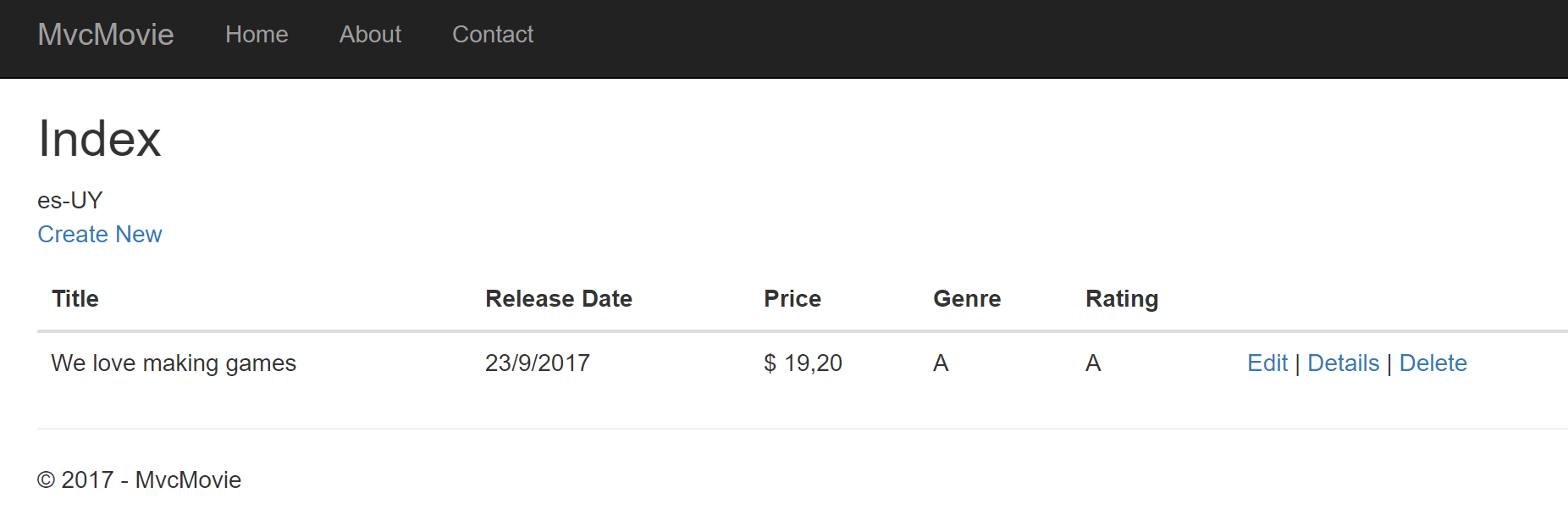
Refreshing the page you should see en-US displayed at the very top.
This will help to see if you does have localization enabled on mvc. When localization is working it can be removed.
To enable another locale than default on mvc you need to add localization support (read Globalization and localization in ASP.NET Core)
For this sample, let's just add es-UY locale and set as the default.
on Startup.cs:
app.UseRequestLocalization("en-UY", "fr-FR");
this will add support for locale "es-UY" and also make it the default culture.
refreshing the Index page on your browser should now show es-UY as the current UI locale.
At this point, using decimal points on the client as 19.50 will allow the jQuery validation but on the server it won't be seen as decimals so you will end with 1.950,00 value.
Then you need to use Globalize with jquery-validation-globalize plugin.
See Globalize installation instructions and jquery-validation-globalize installation instructions. Unfortunately those instructions use bower for the installation and the ASP.NET CORE 2.0 and late doesn't use bower. If you want to use the recommended NPM way, you can still do it. Either way, I highly recommend you check out both projects for documentation and more info. You just need to install Globalize with jquery-validation-globalize plugin - how you do it is secondary.
After you managed to install Globalize and jquery-validation-globalize plugin then you need to use it on your html pages.
on _ValidationScriptsPartial.cshtml add the new required javascript files (after jQuery):
<!-- cldr scripts (needed for globalize) -->
<script src="~/lib/cldrjs/dist/cldr.js"></script>
<script src="~/lib/cldrjs/dist/cldr/event.js"></script>
<script src="~/lib/cldrjs/dist/cldr/supplemental.js"></script>

<!-- globalize scripts -->
<script src="~/lib/globalize/dist/globalize.js"></script>
<script src="~/lib/globalize/dist/globalize/number.js"></script>
<script src="~/lib/globalize/dist/globalize/date.js"></script>

<script src="~/lib/jquery-validation-globalize/jquery.validate.globalize.js"></script>
Refresh your page, it should work with the current culture (in this case, es-UY).
The LibMan tool requires VS 15.8.0 Preview 2.0 or later.
Hope it helps.

@damienbod @bartmax @hishamco would one of you be able to help out with this? (or recommend someone)?
@ryanbrandenburg @danroth27 this is a frequent complaint of customers. Can I get some help on showing how to do this?
@Rick-Anderson
On Index.cshtml add
@System.Globalization.CultureInfo.CurrentUICulture
Refreshing the page you should see en-US displayed at the very top.
This will help to see if you does have localization enabled on mvc. When localization is working it can be removed.
To enable another locale than default on mvc you need to add localization support (read Globalization and localization in ASP.NET Core)
For this sample, let's just add es-UY locale and set as the default.
on Startup.cs:
var defaultCulture = new CultureInfo("es-UY");
var localizationOptions = new RequestLocalizationOptions
{
    DefaultRequestCulture = new RequestCulture(defaultCulture),
    SupportedCultures = new List<CultureInfo> { defaultCulture },
    SupportedUICultures = new List<CultureInfo> { defaultCulture }
};
app.UseRequestLocalization(localizationOptions);
this will add support for locale "es-UY" and also make it the default culture.
refreshing the Index page on your browser should now show es-UY as the current UI locale.
At this point, using decimal points on the client as 19.50 will allow the jQuery validation but on the server it won't be seen as decimals so you will end with 1.950,00 value.
Then you need to use Globalize with jquery-validation-globalize plugin.
You can find here Globalize installation instructions and jquery-validation-globalize installation instructions. Unfortunately those are for bower and the ASP.NET CORE team moved away (a good thing) from bower so if you want to use the recommended NPM way, you can still do it. Either way, I highly recommend you check out both projects for documentation and more info.
After you managed to install Globalize and jquery-validation-globalize plugin then you need to use it on your html pages.
on _ValidationScriptsPartial.cshtml add the new required javascript files (after jQuery):
<!-- cldr scripts (needed for globalize) -->
<script src="~/lib/cldrjs/dist/cldr.js"></script>
<script src="~/lib/cldrjs/dist/cldr/event.js"></script>
<script src="~/lib/cldrjs/dist/cldr/supplemental.js"></script>

<!-- globalize scripts -->
<script src="~/lib/globalize/dist/globalize.js"></script>
<script src="~/lib/globalize/dist/globalize/number.js"></script>
<script src="~/lib/globalize/dist/globalize/date.js"></script>

<script src="~/lib/jquery-validation-globalize/jquery.validate.globalize.js"></script>
Refresh your page, it should work with the current culture (in this case, es-UY).
Hope it helps.
[Edit, moved from top to here]Some notes:
The RegularExpression attribute is used to limit what characters can be input. In the code above, Genre and Rating must use only letters (white space, numbers and special characters are not allowed).
The regular expression is not doing what's described, more notably it requires first letter to be Uppercase.

and don't think you need it, but just in case I made the sample project available on my github at https://github.com/Bartmax/MvcMovie.LocalizationSample (let me know when I can delete it)
@Bartmax I have this error in js, during validation, not you?
jquery.validate.js:666 Uncaught Error: E_DEFAULT_LOCALE_NOT_DEFINED: Default locale has not been defined. at createError (globalize.js:105) at validate (globalize.js:182) at validateDefaultLocale (globalize.js:213) at Function.Globalize.numberParser.Globalize.numberParser (number.js:1422) at Function.Globalize.parseNumber.Globalize.parseNumber (number.js:1474) at $.validator.methods.number (jquery.validate.globalize.js:21) at $.validator.check (jquery.validate.js:639) at $.validator.element (jquery.validate.js:437) at $.validator.onfocusout (jquery.validate.js:266) at HTMLInputElement.delegate (jquery.validate.js:380) createError @ globalize.js:105 validate @ globalize.js:182 validateDefaultLocale @ globalize.js:213 Globalize.numberParser.Globalize.numberParser @ number.js:1422 Globalize.parseNumber.Globalize.parseNumber @ number.js:1474 $.validator.methods.number @ jquery.validate.globalize.js:21 check @ jquery.validate.js:639 element @ jquery.validate.js:437 onfocusout @ jquery.validate.js:266 delegate @ jquery.validate.js:380 dispatch @ jquery.js:4732 elemData.handle @ jquery.js:4544 trigger @ jquery.js:7788 simulate @ jquery.js:7859 handler @ jquery.js:7922

I would really like to let both comma and dot to be accepted as a decimal separator. In Russia and i guess in some other places it is ok to use either dot or comma to separate decimal values, but for the thousands people tend to use spaces, like that: 125 000 000.25
Also, i just cloned repository that @Bartmax provided, it does accept comma as a separator so when i input "1,99" i get "$ 1,99", but when i type in "1.99" i get the movie with the price of "$ 199,00". It doesn't seem like an appropriate behavior.

@coykto-repos is not the case of configure the model with attribute that indicate it is a currency data type? On the other hand, perhaps, you may be using a culture that needs a comma to decimal separator.

@Calkines maybe i'm missing something as i'm not familiar with asp.net core, or .net in general for that matter. I originaly came here because i got really confused by "getting started" tutorial, writen by @Rick-Anderson and others, as neither "." nor "," passed validation for a price field. I have a Django background and i never had problems like that as the framework seems to handled these things well, but here it seems messing with jQuery validation probably would not be enough. As i mentioned, typing in values "1.99" and "1,99" should give me the same result - "$ 1.99" regardless of what culture my browser says it uses, definately not "$ 199". So, this is also server-side (or asp.net-side) problem as far as i understand it, since one of the solutions i found is to write custom IModelBinder (which is far from "getting started").
https://github.com/aspnet/Docs/pull/4382 adds link to this issue until I have time to add this info to the doc.
This happened after I updated the file .bowercc file:
bower ECMDERR Failed to execute "node ./node_modules/cldr-data-downloader/bin/download.js -i bower_components/cldr-data/index.json -o bower_components/cldr-data/", exit code of #1 Whops ENOENT: no such file or directory, open 'C:\Users\Utilizador\source\repos\MyProject\MyProject\bower_components\cldr-data\index.json'
Additional error details: Whops ENOENT: no such file or directory, open 'C:\Users\Utilizador\source\repos\MyProject\MyProject\bower_components\cldr-data\index.json'

please say where I can found this file ".bowercc" I just fund "bower.json" files inside wwwrot>lib>...(multiple folders)

I found 16 bower.json files in my Project but no .bowercc. After installing jquery-validation-globalize there is a new hidden dir 'bower_components' where i find cldrjs, jquery-validation-globalize and some others. What should i reference in 'ValidationScriptsPartial.cshtml' ? Move the Contents to www.lib? I am using Visual Studio 2017 ver 15.15.2 on a german language System. Displaying Date works fine but in .net core 2.0 the fields always display american date-format giving Errors on german date Format (dd.mm.yyyy).


Sorry, no bower.json in my project root. I just created two new Project (ASP.NET Core-Webanwendung / MVC / Core 2.0). Added jquery-validation-globalize thru Nuget in one Project, thru bower in the other. Bower installer said: "no-json No bower.json file to save to, use bower init to create one". Now i'll Google for "bower init"...
@Peter578 bower is about to be discontinued in asp.netcore 2.0. Maybe because of that you can't see the bower.cc file in your project. Check this link: https://wildermuth.com/2017/11/19/ASP-NET-Core-2-0-and-the-End-of-Bower
This thread was to support .net core 1.x (I think)
@Bartmax
IMPORTANT: First update .bowercc to looks like this:
Can you update this?
@Bartmax I'm getting lots of comments - now that we don't use bower this doesn't work.
@Rick-Anderson the authors of both plugins document bower as the "package manager way" to get the libraries. I updated the issue but I think it's out of the scope how to get js libraries from whichever is the package manager of the day.
Let me know if the current update works for you.
Hello!
Thanks to @Bartmax but answer not resolved problem, because JavaScript error in console occurred: E_DEFAULT_LOCALE_NOT_DEFINED (have @MatteoSevera too).
I solved this problem so:
- First, you need to modify the file
.bowerrc(you can find it under the filebower.json):
{
  "directory": "wwwroot/lib",
  "scripts": {
    "preinstall": "npm install [email protected]",
    "postinstall": "node ./node_modules/cldr-data-downloader/bin/download.js -i wwwroot/lib/cldr-data/index.json -o wwwroot/lib/cldr-data/"
  }
}
- Check dependecies in
bower.json:
{
  "name": "asp.net",
  "private": true,
  "dependencies": {
    "bootstrap": "3.3.7",
    "jquery": "3.2.1",
    "jquery-validation": "1.17.0",
    "jquery-validation-unobtrusive": "3.2.6",
    "cldr-data": "29.0.0",
    "globalize": "v0.1.1",
    "jquery-validation-globalize": "1.0.0",
    "cldrjs": "0.5.0"
  },
  "resolutions": {
    "globalize": "^1.0.0",
    "jquery": "3.2.1",
    "cldrjs": "0.5.0",
    "jquery-validation": "1.17.0"
  }
}
- Modify file
_ValidationScriptsPartial.cshtmllike so:
<script src="~/lib/jquery-validation/dist/jquery.validate.js"></script>
<script src="~/lib/jquery-validation-unobtrusive/jquery.validate.unobtrusive.js"></script>

<!-- cldr scripts (needed for globalize) -->
<script src="~/lib/cldrjs/dist/cldr.js"></script>
<script src="~/lib/cldrjs/dist/cldr/event.js"></script>
<script src="~/lib/cldrjs/dist/cldr/supplemental.js"></script>

<!-- globalize scripts -->
<script src="~/lib/globalize/dist/globalize.js"></script>
<script src="~/lib/globalize/dist/globalize/number.js"></script>
<script src="~/lib/globalize/dist/globalize/date.js"></script>

<script src="~/lib/jquery-validation-globalize/jquery.validate.globalize.js"></script>

@inject Microsoft.AspNetCore.Hosting.IHostingEnvironment HostingEnvironment
@{
    string GetDefaultLocale() {
        const string localePattern = "lib\\cldr-data\\main\\{0}";
        var currentCulture = System.Globalization.CultureInfo.CurrentCulture;
        var cultureToUse = "ru-RU"; //Default regionalisation to use

        if (System.IO.Directory.Exists(System.IO.Path.Combine(HostingEnvironment.WebRootPath, string.Format(localePattern, currentCulture.Name))))
            cultureToUse = currentCulture.Name;
        else if (System.IO.Directory.Exists(System.IO.Path.Combine(HostingEnvironment.WebRootPath, string.Format(localePattern, currentCulture.TwoLetterISOLanguageName))))
            cultureToUse = currentCulture.TwoLetterISOLanguageName;

        return cultureToUse;
    }
}

<script type="text/javascript">
    var culture = "@GetDefaultLocale()";
    $.when(
        $.get("/lib/cldr-data/supplemental/likelySubtags.json"),
        $.get("/lib/cldr-data/main/" + culture + "/numbers.json"),
        $.get("/lib/cldr-data/supplemental/numberingSystems.json"),
        $.get("/lib/cldr-data/main/" + culture + "/ca-gregorian.json"),
        $.get("/lib/cldr-data/main/" + culture +"/timeZoneNames.json"),
        $.get("/lib/cldr-data/supplemental/timeData.json"),
        $.get("/lib/cldr-data/supplemental/weekData.json")
    ).then(function () {
        // Normalize $.get results, we only need the JSON, not the request statuses.
        return [].slice.apply(arguments, [0]).map(function (result) {
            return result[0];
        });
    }).then(Globalize.load).then(function () {
        Globalize.locale(culture);
    });
</script>
This solution from article by Stefan Vincent Haug.
Why does the official documentation refer to an answer that does not solve the problem?

@Bartmax I copied your instructions to the top of the issue to resolve some problems people had with the comment we don't use bower. I also fixed a couple problems you mentioned with the tutorial (changes will show up in a couple days) and removed those comments. Can you review my edits? Is there anything we could do to make the instructions easier to follow?
@ryanbrandenburg can you review the instructions at the top and suggest improvements?
@Rick-Anderson I would suggest modifying the example to include at least two supported cultures, even if you only use one in the example just to emphasis that this works in a multi-culture scenario.
I also suggest doing a scrub of that text for phrasing and syntax if you weren't already planning to. It's a good rough draft but some stuff like "You can find here Globalize installation instructions and jquery-validation-globalize installation instructions." needs re-wording before it goes into docs.
Where in the docs where you planning to put this? This is an important scenario, but it's relatively niche, so I don't really think it belongs in, for example, the loc fundamentals doc, which is already a pretty dense read.

Where in the docs where you planning to put this? I'll create a new doc.
Can you post the updated instructions here? This is our highest support issue.
I leave the language improvements to you, but as far as my first comment it would be enough to replace the Startup.cs code section with:
var defaultCulture = new CultureInfo("es-UY");
var supportedCultures = new List<CultureInfo>{ defaultCulture, new CultureInfo("fr-FR") }
var localizationOptions = new RequestLocalizationOptions
{
    DefaultRequestCulture = new RequestCulture(defaultCulture),
    SupportedCultures = supportedCultures,
    SupportedUICultures = supportedCultures
};
app.UseRequestLocalization(localizationOptions);
maybe we can update the doc to use the Mads client-side library tools that is encouraged to use on the new templates. Let me see if I manage to get some time to do it
@Rick-Anderson we can simplify the above code snippet with
app.UseRequestLocalization("en-UY", "fr-FR");
using the builder APIs that we provide https://github.com/aspnet/Localization/blob/dev/src/Microsoft.AspNetCore.Localization/ApplicationBuilderExtensions.cs#L95
