dotnet
Code to clear all the configuration providers breaks my app in Azure App Service
I have used code as described in this article to clear all configuration providers and then add my own providers with order. However, when I deploy this AspNet Core 3.1 app in Azure App Service(Linux), it breaks my application.
public static IHostBuilder CreateHostBuilder(string[] args) =>
            Host.CreateDefaultBuilder(args)
                .ConfigureAppConfiguration((hostingContext, config) =>
                {
                    var env = hostingContext.HostingEnvironment;
                    string[] args = null;

                    // ***If this following line is removed, app loads and behaves as expected****
                    config.Sources.Clear();

                    config
                        .AddJsonFile("appsettings.json", optional: true, reloadOnChange: true)
                        .AddJsonFile($"appsettings.Win2012.json", optional: true, reloadOnChange: true)
                        .AddJsonFile($"appsettings.override.json", optional: true, reloadOnChange: true);

                    // secrets
                    if (env.IsDevelopment())
                    {
                        var appAssembly = Assembly.Load(new AssemblyName(env.ApplicationName));
                        if (appAssembly != null)
                        {
                            config.AddUserSecrets(appAssembly, optional: true);
                        }

                        // Try adding secrets (if not added above) from specified assembly.
                        if (!config.Sources.Where(cf =>
                        {
                            if (cf is JsonConfigurationSource jsonconfigurationSource)
                            {
                                return jsonconfigurationSource.Path == "secrets.json";
                            }
                            else
                            {
                                return false;
                            }
                        }).Any())
                        {
                            var appAssembly2 = Assembly.Load(new AssemblyName("VSSP.Web"));
                            if (appAssembly2 != null)
                            {
                                config.AddUserSecrets(appAssembly2, optional: true);
                            }
                        }
                    }

                    config.AddEnvironmentVariables();
                    config.AddEnvironmentVariables(prefix: "App.Web_");
                    config.AddEnvironmentVariables("LIB_");

                    if (args != null)
                    {
                        config.AddCommandLine(args);
                    }
                })
                .ConfigureWebHostDefaults(webBuilder =>
                {
                    webBuilder.UseStartup<Startup>();
                });
What am I missing here?
Document Details
⚠ Do not edit this section. It is required for learn.microsoft.com ➟ GitHub issue linking.
- ID: 0eb4d762-3910-2c57-8741-3306c15537b6
- Version Independent ID: ba2254a0-ea8e-9b28-e94b-edd0fc58c043
- Content: Configuration in ASP.NET Core
- Content Source: aspnetcore/fundamentals/configuration/index.md
- Product: aspnet-core
- Technology: aspnetcore-fundamentals
- GitHub Login: @Rick-Anderson
- Microsoft Alias: riande

Breaks how? Please provide the simplest possible sample that reproduces the problem on a publicly accessible GitHub repository.

I created a simplest repo here There is nothing fancy, just stock template AspNetCore 3.1 MVC app with modified Program.cs with code referenced from https://learn.microsoft.com/en-us/aspnet/core/fundamentals/configuration/?view=aspnetcore-3.1. This works locally however breaks when hosted in Azure App Service (Linux).
This works locally however breaks when hosted in Azure App Service (Linux).
Expected result?
Actual result?
Expected Result: Application should launch home page properly.

Actual Result: Application crashes.

See https://learn.microsoft.com/en-us/aspnet/core/test/troubleshoot-azure-iis?view=aspnetcore-3.1#troubleshoot-on-azure-app-service
What's the error?
@alexwolfmsft @codemillmatt
Create a ASP.NET Core 3.1 empty web app
dotnet new web -o myApp -f netcoreapp3.1
set deployment to self contained to Linux
Log shows: DotNet Runtime 3.1WARNING: Unable to find the startup DLL name. Could not find any files with extension '.runtimeconfig.json'
Per Startup File section set the compiled DLL name as dotnet <myapp>.dll
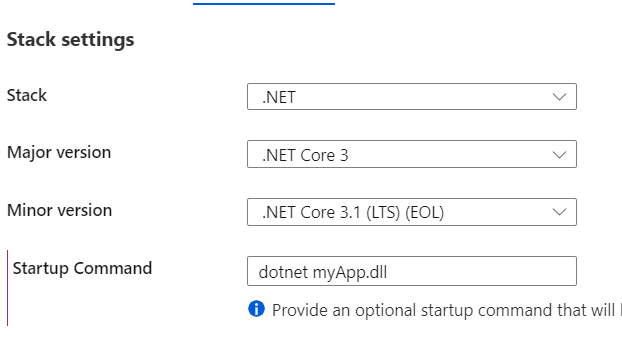
I get the following error It was not possible to find any installed .NET Core SDKs
I have turned on File system logging. However, Log stream options are disabled for me. I guess it doesn't work on ASE. I have looked into Log stream from Kudu but no error in those streams. Also, app runs fine if I don't change anything in stock Program.cs file.
no it's not self-contained.
You need to figure out how to see the error logs.
To add some extra info on this, for any others that may run into the same issue ...
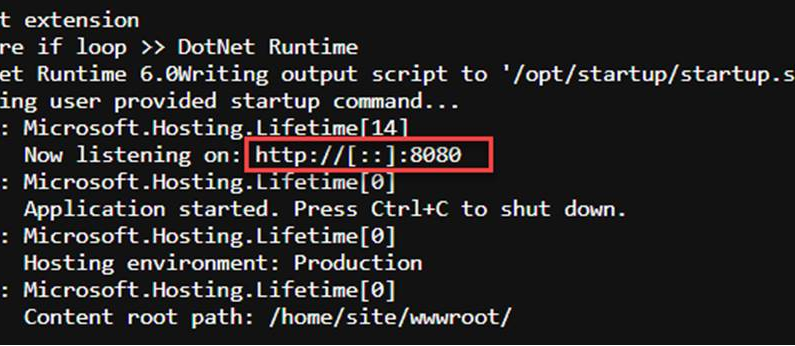
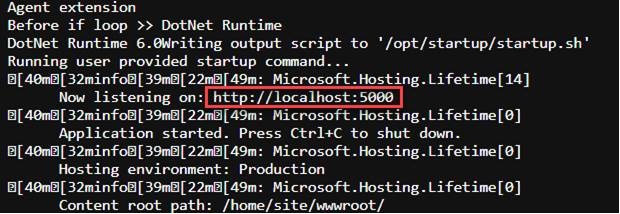
We ran into the same issue as described by @sameer-kumar and found that this led to a mismatch between the exposed port of the container and the port within the container that the .Net core app was listening on.
The docker command that App Service issues starts as docker run -d --expose=8080 --name .. and unless you specify the WEBSITES_PORT setting this is the default port it expects the container to be listening on as well. The execution of the config.Sources.Clear command results in the container potentially listening on a different port (as per the below), and traffic from the app service to the container therefore has nowhere to go.
With config.Sources.Clear :
Without config.Sources.Clear :