
react-native-iap
 react-native-iap copied to clipboard
 dooboolab-community
IAP Build crash on IOS
Version of react-native-iap
"react-native-iap": "^8.3.0",
Version of react-native
react: 17.0.2 => 17.0.2 react-native: 0.68.2 => 0.68.2
Platforms you faced the error (IOS or Android or both?)
IOS
Expected behavior
Works regular
Actual behavior
Even app cant build
Tested environment (Emulator? Real Device?)
Both
Steps to reproduce the behavior
npm install --save react-native-iap npx pod-install / cd ios && pod install (tried both) cd ios && pod deintegrate and installed again. Works on android but when i do npx react-native run-ios its not working
What i did
I just added iap and developed for android. after it done i tried to open ios but it didnt worked. In video tutorials theres no extra step for install and usage. im stuck for now. my app works on android well but not event building ios
Device properties: System: OS: macOS 12.5 CPU: (8) arm64 Apple M1 Memory: 160.44 MB / 16.00 GB Shell: 5.8.1 - /bin/zsh Binaries: Node: 16.16.0 - /usr/local/bin/node Yarn: 1.22.19 - /usr/local/bin/yarn npm: 8.11.0 - /usr/local/bin/npm Watchman: 2022.07.04.00 - /opt/homebrew/bin/watchman Managers: CocoaPods: 1.11.3 - /opt/homebrew/bin/pod SDKs: iOS SDK: Platforms: DriverKit 21.4, iOS 15.5, macOS 12.3, tvOS 15.4, watchOS 8.5 IDEs: Android Studio: 2021.2 AI-212.5712.43.2112.8609683 Xcode: 13.4.1/13F100 - /usr/bin/xcodebuild Languages: Java: 11.0.16 - /usr/bin/javac

i think its about the last version. i just downgraded to 8.1.1 and it worked. i think theres issue on last release
@BLOCKMATERIAL @sercaneryaz can you please take a look at IapExample and tell me what's different from yours? it is working fine for me and now I added a CI build and it's passing

FYI This is the only iOS change I see between 8.1.1 and 8.3.0 that could be causing this issue: https://github.com/dooboolab/react-native-iap/commit/37d4b24ba9af173bd70c667c6408946ecd373598.


@andresesfm
I found what the problem was with
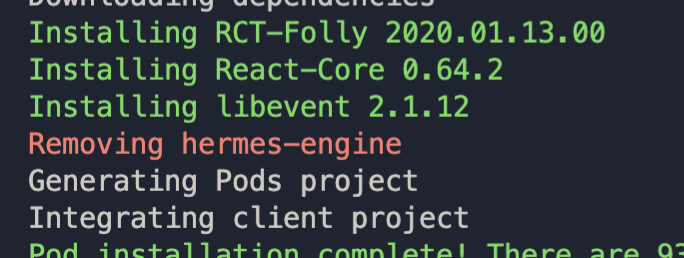
Because Hermes was enabled and if it was, the pod React-Core 0.64.2 would not install because it was not needed for work.
The same problem was with the Lottie library. https://github.com/lottie-react-native/lottie-react-native/pull/738
At the moment, if a user has Hermes enabled, he can't use react-native-iap it's a big problem :(
@BLOCKMATERIAL
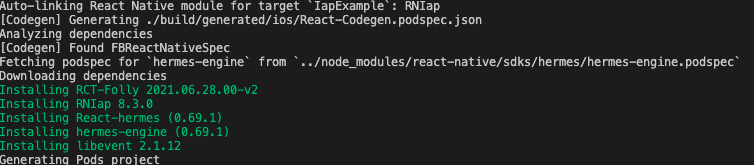
I'm able to run the IapExample app with Hermes just by changing this line: https://github.com/dooboolab/react-native-iap/blob/main/IapExample/ios/Podfile#L16
from :hermes_enabled => flags[:hermes_enabled], to :hermes_enabled => true, and running pod install again:
Could it be a conflict with older versions of RN?
About the lottie fix you linked, the thing we added that we don't have is:
s.pod_target_xcconfig = { 'DEFINES_MODULE' => 'YES' }
Not sure if it'd make a difference.
@andresesfm
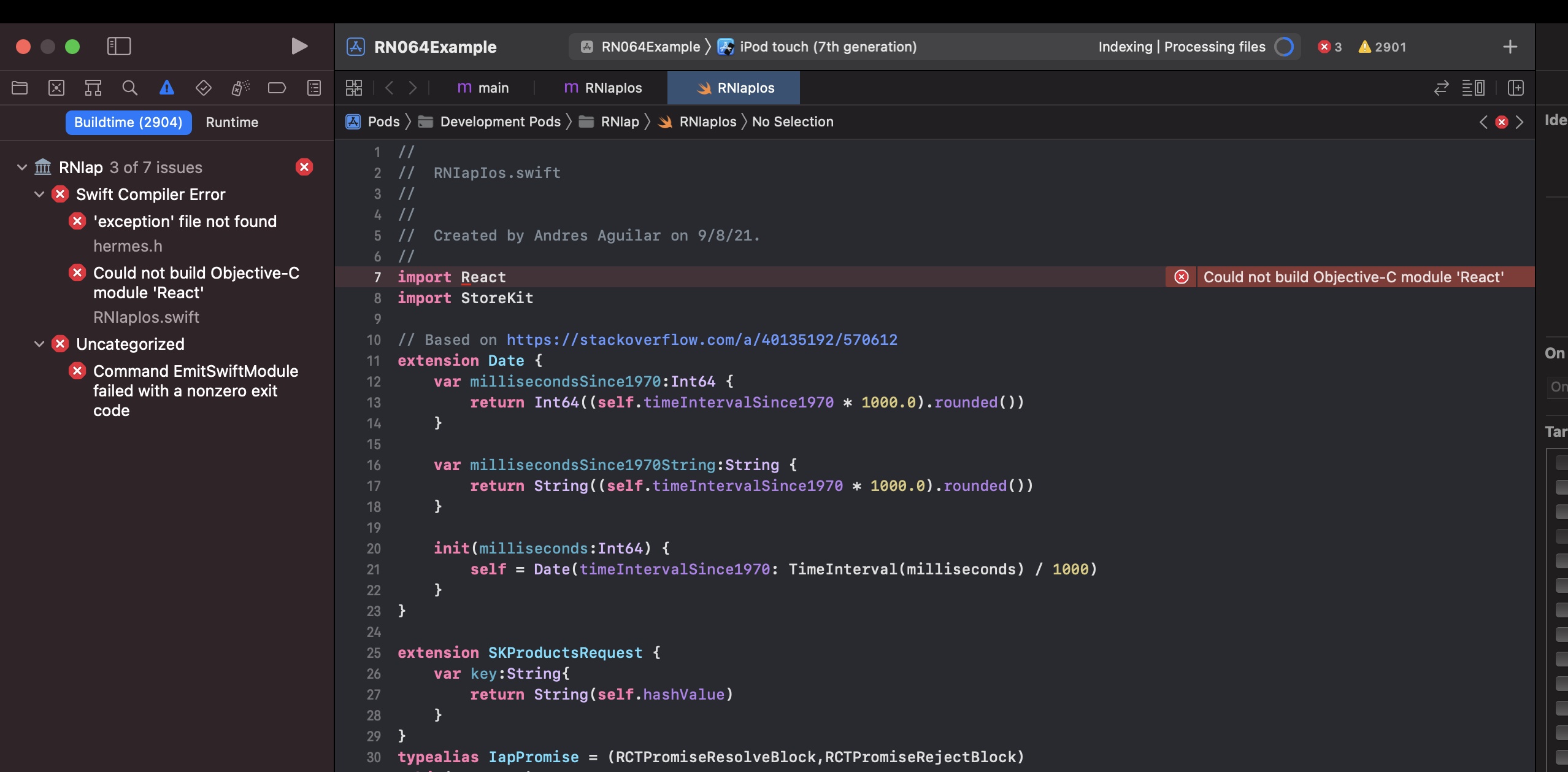
This seems to be a problem with React 0.64 + Hermes (true) + IAP 8.30
I created a blank project and reproduced the same thing

@BLOCKMATERIAL @sercaneryaz can you please take a look at IapExample and tell me what's different from yours? it is working fine for me and now I added a CI build and it's passing
@BLOCKMATERIAL i cant compare for now because after downgrade it started to work so im using for now. but when i do pod deintegrate and install latest version of iap its giving error on build.
@BLOCKMATERIAL , have you tried: https://stackoverflow.com/a/60629386/570612 ?
- 1 crash #ifdef RCT_MAIN_THREAD_WATCH_DOG_THRESHOLD if (RCTIsMainQueue()) { CFTimeInterval start = CACurrentMediaTime(); [_invocation invokeWithTarget:module]; CFTimeInterval duration = CACurrentMediaTime() - start; if (duration > RCT_MAIN_THREAD_WATCH_DOG_THRESHOLD) { RCTLogWarn( @"Main Thread Watchdog: Invocation of %@ blocked the main thread for %dms. " "Consider using background-threaded modules and asynchronous calls " "to spend less time on the main thread and keep the app's UI responsive.", [self methodName], (int)(duration * 1000)); } } else { [_invocation invokeWithTarget:module]; } #else [_invocation invokeWithTarget:module]; #endif

@ntcong91 the log you posted looks more like a runtime crash. Could you please share what method is that happening on?
Sorry @andresesfm. That is my code problem. Just call multiple apis at the same time like. So It blocked the UI thread. iap.getProducts();
@BLOCKMATERIAL , have you tried: https://stackoverflow.com/a/60629386/570612 ?
Didn't work ,same problem
@BLOCKMATERIAL I'm able to run the IapExample app with Hermes just by changing this line: https://github.com/dooboolab/react-native-iap/blob/main/IapExample/ios/Podfile#L16 from
:hermes_enabled => flags[:hermes_enabled],to:hermes_enabled => true,and running pod install again:Could it be a conflict with older versions of RN?
About the lottie fix you linked, the thing we added that we don't have is:
s.pod_target_xcconfig = { 'DEFINES_MODULE' => 'YES' }Not sure if it'd make a difference.
How can I get these changes ? Are they downloaded for the latest version ?
@BLOCKMATERIAL please make the changes locally on your node_modules and let us know if that fixes the issue for you
@BLOCKMATERIAL please make the changes locally on your
node_modulesand let us know if that fixes the issue for you
It didn't work :(
@BLOCKMATERIAL Thank you for trying. It's really hard to attempt a fix without a way to easily reproduce the issue. I would recommend trying to replicate it in the IapExample app so we can get more eyes on it
@andresesfm I created a sample project with the same dependencies as mine , the problem remains the same you can view my code here -> https://github.com/BLOCKMATERIAL/react-native-iap-example-0.64.2
@BLOCKMATERIAL. The minimum ios Version is '12.4'. But you are using https://github.com/BLOCKMATERIAL/react-native-iap-example-0.64.2/blob/main/exampleReactNativeIAP/ios/Podfile#L4
@andresesfm I have been trying to build an iOS app for more than 15 days but having the same issue described here. I have used the latest version 10.0.5 but having the same issues as described above,
Exception file not found, bridge header, Objective C module.
Please let me know if there is any specific change or version mismatch for iOS installation.

@dprajapati1179 please check the IapExample. Most likely you are setting your minimum iOS version too low
Thank you for replying @andresesfm .
I am trying you example and I will update you here.
@andresesfm platform :ios, '12.4' || platform :ios, '13.0' same problem, reopen please topic.
Hello @andresesfm,
I am using react-native version 0.64 so I thought that is the problem so to check that I have created a new project with the same version I have in my current project and just installed IAP latest version.
Then when I am building iOS app without adding a bridging header it gives a build error but once I select the project and add a new swift file then the pop-up of configuring the bridging header is there and after the configuration bridge header the ios app successfully builds.
So my question is why I am getting the exception file not found an error in my ongoing project when I have already configured the bridging header no if I delete the bridge header file and re-created it at that time no pop-up is shown on the screen in Xcode so please explain the process for bridge header first in your documentation.
Getting the same error after adding the plugin followed by the installation guide provided n the website otherwise my project runs fine on both iOs and Android.
Please replay here with the solution.
I tried creating a new app with 0.64.2 but it would not build.
npx react-native init rn_iap_0.64.2_example --version 0.64.2
cd rn_iap_0642_example/
yarn add react-native-iap
cd ios/
pod install
cd ..
yarn ios
It fails with the following error:
Undefined symbols for architecture x86_64:
  "_$sScP8rawValues5UInt8Vvg", referenced from:
      _$sScTss5Error_pRs_rlE8detached8priority9operationScTyxsAA_pGScPSg_xyYaYbKcntFZ in libRNIap.a(RNIapIosSk2-e27bbd0b37fc4df951804cdd36ac59f0.o)
 ...
if I remove rn-iap I still get
Undefined symbols for architecture x86_64:
  "__swift_FORCE_LOAD_$_swiftDataDetection", referenced from:
      __swift_FORCE_LOAD_$_swiftDataDetection_$_YogaKit in libYogaKit.a(YGLayoutExtensions.o)
     (maybe you meant: __swift_FORCE_LOAD_$_swiftDataDetection_$_YogaKit)
  "__swift_FORCE_LOAD_$_swiftFileProvider", referenced from:
      __swift_FORCE_LOAD_$_swiftFileProvider_$_YogaKit in libYogaKit.a(YGLayoutExtensions.o)
     (maybe you meant: __swift_FORCE_LOAD_$_swiftFileProvider_$_YogaKit)
ld: symbol(s) not found for architecture x86_64
clang: error: linker command failed with exit code 1 (use -v to see invocation)
RN 64.0 uses IPHONEOS_DEPLOYMENT_TARGET = 10.0; which is no longer supported. I don't think we should support that old of a version