
dolphin
 dolphin copied to clipboard
 dolphin-emu
WIP - OpenXR
Windows build uses OpenXR headers and a precompiled official loader lib/dll in Externals. CMake build system enables OpenXR if a shared library is found.
OpenXR is enabled by selecting the relevant stereo mode in graphics settings.
Head tracking is working. A matrix produced from each eye's view is pushed into the geometry shader where the game's projection is undone/replaced. (The old depth/convergence settings are then disabled) A per-game setting will need to be added to specify the size of a meter.
Output appears to be working in D3D11. Windows Mixed Reality simulator's OpenXR only supports D3D11, currently. I've implemented D3D12 mirroring D3D11, but it is untested. OpenGL/Vulkan need some work.
As far as I can tell unmatched game/HMD framerates should "just work". Frames are pushed for the next "predicted display time" as they are produced. The runtime should drop/reuse frames as needed. There is currently zero attempt to sync up with the HMD. I don't know if this will cause avoidable studdering. I lack any hardware to test.
Things to save for another PR: User input. Optionally give ortho projections (and ImGui) some depth. Per-game settings to specify the size of a meter. "hiding" of game objects where VR causes issues.

Given that the OpenXR-SDK is able to build under Visual Studio, I don't think we should ship a binary version, if you don't want to put it in externals then it should go in git submodules.

I don't really know anything useful about how dolphin operates or how openXR interfaces between the application and the headsets, but as a VR user, I'd just like to mention a few things that concern me:
framerate mismatch: VR headsets pretty much all run above 60 hz, whether it be 75, 90, whatever, the mismatch will be an issue in terms of causing stuttering, which, in VR, will almost certainly give a lot of people nausea, so you're almost certainly going to want to re-render the most recent "game frame" for each display frame, with the viewpoint modified to match the current position of the VR headset. the positions of in-game elements not changing isn't really an issue, they can stutter as much as they want as long as the viewpoint doesn't... almost anyway once again in the interest of not causing nausea, you WILL probably want to put some interpolation on the game-camera's position in world space for each "duplicate frame" generated. a simple dead-reckoning predictor based on the last few frames produced by the game should theoretically do the job.
I apologize if I'm speaking out of turn here, but I just think these are important to think about

@Mizoxman As I understand it, the OpenXR runtime is expected to warp your rendered views around based on the head orientation predicted when the frame rendered and the current actual head orientation. I can see this happening in the WMR simulator, but I don't know how well it works in practice, especially for things like stretching 30fps into 90fps.
I decided to move from the forum post to here, since I thought that Github would be a better place to report things that should probably be implemented in the final version. The PR author (amazing work, again!) didn't seem to have any of the issues that me and another user did, to sum up the whole thing.
Basically, the OpenXR specification says you "must" use xrGetD3D11GraphicsRequirementsKHR since it gives you the required adapter and minimum Direct3D 11 feature level that you have to use to create a Direct3D 11 device. And you need to do that before creating the OpenXR session (xrCreateSession). (Windows Mixed Reality's runtime just wants xrGetD3D11GraphicsRequirementsKHR to be called once. Even if the adapter LUID and feature levels used matched the "graphics requirements" already and you don't do anything with the graphic requirements).
So, that's basically an important thing to implement that I feel shouldn't be forgotten about. Now, I could try adding the implementation of the function properly into a PR, but I feel like I'm too unfamiliar with how the code base is structured to generate code that's good for multiple video back-ends. And you also need to create an OpenXR instance and get a system id, then create a adapter using the information from xrGetD3D11GraphicsRequirementsKHR and then finally you can initialize a session. So, the code path would probably be complicated, which is another reason why this shouldn't be my first contribution to Dolphin.
I did create my own fork of this PR's branch and added the hack in it. I hope that this isn't a problem. I just want to see if a proper implementation would solve the issues for me and some other users, and it might give some better insight to the thing that I'm almost unable to explain for the last 3 paragraphs :p
Also, I think it might be important to discuss what the by xrGetD3D11GraphicsRequirementsKHR adapter does with the user-chosen adapter? Does it silently overwrite their choice, and would it maybe notify the user when selecting the OpenXR option in the video options that it'll do that? Or something else?
To close this wall of text, if there's anything I can test, debug, give feedback on I'd gladly do so. I'll probably be looking into doing some smaller stuff in the future to contribute to this amazing PR. Also, I hope that it was clear enough, it's pretty late 💤

@Crementif Thanks for the info. I seem to have skipped over that section of the spec despite knowing the equivalent existed for Vulkan. So does adding usage of xrGetD3D11GraphicsRequirementsKHR fix xrCreateSession failing for you? Does it actually work now?
If you can test things I'm mostly curious if the manner I output frames actually works in practice. Are 30 and 60fps games actually playable or is there discernible nausea causing lag?
FYI: I've yet to expose a setting to control the size of a meter for each game. I believe the hard coded value in OpenXR.cpp, units_per_meter, is adequate only for Wind Waker.
Yup, xrCreateSession doesn't give an error if you call xrGetD3D11GraphicsRequirementsKHR once, for whatever reason. And yeah, it does work!
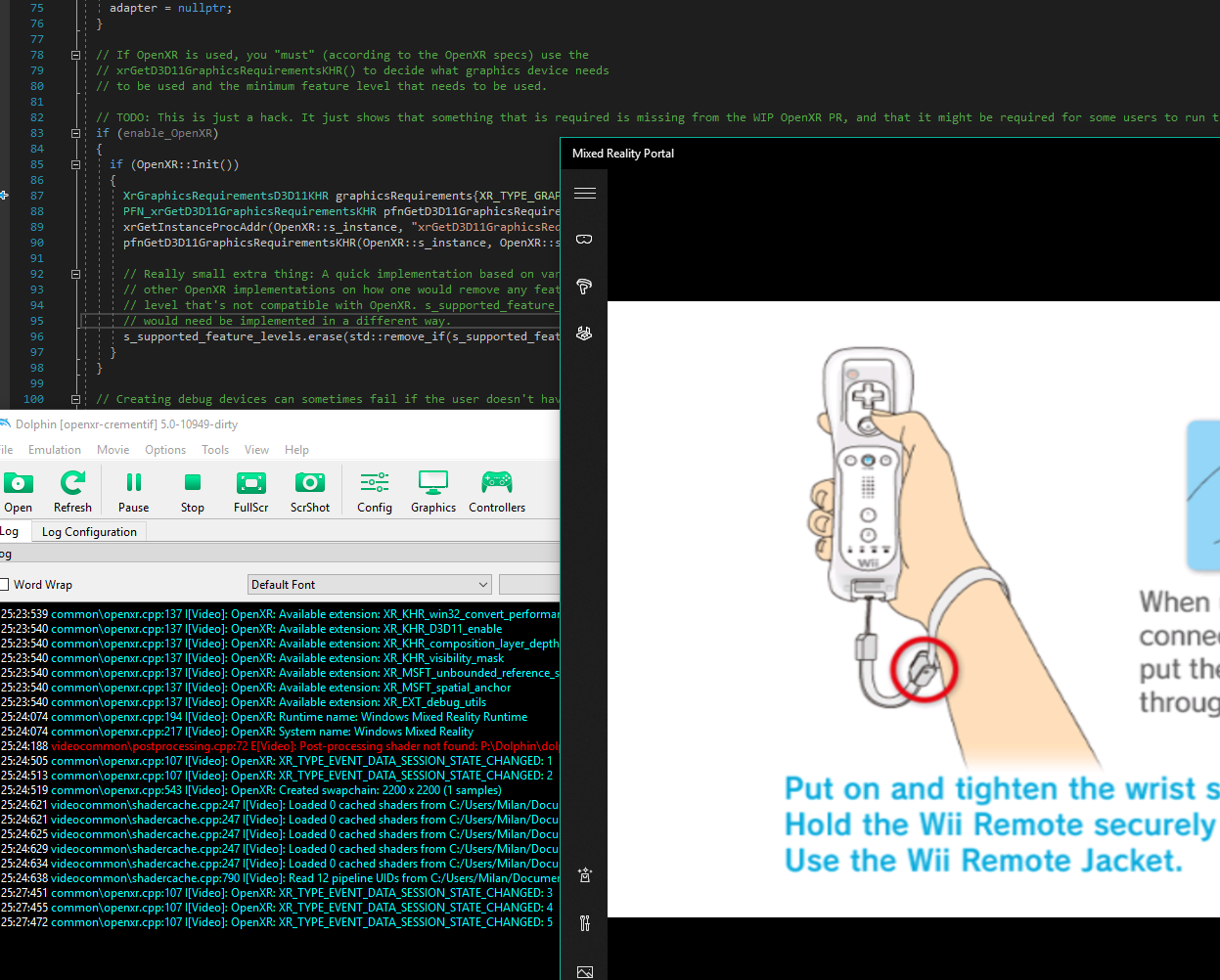
I'll test the nausea thing tomorrow, if that other guy doesn't that is. Only game I've played so far is Super Mario Galaxy, which felt alright, I think. Didn't really get into any gameplay other then menus. I'll give a detailed write-up tomorrow.
Okay, test results are in! Tested a little bit of Super Mario Sunshine (since it's 30FPS), Rhythm Heaven Fever (just to check input latency) and Wii Sports (since it's 60FPS). Here's some of the things I noticed that every game suffers some:
- Everything is displayed in the left eye, while the right eye stays black. So I can't really tell if any games, be it at 30FPS or 60FPS, were nauseating, since there was no stereo effect which just made it feel like I had my eye against a monitor.
- I was gonna try finding a fix since the simulator doesn't give you the option to view both eyes/views. Couldn't find anything obvious in the OpenXR code to be wrong either, so it might just be something related to views/swapchains, which you would understand better. Let me know if you know/can find the cause perhaps or if I should do some debugging on this.
- Moving your head feels kinda jerky. Still (very) playable though. It just feels less smooth then what I'm used to with the Oculus Quest (75hz) or the Lenovo Explorer WMR headset (90hz). This could actually be caused by the interpolation, maybe, which is something I'll probably be able to tell once both eyes work!
- Button inputs felt responsive and there wasn't much more noticeable latency.
- Everything is black behind you in like a 180 degree angle or something like that. I'm not sure if that object hiding fix you mentioned would fix this, or if that needs a different fix.
- 2D screens and videos are very close, but you already have this set as a goal.
Game-specific testing/experience:
- Super Mario Sunshine has a lot of screen-space reflections plus some other graphical bugs. Fixing these screen-space reflections isn't possible, right?
- Wii Sports (only played the Tennis mode) didn't have many graphical bugs. For some reason the Wii heads are super small in VR, which might be something that could be fixed. Unsure. Had some tracking issues though, which caused me to randomly teleport around which made it kinda nauseating. Not really a problem with this PR though.
Some extra thoughts:
- Add a check to see if OpenXR is actually available when you select it. It otherwise crashes somewhere in the
OpenXR::Init()code. - Would support for the OpenXR validation layer make sense (as a low priority thing)?
@Crementif Thanks for testing.
A potential fix for the right eye might be PR #8378. Unfortunately OpenXR fails to initialize when I attach RenderDoc so I gave up on testing if both eyes work. You could try merging in that branch.
Fixing "black behind you" will require game specific hacks.
Random "teleportation" might be caused by the bad units_per_meter value.
And yeah. Better error handling will come.
Yup, merging that branch made stereo work on my HMD. Just quickly played some Wii Sports Tennis again and moving my head didn't really have that jerkiness I described earlier this week. It more or less felt like I was using a headset with a lesser refresh rate, pretty much like the Oculus Quest. I want to do some proper testing with longer play periods but that'll have to wait until the end of the week, since I'm currently unable to spend much time on this. Just thought that I'd mention that.
Also, I just want to clarify something. The random teleportation was just caused by a dark room yesterday.
Can also confirm stereo works with that. Frame pacing is probably fine? Played a match of melee and didn't notice pacing being a problem, but maybe I haven't seen enough of good/bad pacing. Melee menus were also a bit strange and inconsistent. The car in f-zero is way too close to the viewer. Looking down (or up, I don't remember) can also clip through the ground. Is this units_per_meter?

Oh, stumbled over this one by accident today. So finally some new Dolphin VR experience is on the way :D Sadly I still have to wait a while as I own a Valve Index... I really look forward to see how many of the crazy things the brach noone talks about did is still needed in that approach. Like, Hide objects codes, disable culling codes, camera tinkering and all the opcode replay and timewarping as workaround for the too low standard refresh rates... I will provide useful information and not just asking questions as soon as I can use OpenXR on Index.

Codes will still be necessary, there's no generic solution. Camera tinkering is still necessary. I believe that this implementation is relying on the VR drivers to handle timewarping (Oculus and SteamVR do, which I don't believe they did at the time of the old fork).

@jordan-woyak, Just a suggestion, for games like SSBB, a mode like VR180 could be used as to prevent exposing too much geometry.

hey, pulling the source now. Skimmed the comments some what, but not exactly caught up here. What is currently missing / needed?

The opcode replay stuff is still necessary for a perfect experience. However, modern VR drivers are much better at managing lower refresh rates than they used to be.
hey, pulling the source now. Skimmed the comments some what, but not exactly caught up here. What is currently missing / needed?
The main thing that's missing is implementing OpenGL, Vulkan, and D3D12 support.
@jordan-woyak, Just a suggestion, for games like SSBB, a mode like VR180 could be used as to prevent exposing too much geometry.
So just stopping the free-look camera from going more than 90 degrees in any direction? Options like that could be added later if people want them.
D3D11 only might be fine for an initial merge, since there isn't a useful Linux OpenXR implementation.
D3D11 only might be fine for an initial merge, since there isn't a useful Linux OpenXR implementation.
Monado, OpenXR runtime for Linux, is probably just as useful as the Windows Mixed Reality runtime. It probably even works with more hardware.
Monado uses OpenHMD to communicate with the hardware. OpenHMD has rotation-only support for a few of the most popular headsets, and no positional tracking support.
Right now, I think what is most important is getting the options that the Dolphin VR branch based on Razer Hydra provides onto this version, such as hide code functionality, comfort options and whatnot.
I'll note they're also handling methods of ATW to make head turning to be at full framerate regardless of anything else.

Fixing "black behind you" will require game specific hacks.
FYI @jordan-woyak while I think some of the "black behind" is due to games doing culling, I was doing a similar change to support multiple freelook views and I realized that applying projection inverse followed by projection actually causes black in games that would otherwise have more details when looking in 360 degree view. An example is Mario Kart Wii.
The solution I tried was to not apply the projection matrix in the vertex shader (which does solve the issue) but that definitely increases complexity quite a bit because the positions in the vertex shader are expected to be in projected viewspace...

OpenXR support finally arrived over at Valve Index and all other SteamVR only VR solutions. Beta branch is your friend. Anyone a recent version of this pull request? Finally I can test the sh*t our of that one :D
Unfortunately, I don't think this has been worked on since October. I've been messing around with it recently, so I went ahead and merged the #8378 fix with jordan-woyak's work so far. You can find that here. Make sure to checkout the openxr branch if you clone the repo.
I have an Nvidia gpu (and a Rift S), and the patch didn't fix my one-eye issue. Additionally, the Debug (x64) build used to show the menus in both eyes for me (couldn't get in-game), but with this build it doesn't show in the right eye anymore.
But, you can give it a shot and post about your results, and hopefully someone will start working on this again soon.

OK, checked out your fork with patch and built it with MSVC2017 Community. Had to do some project reassign, but then it built quite nicely. Results are nothing new as it seems though. Switched to D3D11 output and reduced some GFX parameters for more speed. Left eye shows stuff, right eye is dead. (Not dead on my Index as SteamVR Menu shows up fine, but dead as no signal from app coming up)... But great to finally see it in action though :D Cam is a bit strange when you are not sitting in the center of the playspace maybe? FZero GX prejects me somewhere out of bounds seeing no car at all. And the mentioned free look laggy jerkiness is confirmed. Not terribly bad, but very noticeable.
EDIT: NVidia GF 2080 here
Rebased. It builds on Linux but I didn't test anything more than that. :(
This is amazing. Having VR in the base fork of Dolphin will finally ensure proper (as perfect as it can get) VR in all of my favorite GC and wii games. You guys are doing gods work!!!
If you want I can help test some games if you get me a test build. I have a Oculus rift S btw.

@jordan-woyak Builds and runs on windows, but still has the left-eye only problem. I was messing around with the swapchains, but didn't find anything. Also, I think Dolphin is not cleanly exiting something XR related, as the .exe sticks around in my processes until I force close it

Hi, I’m probably in over my head, but I'd like to learn how to contribute with integrating OpenXR in Dolphin. I’m a relatively new programmer but I know some C++. Can anybody tell me the things I should be familiar with and/or point me to some documentation?
