dokutan
Redragon M721-Pro Lonewolf2 support
Hi, I want to participate in adding support for this mouse.
lsusb
Bus 006 Device 001: ID 1d6b:0003 Linux Foundation 3.0 root hub
Bus 005 Device 002: ID 046d:0826 Logitech, Inc. HD Webcam C525
Bus 005 Device 001: ID 1d6b:0002 Linux Foundation 2.0 root hub
Bus 004 Device 001: ID 1d6b:0003 Linux Foundation 3.0 root hub
Bus 003 Device 001: ID 1d6b:0002 Linux Foundation 2.0 root hub
Bus 002 Device 001: ID 1d6b:0003 Linux Foundation 3.0 root hub
Bus 001 Device 004: ID 04d9:fc5c Holtek Semiconductor, Inc. USB Gaming Mouse
Bus 001 Device 005: ID 04b4:6018 Cypress Semiconductor Corp.
Bus 001 Device 002: ID 045e:0719 Microsoft Corp. Xbox 360 Wireless Adapter
Bus 001 Device 001: ID 1d6b:0002 Linux Foundation 2.0 root hub
sudo mouse_m908 -R - --bus 1 --device 4 -M 709
# Configuration created with mouse_m908 -R.
# This configuration can be send to the mouse with mouse_m908 -c.
# This feature is currently untested, please report your results.
# Note: reading the scrollspeed is not supported by the mouse.

# Currently active profile: 5

[profile1]

# LED settings
color=ff0000
brightness=0
speed=0
lightmode=off

report_rate=500

# DPI settings
# Active dpi level for this profile: 1
dpi1_enable=1
dpi1=0x0b00
dpi2_enable=1
dpi2=0x1700
dpi3_enable=1
dpi3=0x2f00
dpi4_enable=1
dpi4=0x5f00
dpi5_enable=1
dpi5=0xbc00

# Button mapping
button_left=left
button_right=right
button_middle=middle
button_forward=forward
button_backward=backward
button_dpi=fire:mouse_left:3:0
scroll_up=dpi+
scroll_down=dpi-

[profile2]

# LED settings
color=0000ff
brightness=2
speed=0
lightmode=wave

report_rate=500

# DPI settings
# Active dpi level for this profile: 2
dpi1_enable=1
dpi1=0x0b00
dpi2_enable=1
dpi2=0x1700
dpi3_enable=1
dpi3=0x2f00
dpi4_enable=1
dpi4=0x5f00
dpi5_enable=1
dpi5=0xbc00

# Button mapping
button_left=led_mode_switch
button_right=profile_switch
button_middle=none
button_forward=none
button_backward=none
button_dpi=none
scroll_up=unknown, please report as bug:  ff  ff  0  0
scroll_down=none

[profile3]

# LED settings
color=00ff00
brightness=2
speed=0
lightmode=wave

report_rate=500

# DPI settings
# Active dpi level for this profile: 2
dpi1_enable=1
dpi1=0x0b00
dpi2_enable=1
dpi2=0x1700
dpi3_enable=1
dpi3=0x2f00
dpi4_enable=1
dpi4=0x5f00
dpi5_enable=1
dpi5=0xbc00

# Button mapping
button_left=none
button_right=none
button_middle=scroll_up
button_forward=scroll_down
button_backward=left
button_dpi=right
scroll_up=middle
scroll_down=forward

[profile4]

# LED settings
color=ff00ff
brightness=2
speed=0
lightmode=wave

report_rate=500

# DPI settings
# Active dpi level for this profile: 2
dpi1_enable=1
dpi1=0x0b00
dpi2_enable=1
dpi2=0x1700
dpi3_enable=1
dpi3=0x2f00
dpi4_enable=1
dpi4=0x5f00
dpi5_enable=1
dpi5=0xbc00

# Button mapping
button_left=backward
button_right=fire:mouse_left:3:0
button_middle=dpi+
button_forward=dpi-
button_backward=led_mode_switch
button_dpi=profile_switch
scroll_up=none
scroll_down=none

[profile5]

# LED settings
color=ffff00
brightness=3
speed=0
lightmode=alternating

report_rate=500

# DPI settings
# Active dpi level for this profile: 1
dpi1_enable=1
dpi1=0x0b00
dpi2_enable=1
dpi2=0x1700
dpi3_enable=1
dpi3=0x2f00
dpi4_enable=1
dpi4=0x5f00
dpi5_enable=1
dpi5=0xbc00

# Button mapping
button_left=none
button_right=none
button_middle=unknown, please report as bug:  ff  ff  0  0
button_forward=none
button_backward=none
button_dpi=none
scroll_up=scroll_up
scroll_down=scroll_down

# Macros
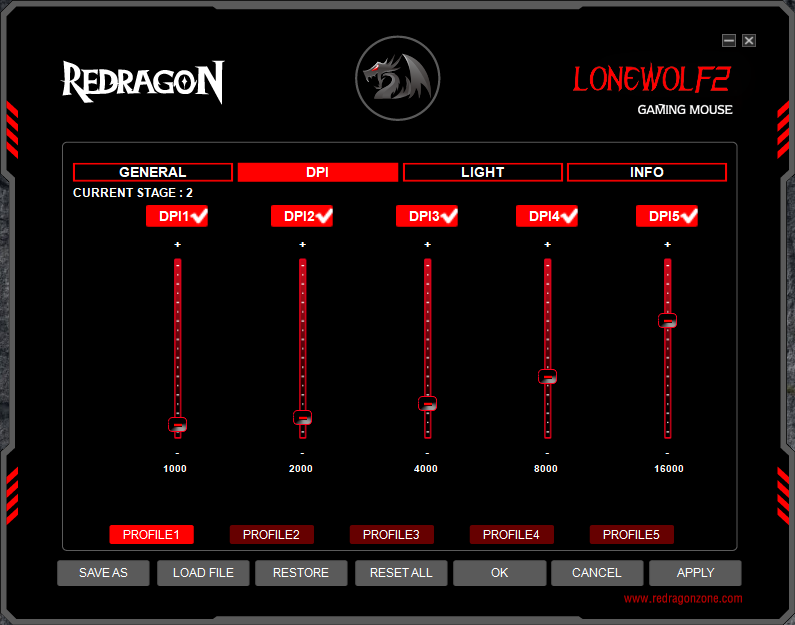
After that, I changed report_rate for all my profiles in the Windows Redragon software. (from 500 to 1000)

sudo mouse_m908 -R - --bus 1 --device 7 -M generic
# Configuration created with mouse_m908 -R.
# This configuration can be send to the mouse with mouse_m908 -c.
# This feature is currently untested, please report your results.
# Note: reading the scrollspeed is not supported by the mouse.

# Currently active profile: 1

[profile1]

# LED settings
color=ff0000
brightness=2
speed=0
lightmode=wave

report_rate=1000

# DPI settings
# Active dpi level for this profile: 1
dpi1_enable=1
dpi1=0x0b00
dpi2_enable=1
dpi2=0x1700
dpi3_enable=1
dpi3=0x2f00
dpi4_enable=1
dpi4=0x5f00
dpi5_enable=1
dpi5=0xbc00

# Button mapping
button_left=left
button_right=right
button_middle=middle
button_forward=forward
button_backward=backward
button_dpi=fire:mouse_left:3:0
scroll_up=dpi+
scroll_down=dpi-

[profile2]

# LED settings
color=0000ff
brightness=2
speed=0
lightmode=wave

report_rate=1000

# DPI settings
# Active dpi level for this profile: 2
dpi1_enable=1
dpi1=0x0b00
dpi2_enable=1
dpi2=0x1700
dpi3_enable=1
dpi3=0x2f00
dpi4_enable=1
dpi4=0x5f00
dpi5_enable=1
dpi5=0xbc00

# Button mapping
button_left=led_mode_switch
button_right=profile_switch
button_middle=none
button_forward=none
button_backward=none
button_dpi=none
scroll_up=unknown, please report as bug:  ff  ff  0  0
scroll_down=none

[profile3]

# LED settings
color=00ff00
brightness=2
speed=0
lightmode=wave

report_rate=1000

# DPI settings
# Active dpi level for this profile: 2
dpi1_enable=1
dpi1=0x0b00
dpi2_enable=1
dpi2=0x1700
dpi3_enable=1
dpi3=0x2f00
dpi4_enable=1
dpi4=0x5f00
dpi5_enable=1
dpi5=0xbc00

# Button mapping
button_left=none
button_right=none
button_middle=scroll_up
button_forward=scroll_down
button_backward=left
button_dpi=right
scroll_up=middle
scroll_down=forward

[profile4]

# LED settings
color=ff00ff
brightness=2
speed=0
lightmode=wave

report_rate=1000

# DPI settings
# Active dpi level for this profile: 2
dpi1_enable=1
dpi1=0x0b00
dpi2_enable=1
dpi2=0x1700
dpi3_enable=1
dpi3=0x2f00
dpi4_enable=1
dpi4=0x5f00
dpi5_enable=1
dpi5=0xbc00

# Button mapping
button_left=backward
button_right=fire:mouse_left:3:0
button_middle=dpi+
button_forward=dpi-
button_backward=led_mode_switch
button_dpi=profile_switch
scroll_up=none
scroll_down=none

[profile5]

# LED settings
color=ffff00
brightness=2
speed=0
lightmode=wave

report_rate=1000

# DPI settings
# Active dpi level for this profile: 2
dpi1_enable=1
dpi1=0x0b00
dpi2_enable=1
dpi2=0x1700
dpi3_enable=1
dpi3=0x2f00
dpi4_enable=1
dpi4=0x5f00
dpi5_enable=1
dpi5=0xbc00

# Button mapping
button_left=none
button_right=none
button_middle=unknown, please report as bug:  ff  ff  0  0
button_forward=none
button_backward=none
button_dpi=none
scroll_up=scroll_up
scroll_down=scroll_down

# Macros

Thanks for the detailed information, that allowed me to add an experimental backend for the M721 in 6f0a4adf4daac630aa5a262d74ba7dc6c60cae49. If you make sure to build from the master branch, it should hopefully be no longer required to use the --bus and --device options, additionally when using -R the correct model should be displayed at the beginning.
If everything works, i expect that there a still two main problems:
- The way the buttons are read and interpreted might be swapped. To fix this simply post the output of
mouse_m90 -R -and the correct mapping. - There will be no actual DPI values used, only the raw bytes. To fix this use the official software to change the DPI to some value, then run
mouse_m90 -R -to get the corresponding bytes. Use this method to create a list for all possible values as there sadly is no linear mapping between DPI and bytes.
If there are any problems, please tell me.

Greetings. Thank you again for your work.
Today I had to use the program again to change the dpi value in my main profile number 1. Unfortunately, the official program on Windows does not allow you to conveniently adjust the desired dpi values, because the selector is very sensitive and they are very easy to miss.
First of all, I want to note that you correctly said that dpi values are encoded under certain values.
Below I will describe my sequence of actions (RS will then mean Redragon software):
-
In the beginning I reset all mouse settings to default via RS and recorded these mouse settings in
m721-win_redragon-default.ini. -
Then I changed the polling frequency values in each profile from 500 to 1000 hz and wrote the settings to
m721-win_redragon-pollrate_1000.ini. The screenshot at the beginning of the issue refers to this stage. -
After that, I changed the DPI parameter 1 in the first profile from 1000 to 800 in RS to get this encoded value and wrote the settings to
m721-win_redragon-pollrate_1000-profile1_dpi1_800.ini. -
Next, I made the desired DPI settings of the first profile in
m721-pollrate_1000-customdpi.iniconfig and wrote these settings to the mouse via mouse_m908. At this time, the following warning was displayed 4 times in the terminal: Warning: Unknown DPI value 0xbc00 (In RS, this value in the DPI5 of each profile is 16000.)
The recorded settings work correctly on Linux and Windows, but if you start RS again, all mouse settings will be shifted and you will need to manually edit or reset the settings to default. I decided not to edit anything and just overwrite the settings that RS read from the mouse again, and then saved these settings to m721-win_redragon-reapply_mycustomdpi.ini.
Additionally, I will attach an archive with configs and a screenshot from RS with default DPI values:
m721-configs.zip