
neomake-autolint
 neomake-autolint copied to clipboard
 dojoteef
Lint as you type using Neomake
Neomake Autolint
DEPRECATED
Neomake has this functionality built-in now, hoorah!
What are you doing still rummaging around this old crusty plugin?! If you're feeling nostalgic for the short-lived wonder of Neomake Autolint read on!
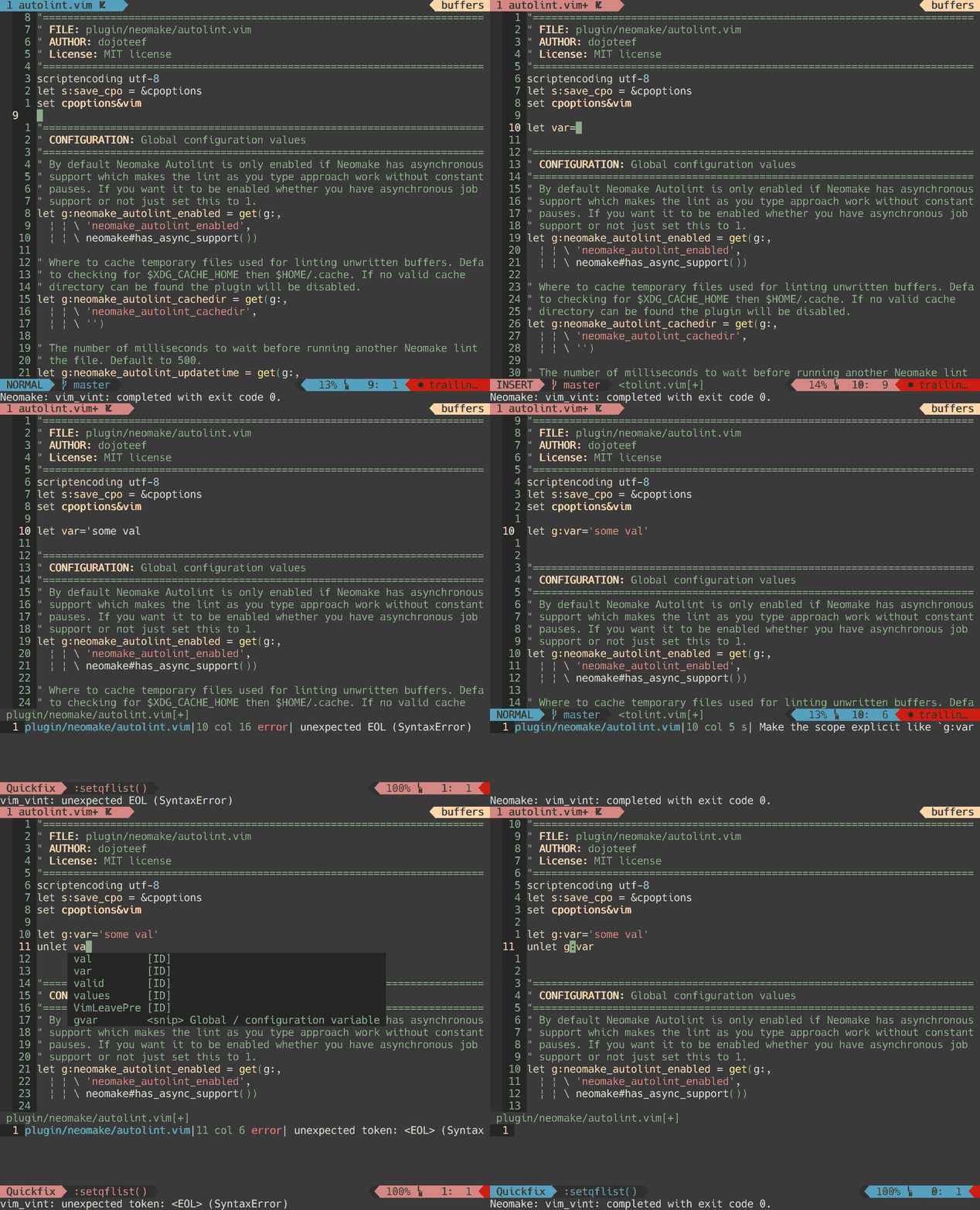
Neomake Autolint leverages Neomake's ability to asynchronously run linters on a file. It augments that functionality with the ability to run file level linters as you type so you get the most immediate feedback. This requires your version of Vim or Neovim to support job control, otherwise the plugin will be disabled. Thanks goes out to the team of Neomake for making a great plugin!
Requirements
Since Neomake Autolint is built upon Neomake the requirements for Neomake Autolint are the same as Neomake's requirements for async support. While it may be possible to use this plugin without async support by setting g:neomake_autolint_enabled manually it is not something that will be actively supported.
For more details see Neomake's requirements.
Installation
Neobundle / Vundle / vim-plug
NeoBundle 'neomake/neomake'
Plugin 'neomake/neomake'

NeoBundle 'dojoteef/neomake-autolint'
Plugin 'dojoteef/neomake-autolint'

Plug 'neomake/neomake' | Plug 'dojoteef/neomake-autolint'
pathogen
git clone https://github.com/neomake/neomake ~/.vim/bundle/neomake
git clone https://github.com/dojoteef/neomake-autolint ~/.vim/bundle/neomake-autolint
Advanced Customization
There may be times where a linter you use needs some tweaking for it to work
properly with the autolinting since it works by way of using a temporary file.
For example if you run pylint you may need to specify the $PYTHONPATH for
it to correctly infer imports. One way to do this is by using the autocommands
NeomakeAutolint or NeomakeAutolintSetup.
Following example usecase assumes your current working directory is the root of the project you want to run pylint on.
" Correctly setup PYTHONPATH for pylint. Since Neomake-Autolint uses a
" temporary file the default PYTHONPATH will be in the temporary directory
" rather than the project root.
function! s:PylintSetup()
  " Store off the original PYTHONPATH since it will be modified prior to
  " doing a lint pass.
  let s:PythonPath = exists('s:PythonPath') ? s:PythonPath : $PYTHONPATH
  let l:path = s:PythonPath
  if match(l:path, getcwd()) >= 0
    " If the current PYTHONPATH already includes the working directory
    " then there is nothing left to do
    return
  endif

  if !empty(l:path)
    " Uses the same path separator that the OS uses, so ':' on Unix and ';'
    " on Windows. Only consider Unix for now.
    let l:path.=':'
  endif

  let $PYTHONPATH=l:path . getcwd()
endfunction

autocmd vimrc FileType python
      \ autocmd vimrc User NeomakeAutolint call s:PylintSetup()
Frequently Asked Questions (FAQ)
Neomake Autolint is not working.
There are a small number of issues that could cause Neomake Autolint to be disabled.
First verify that Neomake is installed. Neomake Autolint depends on Neomake so if it is not installed Neomake Autolint will not work.
Check if your version of vim supports jobs and timers. You can verify this by
typing: :echo has('nvim') || has('job') && has('timers')
If you do not have job-control and still desire to run Neomake Autolint you
can override the default behavior by setting g:neomake_autolint_enabled to
1.
Another issue that could cause Neomake Autolint to be disabled is a missing
cache directory. In order to run a linter over the currently edited file it
needs to be saved to disk. Neomake Autolint saves those temporary files in the
directory as specified in g:neomake_autolint_cachedir. Please verify the
cache directory exists.
Can the sign column always be displayed?
See g:neomake_autolint_sign_column_always in the plugin documentation.
How can I configure Neomake Autolint to run a lint cycle on <X> event?
By default Neomake Autolint runs a lint cycle when text changes in a buffer (whether or not the user is in insert mode), or when the buffer first becomes visible on screen (the BufWinEnter event). If you wish to change this behavior you can customize Neomake Autolint to execute a linting cycle when a specified event occurs.
let g:neomake_autolint_events = {
      \ 'InsertLeave': {'delay': 0},
      \ 'TextChanged': {},
      \ }
The above configuration will only run the lint cycle
- immediately on
InsertLeave - on
TextChangedwith the default delay (seeg:neomake_autolint_updatetime)
See g:neomake_autolint_events in the plugin documentation for more
information.
Plugin Documentation
For more detailed documentation, especially regarding configuration, please
refer to the plugin's help
(:h neomake-autolint.txt).
 dojoteef