

 doitsujin
[W10] AC Origins - loss of stability
First of all, thank you very much for your work, everything you do and the help you provide is greatly appreciated. Without this tool ACO is unplayable. Every time I put dxvk for the first time the game works absolutely smoothly, but after a while and after traveling several distances on the map, it suddenly gets lost. What I do is close the game, I delete the text files ACOrigins_d3d11, ACOrigins_dxgi, ACOrigins_d3d10 and the file ACOrigins.dxvk-cache and when I enter the game again the fluency returns, but only for another time. Even so, when it works "badly" it is still a thousand times better than the game without DXVK. But I would like to keep that fluidity, I don't know much about the subject but is it something related to the cache?

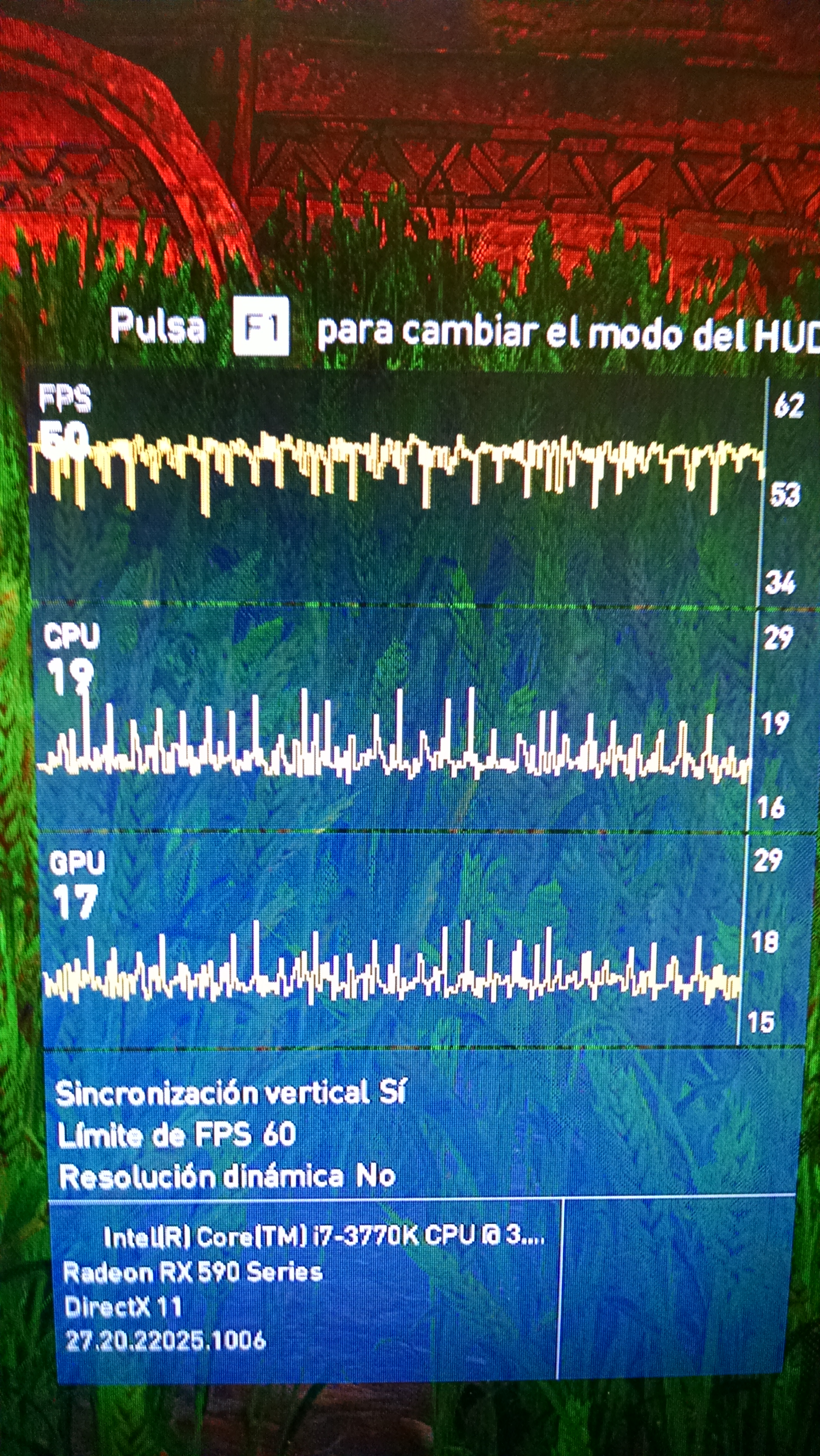 Sorry for the quality of the images, I couldn't take a screenshot.
The photos were taken in the same area, when it started to fail, I went back to the starting point to be able to compare.
Sorry for the quality of the images, I couldn't take a screenshot.
The photos were taken in the same area, when it started to fail, I went back to the starting point to be able to compare.
Extra programs that I use: MSI afterburner and ISLC (help me with loading textures)
Software information
Windows 10 update daily. 12gb ram i7 3770k.
Settings of game:
Antialiasing: High Shadows: Normal Environment details: Very High Textures qual: High Tessellation: Very High Field: High Clutter: Normal Fog: Normal Water: High Reflections of space on screen: High Volumetric clouds: Off Textures details: High Character details: Very Low Ambient occlusion: Very High Depth of field: Off
System information
- GPU: rx590
- Driver: 21.8.2
- Wine version: none
- DXVK version: 1.9.1
Log files
-
d3d9.log: none, if use d3d9 crash the game.
-
d3d11.log: ACOrigins_d3d11.log
-
dxgi.log: ACOrigins_dxgi.log

Looks fairly normal when your frame rates drop below your monitor refresh rate in these games. Not really sure what you want us to do here, we can't magically improve performance by 20%.

I'm sorry if something I said sounded wrong, I'm not looking for magic solutions and I really appreciate what you do here. I am also aware of what hardware I have. I only share my experience since it is curious how installing dxvk works smoothly and after a while stutter occurs. When reinstalling dxvk it becomes smooth again, cyclically. This is why I consult, to see if there was a way to maintain that. Do not get it wrong.

Yes that's all I do, I close the game, open the folder, delete the ACOrigins_d3d11, ACOrigins_dxgi, ACOrigins_d3d10 text files and the ACOrigins.dxvk-cache file. Then I go into the game, I wait for everything to load correctly and I go back to playing without problems, until after a while. Like I say, even when it stutters me, it's incredibly better than playing without dxvk, there's no question, it's just that I found curioso why I lose that smoothness.
delete the ACOrigins_d3d11, ACOrigins_dxgi, ACOrigins_d3d10 text files and the ACOrigins.dxvk-cache file.
Pretty sure, you don't need to do that.
Just restarting without deleting those files should have the exact same effect.
I did that before, in the beginning. It did not touch anything and only restarted the game, but the stutter was already just starting. Then I tried to reinstall dxvk and it worked. I uploaded two photos, they are graphics of the game, the first is when I reinstall and start playing and the second photo is when it gives me stutter.
Are you trying to run this on a machine with 8GB of RAM or something? The cache pretty much cannot decrease performance, however it will obviously increase memory usage since the game precompiles most of its shaders. DXVK will always have some inherent memory overhead over native D3D.
@acorigins Friendly ping. Can you retest with latest dxvk and drivers? :slightly_smiling_face:

Stale issue. We cannot reproduce the problem and there's nothing obvious we could do here.