

 dogecoin
[feat] missing instruction on finding the dogecoin binary exectuable for MacOS users (readme)
It's prefered to have a detailed step by step guide to help mac os user to locate their cli executable. so that they can run command like dogecoind --help.
The current issue is:
in the "getting-started" section of https://github.com/dogecoin/dogecoin/blob/master/doc/getting-started.md, it says "For simplicity, this guide assumes that executables can be found under the PATH environment variable. If needed, you can specify their location by typing PATH=$PATH:/path/to/executables"
For me, but I believe not only for me (mac user), the "for simplicity" becomes the most difficult part of the journey to "Get Started". The only work around I find so far is open dogecoin gui -> click Help -> click debuging window -> console , however this makes it impossible for the ppl who try to use cli integrated with a application running on local for development purpose.
I understand this is not a pure technical issue/feat however since it's part of the project codebase I decided to post it here for anyone has the similar problem in the future.
Thanks!

Hi!
Currently we do not ship dogecoind/dogecoin-cli with the macOS releases. We can look into including those with the next release, just like we do for the Windows releases and create a little guide on how to install these.
That would take care of the command-line guide.
Additionally, it may be useful if someone would create a visual "getting started" guide for GUI users?
Let us know your thoughts.

Thanks for your prompt reply!
Really glad to hear that it's in the plan, The GUI is really simple and easy to understand with a common sense, however it did takes some effort to locate a that where we can execute the command (debugging console). Would be great to leave a note somewhere we have that feature.
I am thinking it would be great to just make a "cli console" as a separate option on the application menu bar (parallel to Help options), the reason I recommend this way is, the existing 'debugging window' options is not as clear that it even provides a console, by having a clear optioin it gonna work as a statement "click me then you have the cli console" gonna be helpful, and let user know we don't really have it supported in shell yet would be great
I hope I state my idea in a clear way
Besides, will I easily get a cli if I run a ubuntu? if so I'll go for a ubuntu docker...if that gonna work
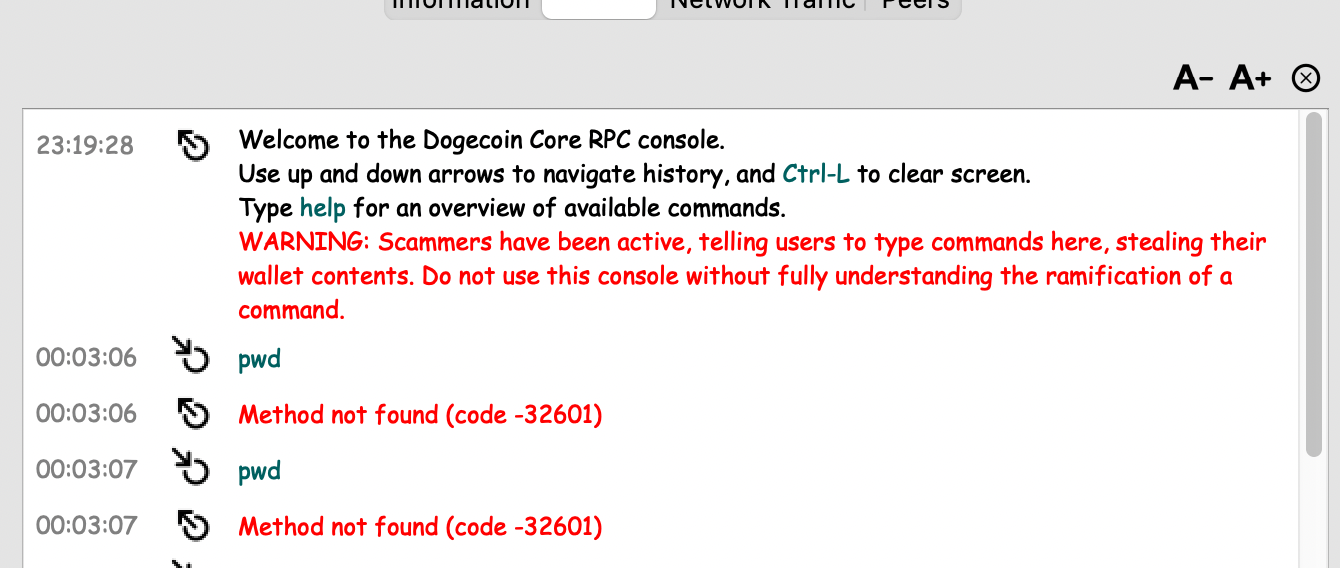 for example, the proposed button directly lead user to this view instead of going through "help -> debugging window" console screen can prompt default msg telling user that macos doesn't have that cli from shell yet
I'm marking this to 1.14.7 as I didn't have the opportunity to get this done with 1.14.6 - apologies.
Was this ever added? Would love to have dogecoind binaries for macOS if possible, having troubles building on M1 Macbook with the existing repo.

Was this ever added?
It's still on the todo-list for the 1.14.7 release, but note that these will be Intel Mac binaries (though they run great through Apple's Rosetta Stone.) I'll do my best to get this into the deterministic build process after we're a little bit further testing recent dependency updates - to not mix too many things.
having troubles building on M1 Macbook with the existing repo.
master/1.14.6 has known issues for M1, which have recently been solved and are staged in the 1.14.7-dev branch. Could you try building it from 1.14.7-dev (git checkout 1.14.7-dev) with the updated guide from #2686 (direct link)? I've updated and tested this last week on a Ventura M1 and this works for me now.