community

community copied to clipboard
 documize
Labels sometimes do not "cut lines" at the right place
Software Versions
- Python: 3.9
- OS: MacOS BigSur 11.4
- Kivy: v2.2.0.dev0
- Kivy installation method: development
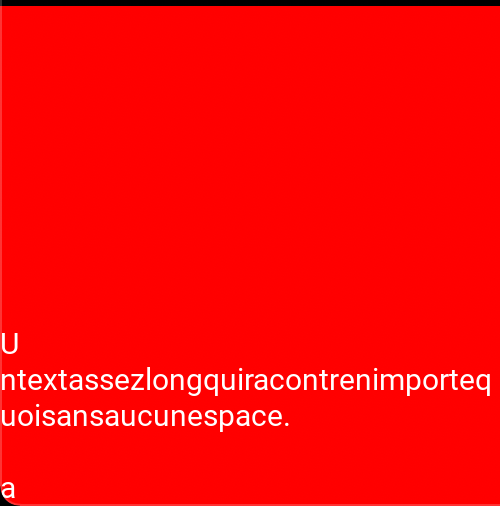
Describe the bug Labels with a width constraint do not "cut lines" at the right place in some specific cases (see code and picture below). It happens in some cases when there is no space in a series of characters wider than the width of the widget. In many languages that's a rare edge case but it's actually not that uncommon in languages like Chinese where the space is not a distinct but is "integrated" in the character for the coma and the period.
To Reproduce
from kivy.app import App
from kivy.lang import Builder

KV = '''
Label:
    text: 'Untextassezlongquiracontrenimportequoisansaucunespace.\\n\\na'
    font_size: 30
    size_hint: (None, None)
    size: 500, 500
    text_size: self.size
    canvas.before:
        Color:
            rgba: (1, 0, 0, 1)
        Rectangle:
            pos: self.pos
            size: self.size
'''
root = Builder.load_string(KV)

class WeatherApp(App):
    def build(self):
        return root

if __name__ == '__main__':
        WeatherApp().run()
*Expected behavior
The U should not be on the first line alone. Instead, the first line should be full with a break happening after the e
Screenshot