
community
 community copied to clipboard
 documize
Make GridLayout honor 'pos_hint' of children

![welcome[bot] avatar](https://avatars.githubusercontent.com/in/4141?v=4 "Published by a pub.dev verified publisher")
Is this pr useful? I can't see the usefulness of it, because the user can't control the drawing order. For example:
from kivy.app import App
from kivy.lang import Builder

KV_CODE = '''
<Label>:
    font_size: '60sp'
GridLayout:
    cols: 2
    spacing: 10
    Button:
        text: '1'
    Button:
        text: '2'
        pos_hint: {'x': -0.5, 'y': -0.5, }
    Button:
        text: '3'
    Button:
        text: '4'
'''

class TestApp(App):
    def build(self):
        return Builder.load_string(KV_CODE)

if __name__ == '__main__':
    TestApp().run()
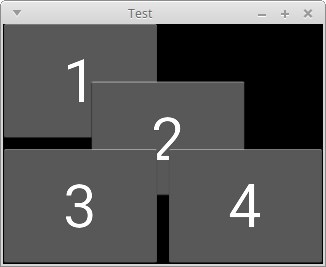
I can't draw 2 on top of 3 and 4.
Also, you forgot about pos and center.
https://github.com/kivy/kivy/blob/cefc5a72118021e01660734d08d1ad2433c7131e/kivy/uix/floatlayout.py#L116-L132

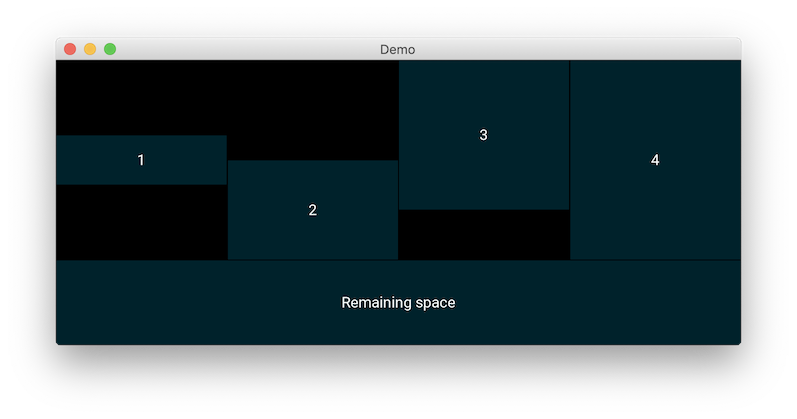
It is probably most useful when widgets are smaller than the grid cell, e.g. a label (or checkbox or anything small) on the left is centered vertically with respect to a higher widget in the contiguous right cell. It is true that there is no handling of overlap, that would be more easily handled by a FloatLayout.
Example:
from kivy.uix.gridlayout import GridLayout
from kivy.app import App
from kivy.lang import Builder

Builder.load_string('''
<Demo>:
    cols: 1
    GridLayout:
        rows: 1
        height: self.minimum_height
        size_hint_y: None
        Button:
            size_hint_y: None
            height: 100
            pos_hint: {'center_y': 0.5}
            text: '1'
            y: 50
        Button:
            size_hint_y: None
            height: 200
            text: '2'
        Button:
            size_hint_y: None
            pos_hint: {'top': 1}
            height: 300
            text: '3'
        Button:
            size_hint_y: None
            height: 400
            text: '4'


    Button:
        text: 'Remaining space'

''')


class Demo(GridLayout):
    pass


class DemoApp(App):
    def build(self):
        return Demo()


if __name__ == '__main__':
    DemoApp().run()
About pos and center, you are right. I was mislead by the widget doc that only states
The keys ‘x’, ‘right’ and ‘center_x’ will use the parent width. The keys ‘y’, ‘top’ and ‘center_y’ will use the parent height.
without mentioning any other key. See also the example in the FloatLayout doc:
button = Button(text='Hello world', size_hint=(.6, .6),
                pos_hint={'x':.2, 'y':.2})
The 'x' and 'y' keys are set simultaneously, tending to show that 'pos' is not available...
I was mislead by the widget doc that only states...
Me too. I realized that those keys exist several months ago.
It is probably most useful when widgets are smaller than the grid cell
If there is a widget with different size from the others inside a GridLayout, isn't the layout gonna be messed up? like this:
GridLayout:
    cols: 2
    spacing: 10
    Button:
        text: '1'
    Button:
        text: '2'
    Button:
        text: '3'
        size_hint: None, None
        size: 100, 100
    Button:
        text: '4'
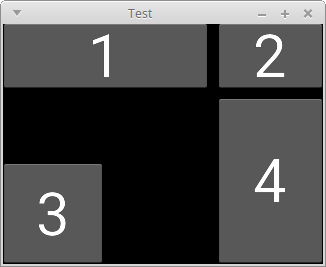
Because of that, I've never set widgets' size individually inside a GridLayout.
Can you show me an example that the pr shines?
It is legal to have widgets of different sizes within a GridLayout, however they will always be positioned at the bottom left of their cell (pos = (0,0)). That's the why of my proposal. I edited my first comment to show an example.
That example can be implemented by using BoxLayout.
But I understand what you want and hope other developers/contributors review this pr.
Regardless of the pr, specifying childrens' size makes the layout unpredictable. e.g. the screen shot I posted:
1is wider than2and4for no reason.4is taller than1and2for no reason.
So I think it's hard to write unit tests unless that behavior is predictable.
Regardless of the pr, specifying childrens' size makes the layout unpredictable.
Apparently, yes, but it is unrelated to the proposed change (i.e. the same happens with the original GridLayout code) that only plays with the widgets position within their cell.
Difficult to show that this change is mandatory, as (as often in software coding) a given result can be obtained in different ways, so I do not claim it resolves impossible situations. I simply suggest a minor change that may be useful in certain situations, using an intuitive use of pos_hint.
In my application, I often use GridLayout because it is a handy way to have widgets of fixed height ordered top-down rather than bottom-up, it's why I was faced to this 'problem' in GridLayout that always positions small widgets at the bottom left of a cell.
I'm actually quite enthusiastic about this idea, I've had cases where i wrapped all the Labels in a GridLayout each into a BoxLayout or FloatLayout, just to be able to align the text on the right, (another solution is to force text_size to size and use halign/valign, but it caused other problems, and wastes a lot of pixels), and these solutions are always specific to the widget you are trying to use, and its sizing policies. This change provide a general solution, that is consistent with the other usages of pos_hint (which, like size_hint), have different interpretation depending on the layout, as long as we can explain these clearly.

Ok then. I'm ok with it as long as unit tests are added and the same code is added to the recycleview version of grid layout.
As to how to add unit tests, I'd just pick some explicit sizes and do a bunch of assert that it matches up to what is expected.
