

 dockware
Support for Shopware Version 6.5
I noticed that we are not able to set the node version to >=18. This is required for the Shopware Version 6.5. Is there a way to change the version in the container? Please give me any advise if i could change this in the Dockerfile.

Now i used the dockware/6.5.0.0 docker template to start the environment. But it always exited with code 1. I think it stucks if it wants to start the mysql server.
Now i used the dockware/6.5.0.0 docker template to start the environment. But it always exited with code 1. I think it stucks if it wants to start the mysql server.
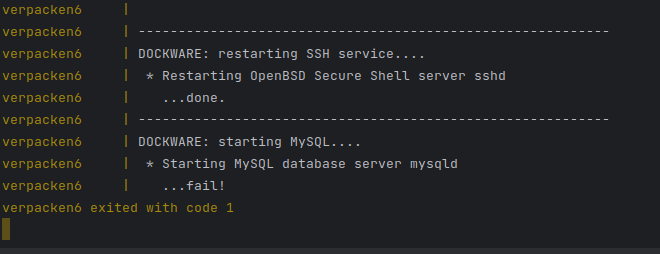
I was having the same issue (with both 6.5.0.0 and the newly released 6.5.1.0). Removing my docker db volume "fixes" the issue, though it does not allow persisting data between invocations. docker-compose.yml for reference:
version: "3"

services:
    shopware:
        image: dockware/dev:6.5.1.0
        container_name: dockware65-dev
        ports:
            - "80:80"
            - "3306:3306"
            - "22:22"
            - "8080:8080"
            - "8888:8888"
            - "9999:9999"
            - "9998:9998"
        volumes:
            - source:/var/www/html
            # - db:/var/lib/mysql
            - C:/Users/rmobi/.ssh/id_rsa:/var/www/.ssh/id_rsa:ro
            - C:/Users/rmobi/.ssh/id_rsa.pub:/var/www/.ssh/id_rsa.pub:ro
            - C:/Users/rmobi/.ssh/known_hosts:/var/www/.ssh/known_hosts:ro
        networks:
            - web
        environment:
            - PHP_VERSION=8.1
            - NODE_VERSION=18
            - XDEBUG_ENABLED=1
volumes:
    source:
        driver: local
    db:
        driver: local

networks:
    web:
        external: false

hi there can you try to delete your local volumes and see if it works then. sometimes for me my disk is filled that leads to such a behaviour. i use containers as throw-away containers anyway, so i just purge docker and start it up again, then it works
could very likely be, if it runs without a volume for you
please let me know what happens, thank you

@boxblinkracer I swear I had tried that at least half a dozen times prior to commenting here, but tried again now and it did work.