

 docker
Fatal Error com.docker.backend cannot start Exit code 101


This problem occurs when upgrading mac to version 13, Mac system version 12 will not have this problem and can run normally

I had the same thing.
Luckily after Reset Docker to factory defaults I restarted my MacBook and that seemed to sort it.

It is the second time I have this problem now on macOS Ventura 13.0, MacBook Pro M1


Reset Docker to factory defaults did not work for me but closing com.docker.backend as @vgorkavenko suggested worked

This problem occurs when upgrading mac to version 13, Mac system version 12 will not have this problem and can run normally
This happens to me and I'm not on Ventura, still on 12.6 (Monterey)

Reset Docker to factory defaultsdid not work for me but closingcom.docker.backendas @vgorkavenko suggested worked
Seemed to have worked for me too.

Reset Docker to factory defaultsdid not work for me but closingcom.docker.backendas @vgorkavenko suggested worked
Worked as a workaround for me too.

The same issue, and closing com.docker.backend via Activity Monitor resolved it for me. Docker seems to crash if the laptop (M1 Max) sleeps.
Testing this StackOverflow answer: https://stackoverflow.com/a/71861493/1985032

Reset Docker to factory defaultsdid not work for me but closingcom.docker.backendas @vgorkavenko suggested worked
Worked as a workaround for me too.

how to close "com.docker.backend".. I find only "Docker" in activity Monitor.


@VamsiNerella
pkill Docker
killall Docker
Update from 4.13 to 4.14.1 solved this issue for me (Ventura m1pro)

Mac system version 12 will not have this problem and can run normally
This is not correct. 12.6 is affected too. I was using 4.14.0 here. Killing all docker processes via Activity Monitor and then restarting it solved it.


I solved it by rebooting the mac
The issue would reappear if you close your macbook or make it sleep

upgrade to 4.15 is ok now
2022年12月6日 21:55,Arslan Ameer @.***> 写道:
I solved it by rebooting the mac
The issue would reappear if you close your macbook or make it sleep
— Reply to this email directly, view it on GitHub https://github.com/docker/for-mac/issues/6565#issuecomment-1339426715, or unsubscribe https://github.com/notifications/unsubscribe-auth/AAMMFHWRVO3GATLYUBHFXKLWL5AVTANCNFSM6AAAAAAR3HJHWI. You are receiving this because you commented.
Facing the issue on version 4.15.0 (93002). Reset Docker to factory defaults and com.docker.backend work for a while, but then after some time the issue persists.

For a while killing all the Docker processes (com.docker.backend, etc) in Activity Monitor, then restarting Docker Desktop resolved this for me, however it was happening multiple times a day during development and is a big time waste. This was not related to putting my Macbook to sleep. It happens while I am actively using the machine. I am absolutely not willing to restart my machine multiple times a day while working to resolve this issue. However today even killing the docker processes did not work, and I'd get this error every single time I tried to restart the desktop application after killing all the processes. Resetting to factory default settings did not work either. I've deleted the application and am downloading the most recent version (4.15), but this is a huge impediment to development. Unfortunately while I have teammates on the same machines with the same OS (12.5), they are not experiencing this issue. I'll update if the re-install resolves the issue, but I've done so once or twice before in the past few weeks without success (granted this was before 4.15 was released).
EDIT: No issues yet on 4.15. Fingers crossed I didn't jinx it by writing this update!
EDIT 2: I spoke too soon. Problem is back again.

Also on 4.15.0 (93002) (M1, macOS 13.0.1) and had this issue until I killed the com.docker.backend processes.
My MacBook Pro also hibernated since I originally launched Docker Desktop. Maybe that's relevant here?


Removing the docker dir with
rm -rf ~/.dockerdid the job for me.
This also worked for me

Removing the docker dir with
rm -rf ~/.dockerdid the job for me.
Works for me too. Stopping com.docker.backend did not work.

 same problem! not work for me

also seeing this issue (Exit code 152) with 4.15 ( and the previous) when I have the Zscaler network security app running on my M1 MBP running Ventura. If I disable Zscaler and do a fresh install of 4.15 , docker-desktop will work OK. Why a fresh install is needed I have no clue.

I've solved the problem using the following Stackoverflow post: https://stackoverflow.com/questions/69552636/cannot-launch-docker-desktop-for-mac/71861493#71861493

same issue happend to me suddently :(
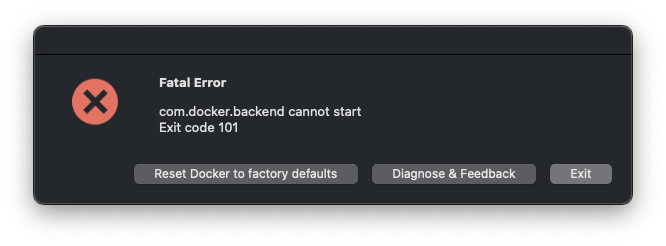
Macbook Pro 14-inch, 2021, Apple M1 Pro Ventura 13.0.1 (22A400)
and reset to factory defaults is not working


Saving future visitors from visiting another link by writing the steps from StackOverflow below
-
Go to finder and open Applications -> Utilities -> Activity Monitor.app
-
Find Docker or Docker Desktop (it was in Not responding mode in my case) and Force Kill the app.
-
Run the following command in Terminal:
sudo rm -rf ~/Library/Containers/com.docker.* -
Open the setting file in the terminal:
sudo vim ~/Library/Group\ Containers/group.com.docker/settings.json
then find
"filesharingDirectories":
Remove all entries inside this key and leave it as "filesharingDirectories": [], save and close the file.
Finally go to the Application folder, find Docker and run it (wait sometime, it takes a minute or so to run)

Saving future visitors from visiting another link by writing the steps from StackOverflow below
- Go to finder and open Applications -> Utilities -> Activity Monitor.app
- Find Docker or Docker Desktop (it was in Not responding mode in my case) and Force Kill the app.
- Run the following command in Terminal:
sudo rm -rf ~/Library/Containers/com.docker.*- Open the setting file in the terminal:
sudo vim ~/Library/Group\ Containers/group.com.docker/settings.jsonthen find
"filesharingDirectories":Remove all entries inside this key and leave it as
"filesharingDirectories": [], save and close the file. Finally go to the Application folder, find Docker and run it (wait sometime, it takes a minute or so to run)
This breaks sam builds using the --use-container flag, seems related to removing /Users so I added it back. Either way, I think this is breaking functionality.

With 4.16 the issue is even worse. It happens at least twice a day on my Mac Studio. It's a terrible experience.