docker
Docker does not respect "run --memory" option
- [x] This is a bug report
- [ ] This is a feature request
- [x] I searched existing issues before opening this one
Expected behavior
Docker should respect "--memory" option passed while starting the container with "run" option.
Actual behavior
Does not respect
Steps to reproduce the behavior
- start a container with option as, docker run --memory "256m"
- Run any application which will consume beyond 256mb.
Output of docker version:
Client: Docker Engine - Community
 Version:           19.03.8
 API version:       1.40
 Go version:        go1.12.17
 Git commit:        afacb8b7f0
 Built:             Wed Mar 11 01:27:05 2020
 OS/Arch:           linux/amd64
 Experimental:      false

Server: Docker Engine - Community
 Engine:
  Version:          19.03.8
  API version:      1.40 (minimum version 1.12)
  Go version:       go1.12.17
  Git commit:       afacb8b7f0
  Built:            Wed Mar 11 01:25:01 2020
  OS/Arch:          linux/amd64
  Experimental:     false
 containerd:
  Version:          1.2.13
  GitCommit:        7ad184331fa3e55e52b890ea95e65ba581ae3429
 runc:
  Version:          1.0.0-rc10
  GitCommit:        dc9208a3303feef5b3839f4323d9beb36df0a9dd
 docker-init:
  Version:          0.18.0
  GitCommit:        fec3683
Output of docker info:
Client:
 Debug Mode: false

Server:
 Containers: 8
  Running: 0
  Paused: 0
  Stopped: 8
 Images: 38
 **Server Version: 19.03.8**
 Storage Driver: overlay2
  Backing Filesystem: <unknown>
  Supports d_type: true
  Native Overlay Diff: true
 Logging Driver: json-file
 Cgroup Driver: cgroupfs
 Plugins:
  Volume: local
  Network: bridge host ipvlan macvlan null overlay
  Log: awslogs fluentd gcplogs gelf journald json-file local logentries splunk syslog
 Swarm: inactive
 Runtimes: runc
 Default Runtime: runc
 Init Binary: docker-init
 containerd version: 7ad184331fa3e55e52b890ea95e65ba581ae3429
 runc version: dc9208a3303feef5b3839f4323d9beb36df0a9dd
 init version: fec3683
 Security Options:
  seccomp
   Profile: default
 Kernel Version: 5.6.8-200.fc31.x86_64
 Operating System: Fedora 31 (Workstation Edition)
 OSType: linux
 Architecture: x86_64
 CPUs: 4
 Total Memory: 7.65GiB
 Name: localhost.localdomain
 ID: 27VS:EYJ5:S27F:YY3G:5QOP:CHDE:N6NS:EH5J:BZH2:AQDS:JU3M:D4ZJ
 Docker Root Dir: /var/lib/docker
 Debug Mode: false
 Username: <--stripped off manually-->
 Registry: https://index.docker.io/v1/
 Labels:
 Experimental: false
 Insecure Registries:
  127.0.0.0/8
 Live Restore Enabled: false
Additional environment details (AWS, VirtualBox, physical, etc.)
I use following commands to build Docker image. Complete source code available here.
-
docker build -t alpine-limits:latest .
-
docker run -it --rm --memory "256m" --memory-swap "256m" --name alpine-limits alpine-limits:latest sh
-
Check limits: / # cat /sys/fs/cgroup/memory/memory.limit_in_bytes 268435456
-
Run any stress program or attached "memeater" program to consume beyond 256 MB. Example output of my memeater application. ( simple consumes memory via malloc in a loop of 10 iterations, consuming 100M everyloop. So in total 1 GB consumption)
 # ./memeater
No arguments. This program consumes 100M for n rounds. Default value of n is 10.
RLIMIT_AS: -1 -1
Going to consume 104857600
Successfully consumed 104857600
Going to consume 209715200
Successfully consumed 209715200
[...]
Going to consume 1048576000
Successfully consumed 1048576000
Expected: Process exit due to OOM Actual: Able to consume memory even upto 1 GB

I tried reproducing the issue, and while I see what you described, here's my results / some details.
Test were executed on a DigitalOcean droplet (Ubuntu 18.04, 2GB ram, no swap enabled)
Client:
 Debug Mode: false

Server:
 Containers: 1
  Running: 0
  Paused: 0
  Stopped: 1
 Images: 10
 Server Version: 19.03.12
 Storage Driver: overlay2
  Backing Filesystem: extfs
  Supports d_type: true
  Native Overlay Diff: true
 Logging Driver: json-file
 Cgroup Driver: cgroupfs
 Plugins:
  Volume: local
  Network: bridge host ipvlan macvlan null overlay
  Log: awslogs fluentd gcplogs gelf journald json-file local logentries splunk syslog
 Swarm: inactive
 Runtimes: runc
 Default Runtime: runc
 Init Binary: docker-init
 containerd version: 7ad184331fa3e55e52b890ea95e65ba581ae3429
 runc version: dc9208a3303feef5b3839f4323d9beb36df0a9dd
 init version: fec3683
 Security Options:
  apparmor
  seccomp
   Profile: default
 Kernel Version: 4.15.0-66-generic
 Operating System: Ubuntu 18.04.3 LTS
 OSType: linux
 Architecture: x86_64
 CPUs: 1
 Total Memory: 1.947GiB
 Name: ubuntu-s-1vcpu-2gb-ams3-01
 ID: 7VHE:PVY6:PXSQ:APMB:RC3E:ITUA:RWAJ:6EZK:QLLC:PHT6:DIIJ:5A6K
 Docker Root Dir: /var/lib/docker
 Debug Mode: false
 Registry: https://index.docker.io/v1/
 Labels:
 Experimental: false
 Insecure Registries:
  127.0.0.0/8
 Live Restore Enabled: false

WARNING: No swap limit support
First of all, to make the test go faster, I changed the amount of memory to be reserved in each iteration to 5 * 1024 * 1024 * 1000 = 5242880000 (50x the original size).
Then, I:
- ran
make clean && make - opened
hmemin a shell, and filtered onmemeater - opened
docker statsin a shell - started the container with;
docker run -it --memory "6m" --memory-swap "6m" --name alpine-limits alpine-limits:latest /memeater 500
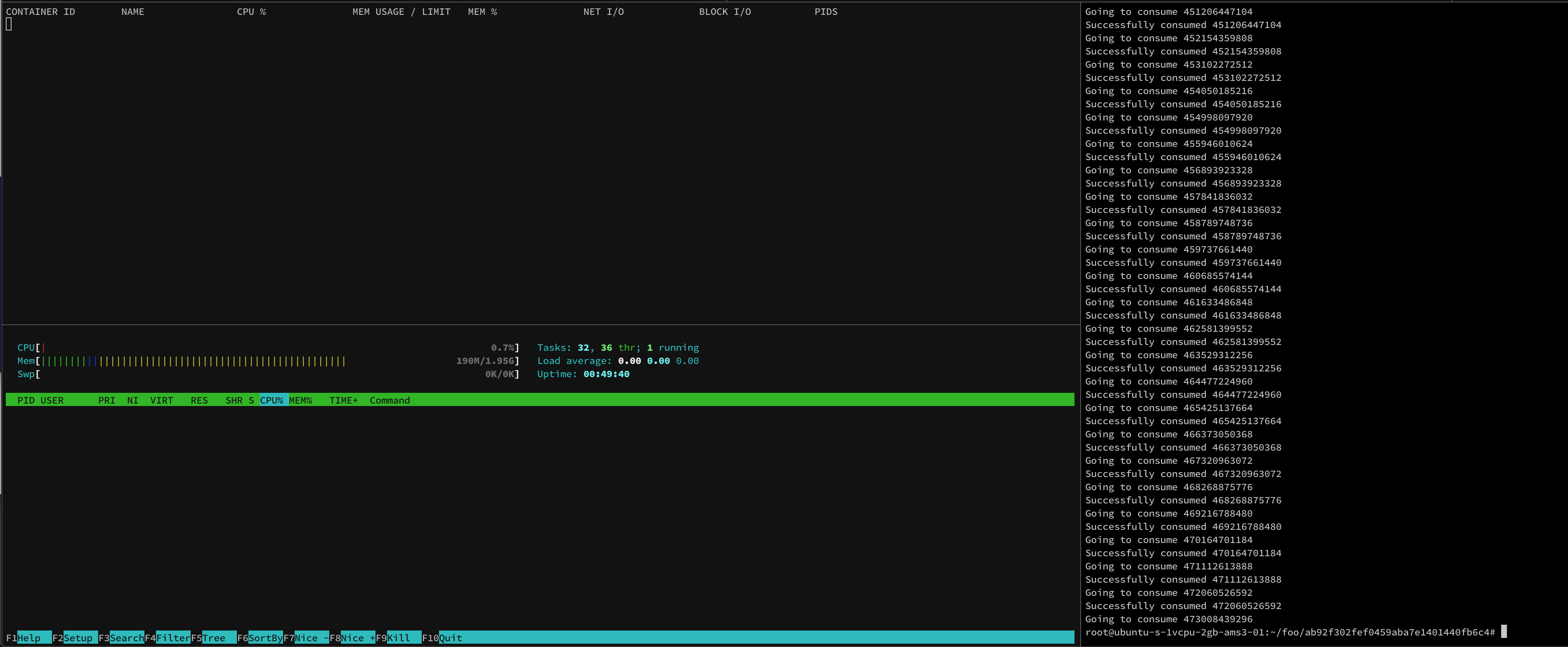
Here's a screenshot while the test is running:

Notice here that, while the container reserved 435G (see the VIRT column), the actual use is less than 6M
docker run -it --memory "6m" --memory-swap "6m" --name alpine-limits alpine-limits:latest /memeater 500
WARNING: Your kernel does not support swap limit capabilities or the cgroup is not mounted. Memory limited without swap.
...
Going to consume 466373050368
Successfully consumed 466373050368
Going to consume 467320963072
Successfully consumed 467320963072
Going to consume 468268875776
Successfully consumed 468268875776
Going to consume 469216788480
Successfully consumed 469216788480
Going to consume 470164701184
Successfully consumed 470164701184
Going to consume 471112613888
Successfully consumed 471112613888
Going to consume 472060526592
Successfully consumed 472060526592
Going to consume 473008439296
Once the container reached its limit, the kernel killed the process, and docker marked the container as OOM Killed
docker ps -a
CONTAINER ID        IMAGE                  COMMAND             CREATED             STATUS                        PORTS               NAMES
e2cb885db533        alpine-limits:latest   "/memeater 500"     8 minutes ago       Exited (137) 13 seconds ago                       alpine-limits

docker inspect --format='{{ json .State}}' alpine-limits | jq .
{
  "Status": "exited",
  "Running": false,
  "Paused": false,
  "Restarting": false,
  "OOMKilled": true,
  "Dead": false,
  "Pid": 0,
  "ExitCode": 137,
  "Error": "",
  "StartedAt": "2020-06-30T19:13:05.62277208Z",
  "FinishedAt": "2020-06-30T19:21:23.734465925Z"
}

Many thanks for the detailed response. From the logs you have shared, your container was able to consume successfully 472060526592 bytes ( 472 GB ) !!! But shouldnt it fail, the moment it crosses 6MB ? Also your setup has 2GB RAM and no swap enabled. Or am I missing something basically here ?
One main difference what I see is, in my system, swap is enabled.
Hello @thaJeztah
My original problem is with 256m. Is this issue relevant with the #41167 ?
Hello @thaJeztah
Upgrading to 20.xx does not solve this problem. Guess this is more related to, https://docs.docker.com/engine/security/rootless/#limiting-resources
When I tried to compile PyTorch in a Docker container with limited memory constraints, my Ubuntu system sometimes will be frozen due to out-of-memory. I suspect that it's due to Docker does not respect the --memory option.