

 docker
Create separate installation page for Raspbian
As reported in https://github.com/moby/moby/issues/40733#issuecomment-615193596, users running Raspbian are currently referred to the Debian page for installation instructions. However, on that page, users are notified that the "install from packages" instructions don't work on Raspbian, and instead should use the convenience script.
While that script is great to have an easy way to install, users may overlook the note and attempt to follow the debian instructions for armhf. The problem is that those instructions appear to work, but Docker might be non-functional (as the packages are not compatible):
I must admit I didn't notice the Raspbian users cannot use this method! notice at https://docs.docker.com/engine/install/debian/. Having said that - the package method does appear to work, so perhaps that warning can be removed?
I've noticed those notes a few times when working on some documentation changes, and was wondering why the instructions wouldn't work. I guess the main reason is that the instructions have debian hard-coded (there's tabs for each architecture, but no separate tabs for debian and raspbian).
I don't have a Raspberry myself, so didn't yet change the docs because I couldn't really test it (lame excuse, I should really get one 😂)
We could either add additional tabs on that page, or (perhaps better) have a separate page for raspbian; doing so would involve;
- copying the
debian.mdfile to araspbian.mdpage- replacing
debianforraspbianand - remove tabs for non-armhf
- replacing
- update
debian.mdto remove instructions forraspbian(possibly add a link to theraspbianpage for people that arrived on the debian page from old reference - updating the "support matrix" on https://docs.docker.com/engine/install/ (source file: https://github.com/docker/docker.github.io/blob/3ad57b1bf36c83c03f6dbbada06529aeb9d94dfc/engine/install/index.md)
- add an entry to the
toc.yamlto include it in the navigation; https://github.com/docker/docker.github.io/blob/3ad57b1bf36c83c03f6dbbada06529aeb9d94dfc/_data/toc.yaml#L1032-L1043

This is great @thaJeztah - thanks for taking the time to raise the ticket.
Reading through the convenience script, it does essentially set up the repositories.
Regarding the two resolutions you suggest, IMHO I'd prefer to avoid duplication of content so would be inclined to take the additional tab approach. I think this would only involve:
- Update the [armhf] tab to read [debian armhf]
- Add a new tab for [raspbian armhf]
One thing I'd anticipate is an arm64 variant for the Raspberry Pi as the RPi3 and RPi4 are both 64bit CPUs, though AFAIK the official OS's don't yet support them as arm64, however I recall community efforts in this area, so it's not far off.
If the builds will be the same between Debian and Raspbian then there's nothing to be done, however if they will differ, then I'd anticipate further steps along these lines:
- Update the [arm64] tab to read [debian arm64]
- Add a new tab for [raspbian arm64]
Slightly separately, I noticed the table on https://docs.docker.com/engine/install/ has fedora links on the raspbian row, rather than pointing at the debian page, which is what I'd expect. I could raise a separate issue for this if necessary.

I'm a bit on the fence on keeping it combined; while I see your point on having duplication, "raspbian", even though close to debian, is a separate distribution. I think having it separately would help discovering those instructions (and would prevent users from possibly applying the wrong instructions)
Slightly separately, I noticed the table on https://docs.docker.com/engine/install/ has fedora links on the raspbian row
Oh! I see I didn't update the links on the checkboxes after adding that line; let me open a PR for that
PR to fix those links is up; https://github.com/docker/docker.github.io/pull/10678
@usha-mandya @StefanScherer WDYT on "separate page" vs "single page" (keeping them combined)?
@thaJeztah I would keep a single page. I think not many changes are needed to make it work, something like this, Raspbian is armhf only, no 64bit variant available, so we would need only one new tab:
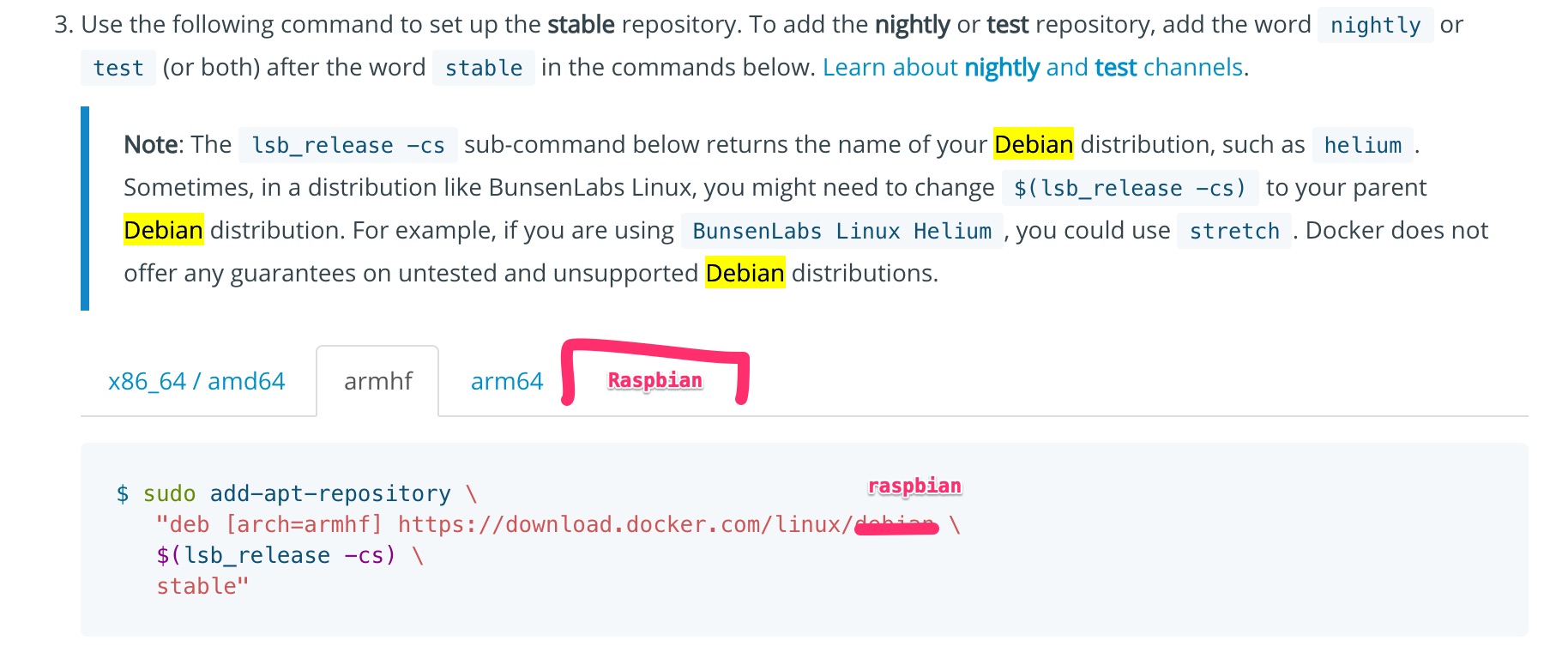

I'd also go for a single page considering the delta between Debian and Raspbian is minor.

Hello @thaJeztah and others,
Sorry to jump in here. I'm trying to install Docker & Docker compose on Raspberry Pi OS to learn how to use it. You write above that although the 'standard' linux install method appears to work it in fact doesn't. Yet the documentation page engine/install/debian.md has conflicting information:

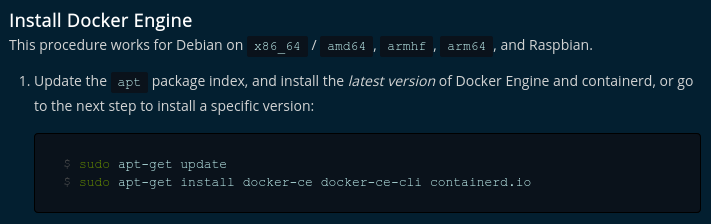
Has the situation perhaps changed since a year ago, when you created this issue? Would you have any insight into which of the two statements in the docs would be correct? (I guess #13925 boils down to the same question.)

Raspberry Pi OS (formerly known as Raspbian) has officially released an arm64 version: https://www.raspberrypi.com/software/operating-systems/#raspberry-pi-os-64-bit
I just followed the instructions for Debian bullseye and had no problems.

Yep, the instructions also worked fine for me on the arm64 version of Raspberry Pi OS.

There hasn't been any activity on this issue for a long time.
If the problem is still relevant, mark the issue as fresh with a /remove-lifecycle stale comment.
If not, this issue will be closed in 14 days. This helps our maintainers focus on the active issues.
Prevent issues from auto-closing with a /lifecycle frozen comment.
/lifecycle stale

Closed issues are locked after 30 days of inactivity. This helps our team focus on active issues.
If you have found a problem that seems similar to this, please open a new issue.
/lifecycle locked