

 docker
every docker commands hangs
Description
Every docker commands hangs, this includes commands such as docker ps docker exec docker version docker foobar docker docker info`
They are few exception such as docker -H foobar which display the usage
Usage:  docker [OPTIONS] COMMAND

A self-sufficient runtime for containers

...
using --tls also produce some output (I have no plan of using it though)
$ docker --tls ps
unable to resolve docker endpoint: open /home/username/.docker/ca.pem: no such file or directory
trying to connect using tcp also produce some output although I do not use it
$ docker -D -H tcp://127.0.0.1 ps
DEBU[0000] FIXME: Got an status-code for which error does not match any expected type!!!: -1  module=api status_code=-1
Cannot connect to the Docker daemon at tcp://127.0.0.1:2375. Is the docker daemon running?
dockerd is currently running
$ sudo systemctl status docker
● docker.service - Docker Application Container Engine
     Loaded: loaded (/lib/systemd/system/docker.service; enabled; vendor preset: enabled)
     Active: activating (start) since Tue 2022-02-22 11:39:49 CET; 16min ago
TriggeredBy: ● docker.socket
       Docs: https://docs.docker.com
   Main PID: 2064 (dockerd)
      Tasks: 174
     Memory: 196.6M
     CGroup: /system.slice/docker.service
             ├─2064 /usr/bin/dockerd -D -H fd:// --containerd=/run/containerd/containerd.sock
             ├─3979 /usr/bin/docker-proxy -proto tcp -host-ip 0.0.0.0 -host-port 8080 -container-ip 172.30.0.2 -container-port 8080
             ├─3989 /usr/bin/docker-proxy -proto tcp -host-ip :: -host-port 8080 -container-ip 172.30.0.2 -container-port 8080
             ├─4039 /usr/bin/docker-proxy -proto tcp -host-ip 0.0.0.0 -host-port 1883 -container-ip 172.29.0.2 -container-port 1883
             ├─4047 /usr/bin/docker-proxy -proto tcp -host-ip :: -host-port 1883 -container-ip 172.29.0.2 -container-port 1883
             ├─4155 /usr/bin/docker-proxy -proto tcp -host-ip 0.0.0.0 -host-port 80 -container-ip 172.30.0.3 -container-port 80
             ├─4162 /usr/bin/docker-proxy -proto tcp -host-ip :: -host-port 80 -container-ip 172.30.0.3 -container-port 80
             ├─4225 /usr/bin/docker-proxy -proto tcp -host-ip 0.0.0.0 -host-port 9113 -container-ip 172.30.0.4 -container-port 9113
             ├─4235 /usr/bin/docker-proxy -proto tcp -host-ip :: -host-port 9113 -container-ip 172.30.0.4 -container-port 9113
             ├─4255 /usr/bin/docker-proxy -proto tcp -host-ip 0.0.0.0 -host-port 6379 -container-ip 192.168.16.4 -container-port 6379
             ├─4268 /usr/bin/docker-proxy -proto tcp -host-ip :: -host-port 6379 -container-ip 192.168.16.4 -container-port 6379
             ├─4631 /usr/bin/docker-proxy -proto tcp -host-ip 0.0.0.0 -host-port 5680 -container-ip 172.27.0.3 -container-port 5678
             ├─4644 /usr/bin/docker-proxy -proto tcp -host-ip :: -host-port 5680 -container-ip 172.27.0.3 -container-port 5678
             ├─4920 /usr/bin/docker-proxy -proto tcp -host-ip 0.0.0.0 -host-port 9726 -container-ip 172.30.0.6 -container-port 9726
             ├─4928 /usr/bin/docker-proxy -proto tcp -host-ip :: -host-port 9726 -container-ip 172.30.0.6 -container-port 9726
             ├─4936 /usr/bin/docker-proxy -proto tcp -host-ip 0.0.0.0 -host-port 5679 -container-ip 172.27.0.4 -container-port 5678
             ├─4950 /usr/bin/docker-proxy -proto tcp -host-ip :: -host-port 5679 -container-ip 172.27.0.4 -container-port 5678
             ├─5266 /usr/bin/docker-proxy -proto tcp -host-ip 0.0.0.0 -host-port 5678 -container-ip 172.27.0.5 -container-port 5678
             └─5282 /usr/bin/docker-proxy -proto tcp -host-ip :: -host-port 5678 -container-ip 172.27.0.5 -container-port 5678
Steps to reproduce the issue:
Describe the results you received:
Minimal output, commands never returning
Describe the results you expected: correct processing of commands, or at least some insight of what might be going wrong
Additional information you deem important (e.g. issue happens only occasionally):
The issue happened on start up, after having pulled multiple images and mounted multiple containers beforehand.
I once completly reinstalled docker-engine to solve the issue but after reinstalling issue happened again.
The issue have been observed to happen randomly on another Ubuntu 20.04 environment.
Output of docker version:
docker version hangs and never return
I installed docker very recently some it is probably docker 20
Output of docker info:
docker version hangs and never return
Additional environment details (AWS, VirtualBox, physical, etc.): Ubuntu 20.04

Update :
I tried to configure dockerd with tcp://127.0.0.1:2375 as host:
/usr/bin/dockerd -D -H tcp://127.0.0.1:2375 --containerd=/run/containerd/containerd.sock
and now the command line docker -D -H tcp://127.0.0.1 ps hangs like the rest of the commands.
So it seems that maybe dockerd is responsible and not docker-cli although it would have been nice to have some logs explaining the problem.
You can use journalctl -xu docker.service to get the daemon logs (or add -nXXX to show the last XXX log entries, e.g. journalctl -n100 -xu docker.service); same for the containerd service journalctl -n100 -xu containerd.service

Ok here are a few updates :
The reason docker was stuck was because daemon docker service was stuck in activation mode, In my above message
Active: activating (start) since Tue 2022-02-22 11:39:49 CET; 16min ago
I managed to get it running by removing /var/run/docker/ and /var/lib/docker
However it still get stuck for some commands.
Here for example docker ps works
user@pop-os ~/ % docker ps
CONTAINER ID   IMAGE                             COMMAND                  CREATED      STATUS       PORTS                                       NAMES
3b4444dd1b61   mdawar/rq-exporter                "python -m rq_export…"   8 days ago   Up 3 hours   0.0.0.0:9726->9726/tcp, :::9726->9726/tcp   my-compose-project-rq-exporter-1
ce612f6252eb   nginx/nginx-prometheus-exporter   "/usr/bin/nginx-prom…"   8 days ago   Up 3 hours   0.0.0.0:9113->9113/tcp, :::9113->9113/tcp   my-compose-project-proxy-exporter-1
corresponding logs :
Mar 03 13:50:43 pop-os dockerd[10158]: time="2022-03-03T13:50:43.744983455+01:00" level=debug msg="Calling HEAD /_ping"
Mar 03 13:50:43 pop-os dockerd[10158]: time="2022-03-03T13:50:43.745263390+01:00" level=debug msg="Calling GET /v1.41/containers/json"
however docker rm hangs forever :
jean@pop-os ~/diagfit % docker rm 3b4444dd1b61
it produces logs though :
Mar 03 13:51:48 pop-os dockerd[10158]: time="2022-03-03T13:51:48.927810592+01:00" level=debug msg="Calling HEAD /_ping"
Mar 03 13:51:48 pop-os dockerd[10158]: time="2022-03-03T13:51:48.929494442+01:00" level=debug msg="Calling DELETE /v1.41/containers/3b4444dd1b61"
none of the two commands produce containerd logs
docker version works though :
Client:
 Version:           20.10.7
 API version:       1.41
 Go version:        go1.13.8
 Git commit:        20.10.7-0ubuntu5~20.04.2
 Built:             Mon Nov  1 00:34:17 2021
 OS/Arch:           linux/amd64
 Context:           default
 Experimental:      true

Server:
 Engine:
  Version:          20.10.7
  API version:      1.41 (minimum version 1.12)
  Go version:       go1.13.8
  Git commit:       20.10.7-0ubuntu5~20.04.2
  Built:            Fri Oct 22 00:45:53 2021
  OS/Arch:          linux/amd64
  Experimental:     false
 containerd:
  Version:          1.5.5-0ubuntu3~20.04.1
  GitCommit:
 runc:
  Version:          1.0.1-0ubuntu2~20.04.1
  GitCommit:
 docker-init:
  Version:          0.19.0
  GitCommit:
Apparently i misscleaned /var/lib/docker/ and /var/run/docker because some devices were busy :
rm: cannot remove /var/lib/docker/subpath/ : Device or resource busy
Once I correctly cleaned by unmounting the corresponding devices, I could properly remove the two folders. after that I was not able to reproduce the error.
I also have the same issue with the latest docker on mac:
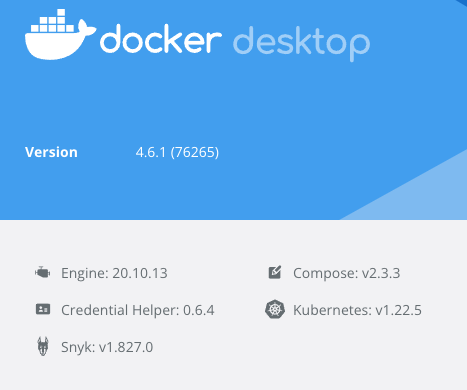
Any command takes >10s to finish.
These are the logs in docker.log which appear when I run docker ps -a until it finishes:
2022-04-06 15:52:35.732007+0200  localhost docker[3359]: (libsystem_info.dylib) Created Activity ID: 0x8bb7c0, Description: Retrieve User by ID
2022-04-06 15:52:35.882571+0200  localhost launchservicesd[129]: [com.apple.launchservices:cas] MESSAGE: reply={result={ApplicationType="UIElement", ChangeCount=537, pid=99605, LSDisplayName="Docker", }, success=true, cacheable=false, } (for client 7728)
2022-04-06 15:52:35.882767+0200  localhost launchservicesd[129]: [com.apple.launchservices:cas] MESSAGE: reply={result={ApplicationType="UIElement", ChangeCount=551, pid=99707, LSDisplayName="Docker Desktop", }, success=true, cacheable=false, } (for client 7728)
2022-04-06 15:52:36.042508+0200  localhost launchservicesd[129]: [com.apple.launchservices:cas] MESSAGE: reply={result={ApplicationType="UIElement", ChangeCount=537, pid=99605, LSDisplayName="Docker", }, success=true, cacheable=false, } (for client 7728)
2022-04-06 15:52:36.042610+0200  localhost launchservicesd[129]: [com.apple.launchservices:cas] MESSAGE: reply={result={ApplicationType="UIElement", ChangeCount=551, pid=99707, LSDisplayName="Docker Desktop", }, success=true, cacheable=false, } (for client 7728)
2022-04-06 15:52:40.298663+0200  localhost com.docker.cli[3362]: (libsystem_info.dylib) Created Activity ID: 0x8bb800, Description: Retrieve User by ID
2022-04-06 15:52:40.313744+0200  localhost com.docker.driver.amd64-linux[99745]: proxy >> HEAD /_ping
2022-04-06 15:52:40.315162+0200  localhost com.docker.driver.amd64-linux[99745]: proxy << HEAD /_ping (1.503975ms)
2022-04-06 15:52:44.858328+0200  localhost com.docker.cli[3364]: (libsystem_info.dylib) Created Activity ID: 0x8bb820, Description: Retrieve User by ID
2022-04-06 15:52:44.874640+0200  localhost com.docker.driver.amd64-linux[99745]: proxy >> HEAD /_ping
2022-04-06 15:52:44.876030+0200  localhost com.docker.driver.amd64-linux[99745]: proxy << HEAD /_ping (1.404968ms)
2022-04-06 15:52:48.634164+0200  localhost launchservicesd[129]: [com.apple.launchservices:cas] MESSAGE: reply={result={CFBundleIdentifier="com.docker.docker", }, success=true, cacheable=false, } (for client 126)
2022-04-06 15:52:48.634465+0200  localhost launchservicesd[129]: [com.apple.launchservices:cas] MESSAGE: reply={result={CFBundleIdentifier="com.electron.dockerdesktop", }, success=true, cacheable=false, } (for client 126)
2022-04-06 15:52:49.414713+0200  localhost com.docker.cli[3366]: (libsystem_info.dylib) Created Activity ID: 0x8bb830, Description: Retrieve User by ID
2022-04-06 15:52:49.429892+0200  localhost com.docker.driver.amd64-linux[99745]: proxy >> HEAD /_ping
2022-04-06 15:52:49.432873+0200  localhost com.docker.driver.amd64-linux[99745]: proxy << HEAD /_ping (2.9896ms)
2022-04-06 15:52:49.433158+0200  localhost com.docker.driver.amd64-linux[99745]: proxy >> GET /v1.41/containers/json?all=1
2022-04-06 15:52:49.434665+0200  localhost com.docker.backend[99607]: (ca50c6d6) dd98a27b-BackendAPI S<-C Go-http-client/1.1 GET /forwards/list
2022-04-06 15:52:49.434962+0200  localhost com.docker.backend[99607]: (ca50c6d6) dd98a27b-BackendAPI S->C Go-http-client/1.1 GET /forwards/list (392.034µs): []
2022-04-06 15:52:49.435135+0200  localhost com.docker.driver.amd64-linux[99745]: proxy << GET /v1.41/containers/json?all=1 (1.979219ms)
2022-04-06 15:52:49.438325+0200  localhost com.docker.backend[99607]: (9e9c99f2) 8a7f0d74-CLIAPI S<-C Go-http-client/1.1 POST /usage
2022-04-06 15:52:49.438486+0200  localhost com.docker.backend[99607]: (9e9c99f2) 8a7f0d74-CLIAPI S<-C Go-http-client/1.1 bind: {"command":"ps","context":"moby","source":"cli","status":"success"}
2022-04-06 15:52:49.438576+0200  localhost com.docker.backend[99607]: (9e9c99f2-1) af26d766-BackendCMD C->S SwiftAPI POST /usage/cli: {"command":"ps","context":"moby","source":"cli","status":"success"}
2022-04-06 15:52:49.452987+0200  localhost com.docker.backend[99607]: (9e9c99f2-1) af26d766-BackendCMD C<-S 00b7c85c-SwiftAPI POST /usage/cli (14.404611ms): OK
2022-04-06 15:52:49.453084+0200  localhost com.docker.backend[99607]: (9e9c99f2) 8a7f0d74-CLIAPI S->C Go-http-client/1.1 POST /usage (14.789158ms): OK

In my case I found a solution, which was adding 127.0.0.1 localunixsocket to my /etc/hosts. There are other hostname suggestions in this other issue: https://github.com/docker/compose/issues/3419
After adding that line all my docker cli commands became fast again.
Edit: After 2 hours the problem is back. I've tried disconnecting from WiFi and docker command was fast again. After reconnecting to wifi the issue was gone, but it will probably be back again at some point I guess.
Hi, with the following docker version:
Client: Docker Engine - Community Version: 19.03.13 API version: 1.40 Go version: go1.13.15 Git commit: 4484c46 Built: Wed Sep 16 17:03:40 2020 OS/Arch: linux/arm64 Experimental: false
Server: Docker Engine - Community Engine: Version: 19.03.13 API version: 1.40 (minimum version 1.12) Go version: go1.13.15 Git commit: 4484c46 Built: Wed Sep 16 17:02:11 2020 OS/Arch: linux/arm64 Experimental: false containerd: Version: 1.3.7 GitCommit: 8fba4e9a7d01810a393d5d25a3621dc101981175 runc: Version: 1.0.0-rc10 GitCommit: dc9208a3303feef5b3839f4323d9beb36df0a9dd docker-init: Version: 0.18.0 GitCommit: fec3683
and Ubuntu 20.04.
I'm in a condition where docker ps, docker version, docker status hangup as commands.
Running strace on docker version I have this output on while waiting:
..
futex(0x40003d0bc8, FUTEX_WAKE_PRIVATE, 1) = 1
futex(0x40003d0bc8, FUTEX_WAKE_PRIVATE, 1) = 1
socket(AF_UNIX, SOCK_STREAM|SOCK_CLOEXEC|SOCK_NONBLOCK, 0) = 3
setsockopt(3, SOL_SOCKET, SO_BROADCAST, [1], 4) = 0
connect(3, {sa_family=AF_UNIX, sun_path="/var/run/docker.sock"}, 23) = 0
epoll_ctl(4, EPOLL_CTL_ADD, 3, {EPOLLIN|EPOLLOUT|EPOLLRDHUP|EPOLLET, {u32=4097254504, u64=281474778997864}}) = 0
getsockname(3, {sa_family=AF_UNIX}, [112->2]) = 0
getpeername(3, {sa_family=AF_UNIX, sun_path="/run/docker.sock"}, [112->19]) = 0
futex(0x40004404c8, FUTEX_WAKE_PRIVATE, 1) = 1
write(3, "HEAD /_ping HTTP/1.1\r\nHost: docker\r\nUser-Agent: Docker-Client/19.03.13 (linux)\r\n\r\n", 82) = 82
futex(0x4000098148, FUTEX_WAKE_PRIVATE, 1) = 1
futex(0xaaaaae29b348, FUTEX_WAIT_PRIVATE, 0, NULL) = 0
futex(0xaaaaae29b348, FUTEX_WAIT_PRIVATE, 0, NULL) = 0
futex(0xaaaaae29b348, FUTEX_WAIT_PRIVATE, 0, NULL) = 0
futex(0xaaaaae29b348, FUTEX_WAIT_PRIVATE, 0, NULL) = 0
futex(0xaaaaae29b348, FUTEX_WAIT_PRIVATE, 0, NULL) = 0
futex(0xaaaaae29b348, FUTEX_WAIT_PRIVATE, 0, NULL) = 0
futex(0xaaaaae29b348, FUTEX_WAIT_PRIVATE, 0, NULL) = 0
futex(0xaaaaae29b348, FUTEX_WAIT_PRIVATE, 0, NULL) = 0
futex(0xaaaaae29b348, FUTEX_WAIT_PRIVATE, 0, NULL) = 0
futex(0xaaaaae29b348, FUTEX_WAIT_PRIVATE, 0, NULL) = 0
futex(0xaaaaae29b348, FUTEX_WAIT_PRIVATE, 0, NULL) = 0
futex(0xaaaaae29b348, FUTEX_WAIT_PRIVATE, 0, NULL) = 0
futex(0xaaaaae29b348, FUTEX_WAIT_PRIVATE, 0, NULL) = 0
Restarting docker.service solves the issue but we need to avoid it to go into that status.
Any idea?


This issue has been collecting multiple issues (different cases, versions, etc). We suggest closing this issue and please re-open new ones, for each specific case, in https://github.com/moby/moby.
Additionally, make sure that your kernel is up to date. We've seen issues where a kernel bug is impacting commands. More info at https://github.com/moby/moby/issues/44763#issuecomment-1385745970.
