
Dnn.Platform
 Dnn.Platform copied to clipboard
 dnnsoftware
Add OAuth 2.0 token-based support for sending emails
Description of problem
As reported here: https://dnncommunity.org/forums/aft/3003 MS is ending support for basic authentication see:
In September 2021, we announced that effective October 1, 2022, we will begin disabling Basic authentication for Outlook, EWS, RPS, POP, IMAP, and EAS protocols in Exchange Online. SMTP Auth will also be disabled if it is not being used. See full announcement: Basic Authentication and Exchange Online – September 2021 Update.
This will mean that sending emails from DNN using an Office 365 / Exchange / Outlook account would no longer be possible.
Description of solution
To be discussed..
Description of alternatives considered

Google will also stop allowing SMTP https://support.google.com/accounts/answer/6010255?hl=en#:~:text=To%20help%20keep%20your%20account,only%20your%20username%20and%20password.

More info: https://techcommunity.microsoft.com/t5/exchange-team-blog/announcing-oauth-2-0-client-credentials-flow-support-for-pop-and/ba-p/3562963
I wish I had more time to delve into this and assist. Please look at how Duplicati deals with this - see https://www.duplicati.com/articles/OAuth/ There is a service to handle OAuth - https://duplicati-oauth-handler.appspot.com/

Tomorrow is the planned day for Exchange Online
But deadline was extended, Oct 1 2022 MS will disable support with an option to enable it back manually by tenant admin.
It will be finally disabled in Jan 2023 -- this is the final deadline.
https://techcommunity.microsoft.com/t5/exchange-team-blog/basic-authentication-deprecation-in-exchange-online-september/ba-p/3609437

@mitchelsellers @WillStrohl @david-poindexter @donker @valadas Sorry for the Github Spam.. First of all, I logged because a community member pointed me to the possible implications of this issue, not because it's an issue for us. I would like to know if this is somehow on the Radar as not being able to send emails from office 365 in the near future sounds like a serious dealbreaker for a lot of DNN users.
This one is most likely a large change for DNN.
I'm not aware of anyone actively working on this at the moment. The usage of third party delivery services such as MailGun or SendGrid offer some work arounds.
Using a traditional email account for delivery presents its own special situations for sure.

@dnnsoftware/approvers Does anyone have an idea of how this would work contextually with an OAuth flow from the persona bar?
We'd need some way for the SMTP provider to have its own settings screen (either plugging into what's there or redirect to a separate page). Typically it would open the 3rd party site in a popup and then have an endpoint setup to handle the 3rd party redirect and record the token. I'm assuming this would be a long-lived token, not something that needs to happen on a regular basis.

Honestly, should we support connecting directly to something like O365 for relaying email? This isn't really a best practice. You lack all of the tooling to know if email is consistently being sent, reviewing any exceptions, etc. We should be encouraging people to use an actual SMTP service, right?

IMO it depends on the size of the user base and the number of emails being sent out. Some sites just send out a couple of administrative mails per year.

@WillStrohl Well I think we might have quite a lot of Users that use an office 365 email account and if it does work with other email providers and not with the MS service that's going to be difficult to explain to the non tech / nerd user IMO.
We have detected this issue has not had any activity during the last 90 days. That could mean this issue is no longer relevant and/or nobody has found the necessary time to address the issue. We are trying to keep the list of open issues limited to those issues that are relevant to the majority and to close the ones that have become 'stale' (inactive). If no further activity is detected within the next 14 days, the issue will be closed automatically. If new comments are are posted and/or a solution (pull request) is submitted for review that references this issue, the issue will not be closed. Closed issues can be reopened at any time in the future. Please remember those participating in this open source project are volunteers trying to help others and creating a better DNN Platform for all. Thank you for your continued involvement and contributions!
![stale[bot] avatar](https://avatars.githubusercontent.com/in/1724?v=4 "Published by a pub.dev verified publisher")
https://github.com/dnnsoftware/Dnn.Platform/pull/5460 was submitted to support this scenario but unfortunately we don't have any testable implementation. Would be nice if we can resolve that last part.

It is a must-have feature. Many email providers are moving to OAUTH 2.0... In office 365 the alternative is to set a SMTP Connector, but as you certainly know, it could lead to delivery issues (the email sent using a connector could be considered as spam).

@fablaser 2 implementations were submitted after my previous message and the Pull Request was merged.
The documentation to setup for Microsoft is in the https://github.com/jstedfast/MailKit/blob/master/ExchangeOAuth2.md
I was able to get to the authentication part but then could not send emails. My Microsoft account is all whacked though. If you want to give 9.13.0 a try, it is currently in RC (Release Candidate) stage but unless any big issue comes up we are doing the official release tonight...
@fablaser 2 implementations were submitted after my previous message and the Pull Request was merged.
The documentation to setup for Microsoft is in the https://github.com/jstedfast/MailKit/blob/master/ExchangeOAuth2.md
I was able to get to the authentication part but then could not send emails. My Microsoft account is all whacked though. If you want to give 9.13.0 a try, it is currently in RC (Release Candidate) stage but unless any big issue comes up we are doing the official release tonight...
Thank you, I have some question about oauth implementation in DNN. In the past, I wrote some .NET apps that supports oauth2.0 in both "delegated" and "Application" permissions .
Using Application permissions, you need to set: TenantID, ClientID and Secret. In this case, no need to "authorize" Using Delegated permissions, you only need to set TenantiID and ClientID. In this case application needs to "authorize".
In DNN I see that, when I set TenantID, ClientID and Secret, authorize button is shown and it asks for admin password. This sounds strange to me... what is the permission implemented in DNN? Delegated or Application?
Thanks
This sounds strange to me... what is the permission implemented in DNN? Delegated or Application?
I believe it's Application permission based on the Microsoft documentation I've read and the code that @zyhfish wrote. I have been trying for weeks in both the RC and now in the release version of 9.13 to send an email without success. I've flipped a thousand switches, and I still can't make it work.
I've used the following as the primary guideline: https://learn.microsoft.com/en-us/exchange/client-developer/legacy-protocols/how-to-authenticate-an-imap-pop-smtp-application-by-using-oauth.
If anyone has been successful in getting this to work, I am desperate for assistance. I'm working for a brand-new client, and I can't release the application (nor invoice them) until this is resolved.

@dowdian I am working to try and get some input from @zyhfish as sadly I cannot test this with my O365 client due to permissions issues that limit policies
For what it's worth, I use services specializing in sending emails for all my sites. Something like sendgrid.
@valadas I looked into SendGrid actually. Is that something I can set up on my Azure account to send emails through my clients O365 Exchange instance? I gave up trying to get that set up because the folks managing the client's Exchange instance had difficulty setting up the account with Twilio. Twilio sales won't talk to me because the estimated email volume of the application is too low by a factor of 200.
Also, if it's of any use, the failure is happening at line 142 of ExchangeOnlineOAuthProvider.cs.
smtpClient.Authenticate(username, accessToken);
Yes sendgrid is pretty easy to setup, it is a proxy for sending emails out (could be marketing platform but can actu also just as a proxy). You set it up for the "from" address you will be using. You can verify just that address by replying to their email and then you can use plain smtp configuration and your api key is your password.
Now if you need to send emails "from" multiple people from a certain domain, you may want to do a domain verification instead of an email address verification. This will require you to enter some dns entries for verification of ownership of that domain but then you can send from any inbox on that domain.
If you need some help, join us on discord here https://discord.gg/USQSR3KA and ping me up danielvaladas I'll be glad to help you, this is like 10 minutes to setup...
That sounds like the solution I’ve been searching for! I’ll reach out to you on Discord tomorrow. Thank you!!!
Michael Dowd Sent from my phone
From: Daniel Valadas @.> Sent: Thursday, October 5, 2023 10:01:57 PM To: dnnsoftware/Dnn.Platform @.> Cc: Michael Dowd @.>; Mention @.> Subject: Re: [dnnsoftware/Dnn.Platform] Add OAuth 2.0 token-based support for sending emails (Issue #5139)
Yes sendgrid is pretty easy to setup, it is a proxy for sending emails out (could be marketing platform but can actu also just as a proxy). You set it up for the "from" address you will be using. You can verify just that address by replying to their email and then you can use plain smtp configuration and your api key is your password.
Now if you need to send emails "from" multiple people from a certain domain, you may want to do a domain verification instead of an email address verification. This will require you to enter some dns entries for verification of ownership of that domain but then you can send from any inbox on that domain.
If you need some help, join us on discord here https://discord.gg/USQSR3KA and ping me up danielvaladas I'll be glad to help you, this is like 10 minutes to setup...
— Reply to this email directly, view it on GitHubhttps://github.com/dnnsoftware/Dnn.Platform/issues/5139#issuecomment-1749481178, or unsubscribehttps://github.com/notifications/unsubscribe-auth/ADHYAC32K5WYF5NCSGIXMDTX5372LAVCNFSM5ZIT6AO2U5DIOJSWCZC7NNSXTN2JONZXKZKDN5WW2ZLOOQ5TCNZUHE2DQMJRG44A. You are receiving this because you were mentioned.Message ID: @.***>

In the DNN v.9.13 OAuth option, I entered the Auth provider as Exchange Online along with the Tenant ID, Client ID, and Client Secret. Upon clicking the Authorize button, it redirected me to the Outlook login page. After completing the 2FA, I encountered the error message "Original exception: AADSTS700025: Client is public so neither 'client_assertion' nor 'client_secret' should be presented."
I believe the issue doesn't lie with the IDs, keys, or application registration settings, as I am successfully using them in my own code to send emails. Since the only option available to me is to use the Office 365, I would appreciate any assistance. Thanks.

In the DNN v.9.13 OAuth option, I entered the Auth provider as Exchange Online along with the Tenant ID, Client ID, and Client Secret. Upon clicking the Authorize button, it redirected me to the Outlook login page. After completing the 2FA, I encountered the error message "Original exception: AADSTS700025: Client is public so neither 'client_assertion' nor 'client_secret' should be presented."
I believe the issue doesn't lie with the IDs, keys, or application registration settings, as I am successfully using them in my own code to send emails. Since the only option available to me is to use the Office 365, I would appreciate any assistance. Thanks.
Did you configured web authentication url? You need to set https://YOURDOMAIN/Providers/SmtpOAuthProviders/ExchangeOnline/Authorize.aspx URL.
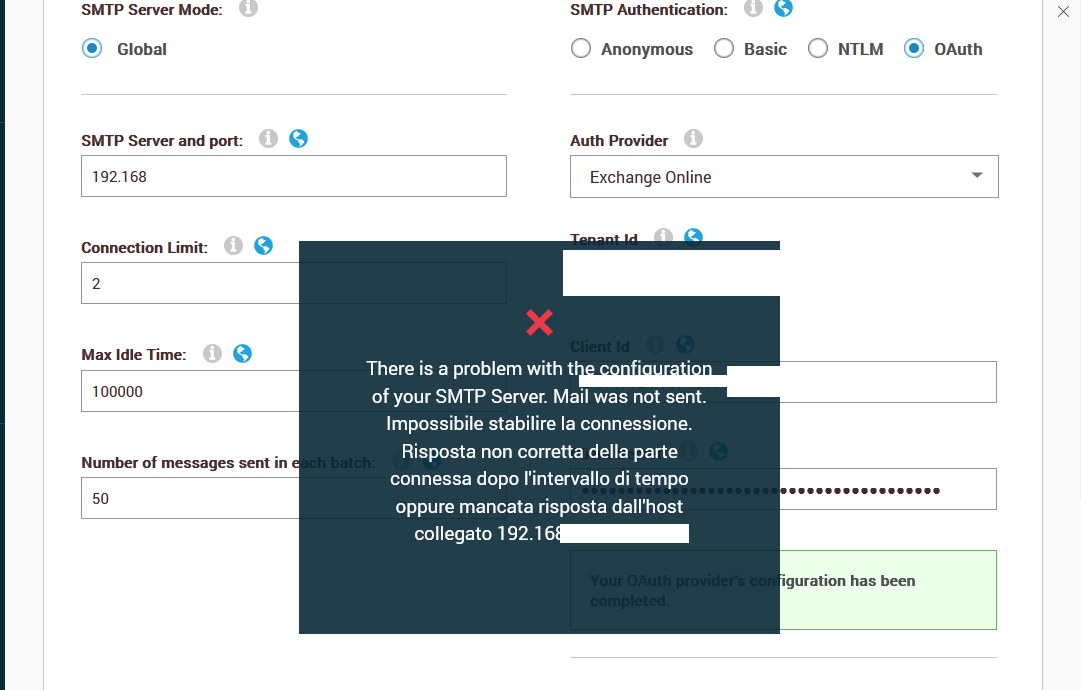
In my case I can successfully authenticate, but I cannot send emails: it continue using SMTP address:
In the DNN v.9.13 OAuth option, I entered the Auth provider as Exchange Online along with the Tenant ID, Client ID, and Client Secret. Upon clicking the Authorize button, it redirected me to the Outlook login page. After completing the 2FA, I encountered the error message "Original exception: AADSTS700025: Client is public so neither 'client_assertion' nor 'client_secret' should be presented." I believe the issue doesn't lie with the IDs, keys, or application registration settings, as I am successfully using them in my own code to send emails. Since the only option available to me is to use the Office 365, I would appreciate any assistance. Thanks.
Did you configured web authentication url? You need to set https://YOURDOMAIN/Providers/SmtpOAuthProviders/ExchangeOnline/Authorize.aspx URL.
In my case I can successfully authenticate, but I cannot send emails: it continue using SMTP address:
Yes, I did add the redirect URL. Before adding the URL, the error was" The redirect URL https://YOURDOMAIN/Providers/SmtpOAuthProviders/ExchangeOnline/Authorize.aspx specified in the request does not match the redirect URLs configured for the application <Client ID>. I am using the application permissions. Thanks.