

 dnnsoftware
DNN Editbar (when open) will affect custom webforms modules
Description of bug
When you are in edit mode, with the bottom editbar open, it will wrap your modules in a updatepanel even if you DON'T have enabled "Supports partial rendering" in its module settings.
I first discovered this issue 4 days ago trying to make a simple module that have asp:FileUpload feature and it always returned false in the HasFiles property.
I know that UpdatePanel (aka Ajax/partial rendering support) wont work with fileUpload but the problem goes beyond that. (Btw I solved this specific custom upload module using the Dnn:FilePickerUploader)
One day later, In another module, I just needed a simple Listview with an SQLDataSource to List, Insert, Update and Delete some database records. No uploads in this case. The insert was working ok. The list also fine. But when you try to update or delete the row will be blank after the (partial) postback and the database won't be touched.
My first concern is that it was something related to 2sxc, because I've previously done some similar custom modules in the beginning of this site months ago, then in December I installed 2sxc, used it for some pages, and I only had to do similar custom modules again now.
But now I confirmed that this behavior is happening in the Dnn.Platform\Dnn.AdminExperience\EditBar\Dnn.EditBar.UI\Controllers\ContentEditorManager.cs in the CreateChildControls override (base in System.Web.UI.Control):

Steps to reproduce
- Create a simple ascx module with an SqlDataSource and a Listview (or Gridview, any databound module)
- With the Editbar open, try to use your custom module to list, insert, edit or delete some records
- Confirm that at least Edit (update) and Delete won't work
Alternatively, I created a simple module to demonstrate this behavior, and I'm attaching it here: Simple Module_1.0.0_Install.zip
It's a really SIMPLE module (no dll's, no hidden code. Just a simple ascx with a datasource and a listview (CRUD) to edit the DNN "Urls" table (that is normally empty).
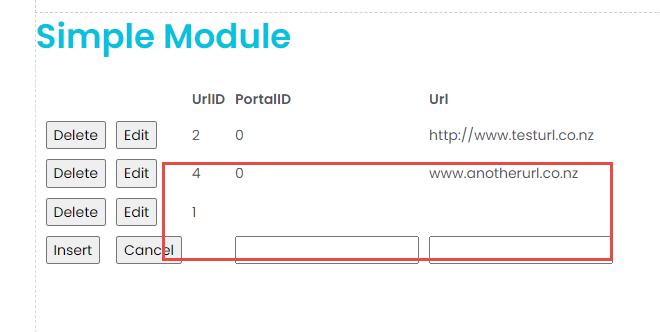
To test you first create a record, just put 0 in the PortalId column and some Url in the Url table. It works fine. THEN you gonna try Edit this newly inserted record. In my tests it wont work.
Current behavior
Editbar will affect some functionalities of custom modules.
Expected behavior
Editbar should not affect custom modules. Even if the Updatepanel for edit mode is by design, and JUST in this case is expected to affect modules that have an upload feature,.... BUT it SHOULD NOT affect simple CRUD webforms modules. BTW, these same CRUD modules WILL WORK with UpdatePanel if you enable it on the module extension settings but have the Editbar closed. So someway this Editbar's UpdatePanel wrapping isn't doing the same that happen when you enable partial rendering support on the module extension settings.
Screenshots
Screencast: https://drive.google.com/file/d/1Ox1KhEUckZj81NdLZ7OuZSWWM4C86gG4/view?usp=sharing
Error information
No errors appear on Admin logs, the row being edited just disappear when you try to update it but if you refresh the page it's back there:
Additional context
When I thought it was an 2sxc issue I created this issue ( https://github.com/2sic/2sxc/issues/2668 ) on their repository, but today I discovered it's not 2sxc fault.
Affected version
- [x] 09.10.02
- [x] 09.10.02
- [x] 09.06.02
Affected browser
not browser related
- [x] any

More insight:

I guess this behavior exists since 2017 (or even before) when "DnnAjaxPanel" was replaced by "UpdatePanel".
I don't know if before this change it would work. I must check which DNN version was back then to install and test it.
Commit message: hash: 8444eb89d4a562151d7ca79d58ae176a8c931dc9 Author: Ben [email protected] 8/march/2017 03:44 Parent: 59109586 CONTENT-7959: use update panel.
There were also another related commit that got reverted:
0fad98cc91371f71fe312992112ff7616ea00d74 Mohtshum [email protected] 03/01/2018 10:17:21 +00:00 DNN-10523: Webform postback in Edit mode loosing viewstate of the GridView
3fd4d97af758476142216aa33332d6892999b738 Mohtshum [email protected] 03/01/2018 10:21:58 +00:00 Revert "DNN-10523: Webform postback in Edit mode loosing viewstate of the GridView"
Thanks for the deep dive into this one. It looks to me like the reverted commit you posted is probably the main culprit, that you're losing ViewState because of the timing of adding this wrapping UpdatePanel. But, as you post originally, modules that have opted out of partial updates may be broken in general because of being wrapped in an UpdatePanel, so this behavior seems like a problem even if the ViewState issue is addressed. The UpdatePanels are wrapping the pane in this scenario, rather than individual modules, so it's not as simple as just disabling it for modules that don't support partial updates. I'm not sure what behavior we are using these UpdatePanels for (any @dnnsoftware/approvers know more than me?), I would guess it has to do with drag-and-drop of modules or something like that. It seems to me that whatever behavior it is, the right answer is to move that behavior more directly to the client-side, and not use UpdatePanels. But that's potentially a bigger effort, so open to other options anyone else can come up with.

I was wondering if the update panel was only inserted at the top of the container, where you have the option to edit the module instance title (when your container supports it) but I don't know if it's feasible because the way containers work (it's made to wrap your module anyway). What surprises me is 1) how we've never seen this issue before and more importantly 2) why update panel only breaks part of the listView operations... List works (ok, it's not a postback), Insert works (and it IS a postback), but DELETE and EDIT(update) are not! What the heck! I'm glad I found a workaround (just close the edit bar) but it still got me thinking!
I think the issue has to do with losing (i.e. having invalid) ViewState. An insert doesn't rely on the state of the control, but edit and delete need to know which items have already been data-bound so that the control can find which one to edit or delete.
If it is only for editing the module title, then it seems like this behavior should be part of the title control, rather than wrapping the whole pane.
I think the issue has to do with losing (i.e. having invalid) ViewState. An insert doesn't rely on the state of the control, but edit and delete need to know which items have already been data-bound so that the control can find which one to edit or delete.
Makes sense