

 dnfield
SVG anti-aliasing options guidance?
So I'm building for Android TV / Google TV where screens are physically large, but resolutions can be quite low. As a result I have noticed many of my SVG images are missing any anti-aliasing and so have the saw-tooth pixelated edges look. There seems to be no clear option in flutter_svg to enable anti-aliasing.
The flutter_svg package does support DrawablePaint class which provides an isAntiAlias property, but it is immutable.
Is there any guidance/recommendations on how to use this? I realise this would be costly, but if I must choose between grainy looking UI vs. cost, then that is a cost I want to incur.

UPDATE: I did find in SvgPicture the clipBehavior property and set to Clip.antiAlias instead of the default Clip.hardEdge and there was no difference. I then moved it up to Clip.antiAliasWithSaveLayer and still no difference.
generally speaking, everything that flutter draws is already anti aliased. Do you have some examples of SVGs that look aliased or perhaps some screenshots of the particular artifacts you are seeing?

I ran into a similar issue. I did some tests to narrow it down, here's the file I ended up with:
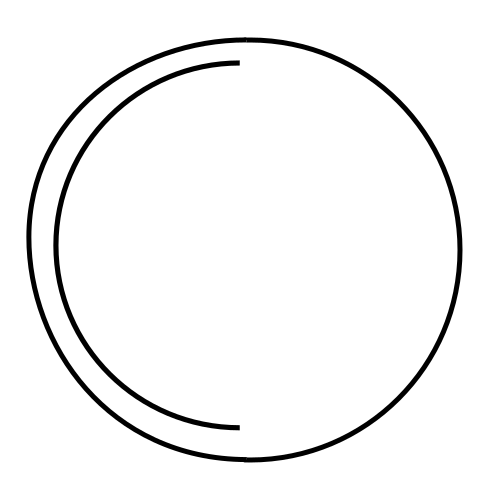 The left half of the outer circle is a curve with a border, which renders nicely.
The right half is a real circle, which also renders nicely.
Inside is a curve in the shape of a border, but which is filled, not using a border. Visually, it's roughly of the same thickness as the borders, but it doesn't render as nicely. It still receives some anti-aliasing, but it looks worse, and there's a noticeable gap:
The left half of the outer circle is a curve with a border, which renders nicely.
The right half is a real circle, which also renders nicely.
Inside is a curve in the shape of a border, but which is filled, not using a border. Visually, it's roughly of the same thickness as the borders, but it doesn't render as nicely. It still receives some anti-aliasing, but it looks worse, and there's a noticeable gap:
 So there appears to be an issue rendering slim shapes, but maybe that's just "doing it wrong"...
