
flutter_svg

flutter_svg copied to clipboard
 dnfield
Image is not displaying properly
I have the image icon_list.svg
icon_list.svg
<svg xmlns="http://www.w3.org/2000/svg" width="27" height="19" viewBox="0 0 27 19">
  <g id="Icon_feather-list" data-name="Icon feather-list" transform="translate(-3 -7.5)">
    <path id="Path_1384" data-name="Path 1384" d="M12,9H31.5" transform="translate(-3)" fill="none" stroke="#d1d1d1" stroke-linecap="round" stroke-linejoin="round" stroke-width="3"/>
    <path id="Path_1385" data-name="Path 1385" d="M12,18H31.5" transform="translate(-3 -1)" fill="none" stroke="#d1d1d1" stroke-linecap="round" stroke-linejoin="round" stroke-width="3"/>
    <path id="Path_1386" data-name="Path 1386" d="M12,27H31.5" transform="translate(-3 -2)" fill="none" stroke="#d1d1d1" stroke-linecap="round" stroke-linejoin="round" stroke-width="3"/>
    <path id="Path_1387" data-name="Path 1387" d="M4.5,9h0" fill="none" stroke="#d1d1d1" stroke-linecap="round" stroke-linejoin="round" stroke-width="3"/>
    <path id="Path_1388" data-name="Path 1388" d="M4.5,18h0" transform="translate(0 -1)" fill="none" stroke="#d1d1d1" stroke-linecap="round" stroke-linejoin="round" stroke-width="3"/>
    <path id="Path_1389" data-name="Path 1389" d="M4.5,27h0" transform="translate(0 -2)" fill="none" stroke="#d1d1d1" stroke-linecap="round" stroke-linejoin="round" stroke-width="3"/>
  </g>
</svg>
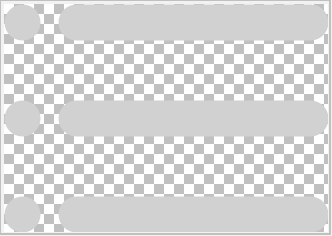
But the code displays only the lines. It is not displaying the circles in the image.
Code Sample
import 'package:flutter/material.dart';
import 'package:flutter_svg/flutter_svg.dart';

void main() {
  runApp(MyApp());
}

class MyApp extends StatelessWidget {
  // This widget is the root of your application.
  @override
  Widget build(BuildContext context) {
    return MaterialApp(
      title: 'Flutter Demo',
      theme: ThemeData(
        primarySwatch: Colors.blue,
      ),
      home: MyHomePage(title: 'Flutter Demo Home Page'),
    );
  }
}

class MyHomePage extends StatefulWidget {
  MyHomePage({Key key, this.title}) : super(key: key);

  final String title;

  @override
  _MyHomePageState createState() => _MyHomePageState();
}

class _MyHomePageState extends State<MyHomePage> {
  @override
  Widget build(BuildContext context) {
    return Scaffold(
      appBar: AppBar(
        title: Text(widget.title),
      ),
      body: Padding(
        padding: const EdgeInsets.all(10.0),
        child: Column(
          children: [
            SvgPicture.asset(
              "assets/icon_list.svg",
              color: Colors.black,
            ),
          ],
        ),
      ),
    );
  }
}


I'm not quite sure why the browser does what it does here. The horizontal line is 0 pixels.

As a workaround, even changing those paths to have h.0001 makes the circles show up.
Per the spec, that value should be the number of pixels to draw a horizontal line. It looks like Chrome interprets that as hairline, whereas this package interprets it as 0. I'd be curious what other renderers do.