

 dmitry-s93
MSI GE63 RAIDER RGB 8RE
Hello, I'm making this message to add proper support for my laptop, which is, as the title says, an MSI GE63 RAIDER RGB 8RE.
There are no proper guidelines to follow yet for making device requests, so I'm gonna try and follow what people generally show you.
Laptop Details :
- Laptop : MSI GE63 RAIDER RGB 8RE
- EC Version : 16P5EMS1.111
- EC Build : 05/20/2019 09:44:24
- Windows + Arch Linux
- MControlCenter 0.3.0 (installed via custom PKGBUILD from https://github.com/dmitry-s93/MControlCenter/pull/43)
Test details :
- Battery charge : :heavy_check_mark: (Is it normal that it's off by +1% though ?)

- CPU Temps : :heavy_check_mark: All correct.
- Fan speeds : :x: First is incorrect.
- Cooler Boost : :heavy_check_mark: Works !
- Modes : :x: Greyed out. Feature available in Dragon Center on my Windows installation.
- Battery settings : :x: Greyed out. In comparison, isw seems to support that feature on my laptop.
- Keyboard backlit : :question: Greyed out. I'm not sure about this setting. My keyboard is one made by SteelSeries, so maybe it's normal for it to be greyed out. However, for the sake of comparison, I'd like to confirm that msi-perkeyrgb works properly with my laptop.
- USB RGB lighting : :x: Completely missing.
- FN / Super : :x: Doesn't work at all.
- WebCam : :heavy_check_mark: Works !
- USB Power Share : :question: Greyed out. Not sure my model has this feature.
EC Dump : I'm not sure my current EC dump is "clean" after messing around with MControlCenter, if you see what I mean. As such, I think it's better for me to give you this one instead from a few months ago : https://github.com/JordanViknar/isw-ge63-8re/issues/1 If you wish to, you can still ask me for my current EC dump though.

If you wish to, you can still ask me for my current EC dump though.
I'm gonna be unable to access my MSI laptop for a few days, so I think it's better that I do it now, in case you DO need it.
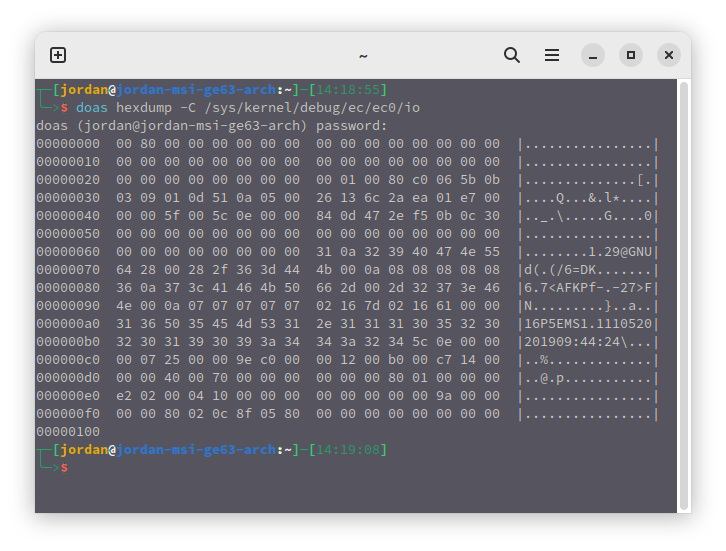

- Battery settings : x Greyed out. In comparison, isw seems to support that feature on my laptop.
What battery mode is enabled on your laptop? At address 0xEF value 00.
- Battery settings : x Greyed out. In comparison, isw seems to support that feature on my laptop.
What battery mode is enabled on your laptop? At address 0xEF value 00.
(By the way, I'm back home, so I have access to my laptop again.)
I never (intentionally) changed the battery settings. They're supposed to be at the default "charge until it's 100%, don't charge again until it's under 90%" behavior, and my laptop seems right now to be indeed respecting this. You can compare with https://github.com/JordanViknar/isw-ge63-8re/issues/1 I guess, to be certain.
I don't know if that's the case for every MSI laptop in general, but there's no settings for the battery in Dragon Center on Windows. I only said "seems" because isw was properly detecting that no battery tweaks were applied.
there's no settings for the battery in Dragon Center on Windows
This function is not provided by the manufacturer for this model?
You need to try changing the charge limit and see if it works or not. In MControlCenter the function is disabled because the value is not between 128 and 228 (dec). Default is 128 - always charge up to 100%.
there's no settings for the battery in Dragon Center on Windows
This function is not provided by the manufacturer for this model?
You need to try changing the charge limit and see if it works or not. In MControlCenter the function is disabled because the value is not between 128 and 228 (dec). Default is 128 - always charge up to 100%.
Used isw to change the threshold...
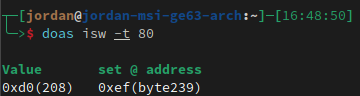
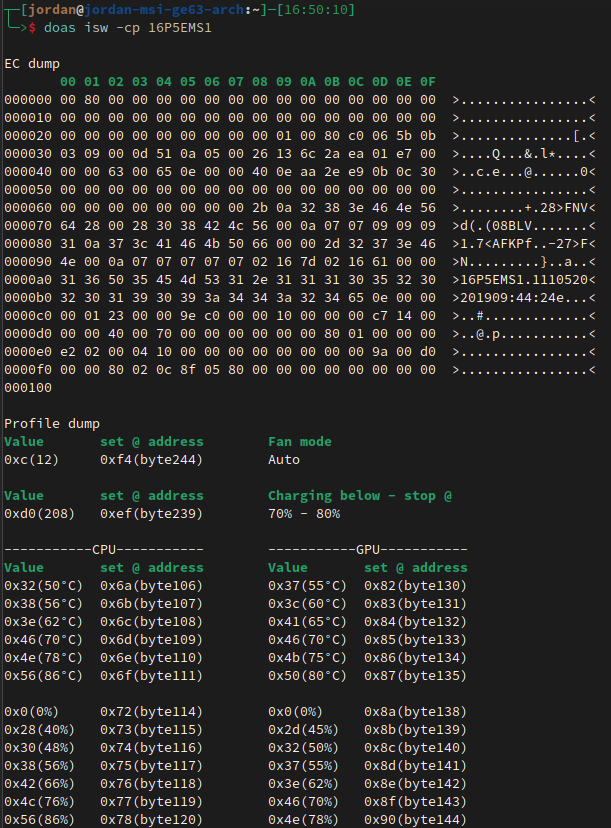
which now gives me this EC dump :
MControlCenter now properly allows me to access battery settings.
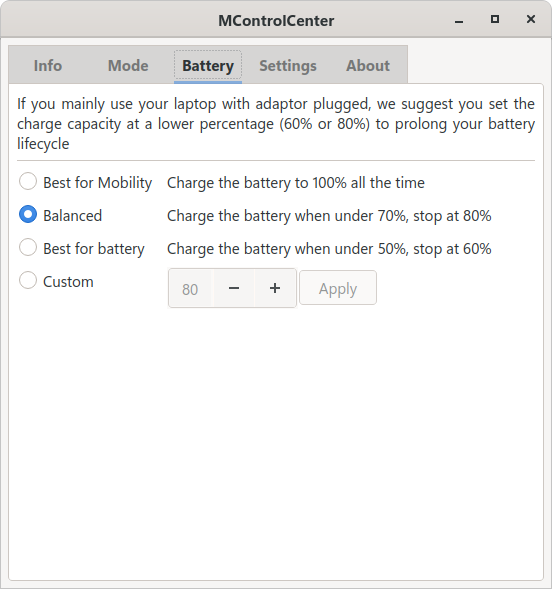
I will check if the setting properly works. If it does, I'm guessing MControlCenter should account for laptops that have 0 as default value.
I will check if the setting properly works.
If the battery charge setting works correctly, then I will add this feature. Please let me know when there is a result.
I will check if the setting properly works.
If the battery charge setting works correctly, then I will add this feature. Please let me know when there is a result.
Nope, the laptop completely ignored the setting, and did the usual "charge until 100% when it's under 90%".
Sorry for thinking isw allowed my laptop to use this feature. I guess it's just not compatible.
Following the 0.3.1 update, the charge level and the fan speeds are now correct, but the FN / Super swapping still does not work.
but the FN / Super swapping still does not work
Does FN/Super swapping work on Windows?
but the FN / Super swapping still does not work
Does FN/Super swapping work on Windows?
I last tried a really long time ago on Windows, but I do remember it working properly, as expected, from Dragon Center.
I last tried a really long time ago on Windows, but I do remember it working properly, as expected, from Dragon Center.
Can you do EC register monitoring when toggling this setting under Windows?
I last tried a really long time ago on Windows, but I do remember it working properly, as expected, from Dragon Center.
Can you do EC register monitoring when toggling this setting under Windows?
I'll try to remember to do that, next time I boot on Windows.
I last tried a really long time ago on Windows, but I do remember it working properly, as expected, from Dragon Center.
Can you do EC register monitoring when toggling this setting under Windows?
Turns out "next time I boot on Windows" is becoming a very long time, so I'll just do it now.
FN / Super switching on my laptop :
Enabled = Value 10 at Address 0xBF Disabled = Value 00 at Address 0xBF
Gonna manually change the EC on Linux and see if this works.
FN / Super switching on my laptop :
Enabled = Value 10 at Address 0xBF Disabled = Value 00 at Address 0xBF
Gonna manually change the EC on Linux and see if this works.
No effect on Linux.