
fish
 fish copied to clipboard
 dmi3
dmi3
Fish config with awesome flexible prompt, unicode symbols, better fzf integration and lot of handy functions.
Fish Shell Goodies
_install.fish
 _____ _     _
|   __|_|___| |_
|   __| |_ -|   |
|__|  |_|___|_|_|
Fish config with awesome flexible prompt, unicode symbols, better fzf integration and lot of handy functions.
- Lots of functions/ideas are easily portable to Bash/Zsh/your preffered shell
-
- Feel free to explore!
- This readme automatically generated from comments in scripts
- Please notify me if you notice any errors
- Works nice with my Kitty shell config and useful script collection
Instalation
git clone [email protected]:dmi3/fish.git- Install configs:
- All: run
./_install.fish⚠ this will remove~/.config/fish! Backup before running - Some: source files you are interested in your
~/.config/fish/config.fish
- All: run
- Install fzf or run
fish -c update-fzf
aliases.fish
Useful aliases
- We also have Bash version, and portable Over-SSH version
- Create missing directories in path when calling
mkdir pathcommand to print full file pathrmmcommand to remove directories, but ask nicelycppcommand to copy directories, but ask nicelycpto ask when overwriting filesmvto ask when overwriting filesadd-to-pathCommand to add current directory to path- Human readable sizes for
df,du,free(i.e. Mb, Gb etc) fscommand to show free space on physical drivesdiskscommand to List disks- Clearly shows which disks are mounted temporary
- I always run this command before
ddsd-card, to make 100% sure not to override system partition
partitionscommand to list partitionssizeofcommand to show size of file or directoryconnectcommand Connect to wifi from terminallockblockcommand to prevent screen locking untill next rebootwgetto save file with provided nameunsetto unset enviroment variable- Prepend
sudotonanocommand if file is not editable by current user- Warn if file does no exist
- If Sublime Text installed - use it instead of Gedit
- Show 3 (next and prev) months in
cal, start week on monday- Use nicl in installed
- If sssh2 installed - use it instead of ssh
- If plug installed - use it for interactive mount/unmount of USB drives
icatShow images in kittyll"Scroll ll if theres more files that fit on screen"mkcd"Create and cd to directory"amount"Mount archive"aumount"Unmount all mounted archive (and gvfs locations)"copy"Copy pipe or argument"copypath"Copy full file path"color"Print color"reset_windows"Reset all windows size and bring it to main monitor. Useful if DE messes up in multiple monitor configuration"- `nano
run"Make file executable, then run it"launch"Launch GUI program - hide output and don't close when terminal closes"open"Open file by default application in new process"b"Exec command in bash. Useful when copy-pasting commands with imcompatible syntax to fish "c"Math using Python"subl"Starts Sublime Text. Additionally supports piping (i.e.ls | subl) and urls (i.e.subl http://jenkins/logs)"qr"Prints QR. E.g. super useful when you need to transfer private key to the phone without intermediariescat ~/.ssh/topsecret.pem | qr"
colors.fish
Dark theme. See screenshots.
completions/todo.fish
Decription
Auto generate completion for todo script.
Search script for strings starting with -- and add them
to Fish completion as arguments for todo command
config.fish
Entry point that includes all other configs
developer.fish
Functions useful for developers
ccatCat file, but with syntax highlightinggit-show-unpushed-commitsGit show unpushed commitsserver-hereStart serving files in current directory and open browsergit-revert-file"Revert single file in git"git-wat"Show 5 latest commits"git-recent-branches"Show recentbranches"git-pr"Create PR on Github"gradle"Use ./gradlew if exists"src'Open/edit source of script or function located in $PATH' --wraps whichtd"Add to ~/todo.md list"sdkman"Run sdkman"sdkman-init"Inits sdkman"bak"Copies (backups) file in same folder with .bak extension"
main.fish
Better integration of Fish Shell and fzf
- See Official Fish documentation
- Clear input on
Ctrl+U - Exit on
Escif single command mode enabled - Convinient directory navigation using
Alt+Ctrl+→←↑- History back/forward/go to parent dir
- You can use Fish as file manager!
- Comes handy when you start typing command, then realize wrong dir
- Send terminate on
Ctrl+Shift+Cto freeCtrl+Cfor copy (in terminal settings). See https://developer.run/36 - Prints directory and currently running command in tab title ↓
-
Ctrl+Rshow fzf (fuzzy) history search where you can:- Super advanched analog or
Ctrl+Rin Bash - Execute previos command
- Edit command before execution
- Delete history entry (very useful for no longer actual commands)
-
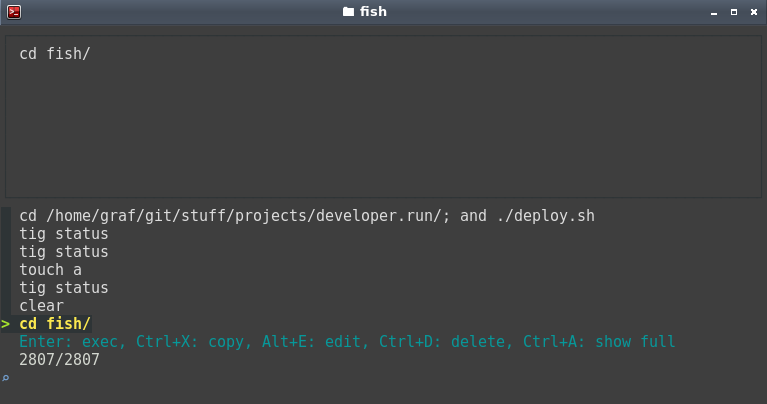
- Super advanched analog or
- Ignore
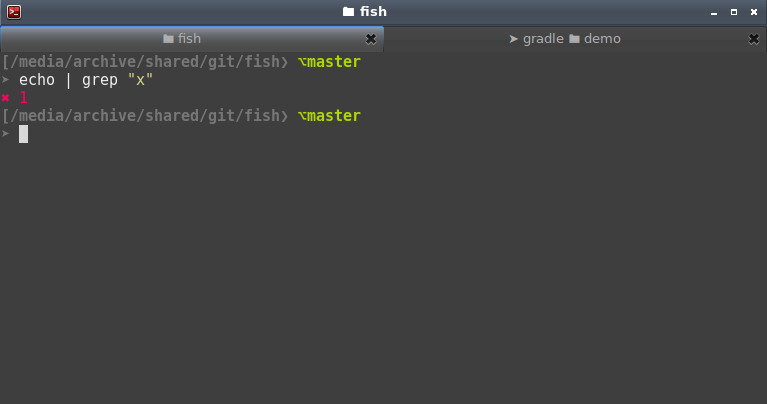
ls,ll, andcdhistory.Ctrl+Eis better way to access previosly visited directories fish_user_key_bindings"Key bindings. Go to functions definition for description. Usefish_key_reader. Docs"fish_title"Prints directory and currently running command in tab title.user@hostin prompt when connected via ssh."fish_greeting"Prints/var/run/motd.dynamicas greeting. Use in combination with headlines.sh to see top news"show_exit_code"Show exit code on command failure" --on-event fish_postexecwhat-did-just-happened"Show start time, and duration of last executed command"save_dir"If command was executed if directory, save dir to Ctrl+E history for quick access." --on-event fish_postexecfzf-history-widget"Ctrl+R for history"search"CTRL+FFuzzy recursive search files by name in current directory & append selection to current command"search-contents"ALT+CTRL+Fsearch (fuzzy) file by contents"scd"Ctrl+Eto access most frequently visited directories."update-fzf"Installs or updates fzf"freq"Line frequency in piped input. See https://gist.github.com/rsvp/1859875"bind_bang"Type!!to get last command"bind_dollar"Type!\$to get last command argument"
prompt.fish
Description
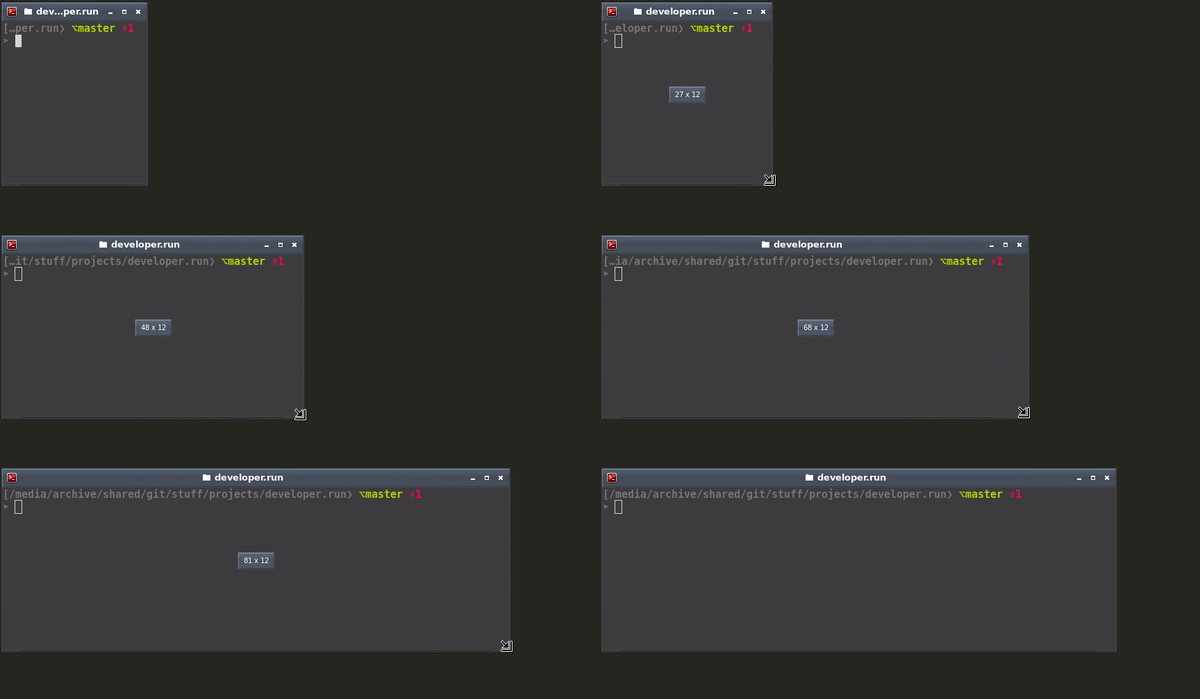
Two line prompt with full path and Git integration that scales nicely
- `fish_prompt
singlecmd.fish
Decription
- Prompts for single Fish command in left bottom corner of given application window
- To make benefit of Fish shell autocompletion and history
- Closes after one command is executed
- If command fails, leaves window to inspect error message
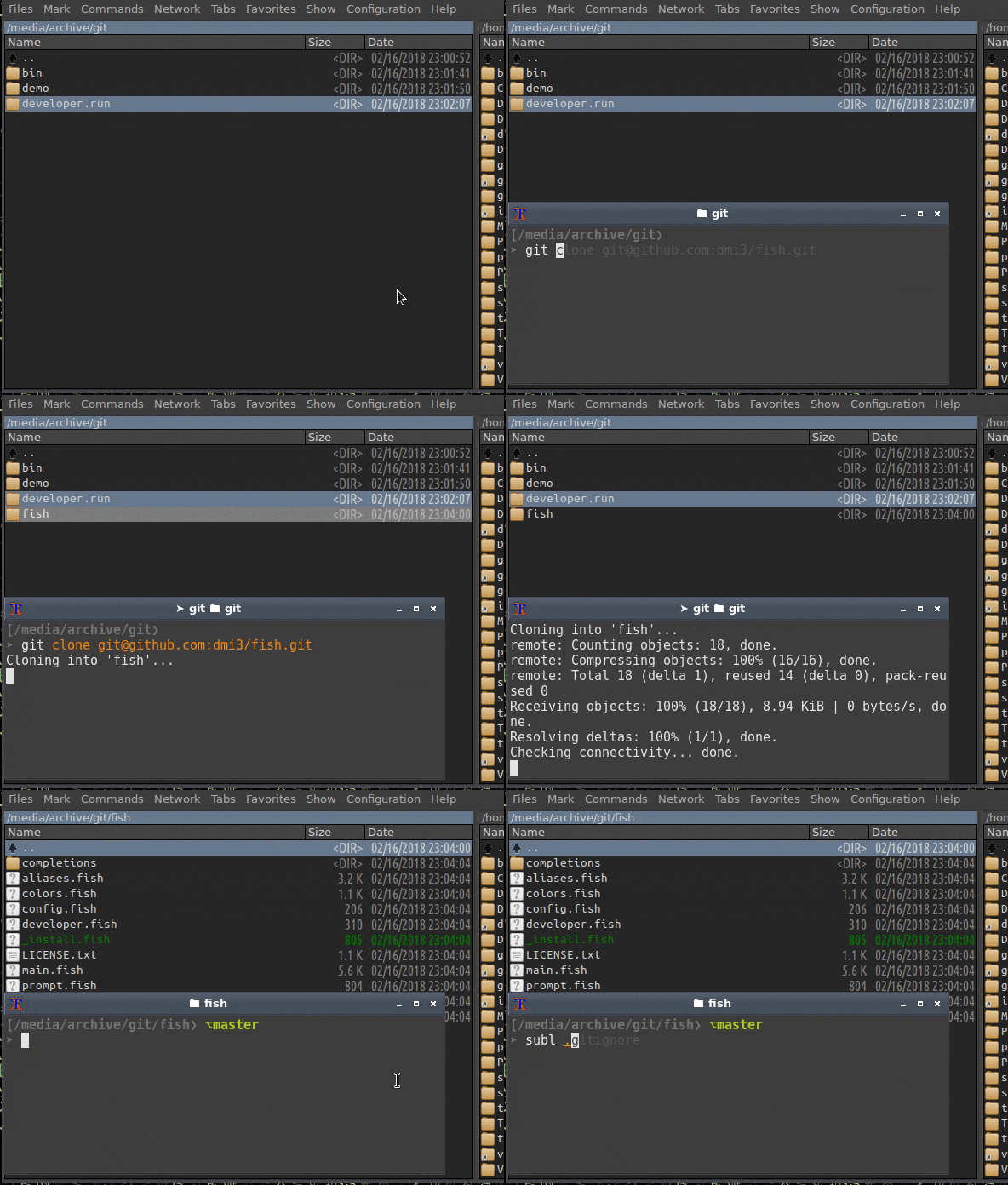
For example you want execute git clone [email protected]:dmi3/bin.git in current directory from Double Commander:
- Press
Shift+F2and terminal window appears in left bottom corner of Double Commander window - First you want
gitandcloneto be autocompleted using Fish - During clone process you want to see
gitcommand output to monitor progeress - If everything is ok, promt will close
- In case of error you will have chance to read error message
Requirements
sudo apt-get install fish wmctrl xterm
Usage
- Use Fish config that supports
ONE_COMMAND - Argument is window title of any app:
singlecmd.fish "Sublime Text"singlecmd.fish "IntelliJ IDEA"- ...
- OR open Double Commander
Toolbar→Insert new button:- Command:
/path/to/singlecmd.fish - Parameters:
"Double Commander" - Hot Key:
Shift+F2
- Command:
web.fish
Calls to various CLI friendly web services
myipShows external iplocalipShows (local) internal ipwhereamiis like whoami but shows your external ip and geolocationxkcdPrint color-adjusted xkcd in your terminal! See https://developer.run/40albumartShow hi-res album art of currently playing song in Spotify- Requires sp
random-name"Random name for registration on random websites. How about Helen Lovick? Roger Rice?"random-alias"Docker-like alias generator:thirsty_mahavira,boring_heisenberg. Don't know how to name file/project/branch/file? Use this!"random-email"Random email for registration on random websites. Generate random email in one of Mailinator subdomains and provide link to check it. Useful when http://bugmenot.com/ is not available."random-password"Generate random password" --argument-names 'length'weather"Show weather"xsh"Prepend this to command to explain its syntax i.e.xsh iptables -vnL --line-numbers"transfer"Upload file to transfer.sh"translate"Translate word using Yandex"syn"Find synonyms for word"emoji"Search emoji by name"waitweb'Wait until web resource is available. Useful when you are waiting for internet to get back, or Spring to start' --argument-names 'url'virustotal"Check file hash by virustotal.com"
 dmi3
dmi3