

 dmarmor
Missing Script on start
I very rarely have this popup on start:
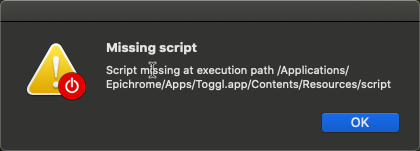
Thought, the app started apparently correctly. No idea if this is important for you to know @dmarmor
[EDIT]
After that i closed the app to edit something in it. This then appeared:

Ideen the app had a size of 500MB.
- I run the scan --> nothing to fix
- Check the activity monitor --> no App running
- Tried to start the app --> A short "jump" in the dock, then nothing
- Try to edit it again: still the same error message ("app running")
- Deleted the Payload dir --> no better
- Recovered from the backup --> app still doesn't start (!!)
- Recovered the payload dir --> not better
- Try to edit --> Worked. Edited something for the app to be rebuild --> Icon disappeared in the finder! Although correct in the edit wizard. --> It started an empty app with that default icon
- Closed. The app still 500MB and no app running in the activity monitor
- Rebooted the mac --> Finally i could edit it again and start it. But now i'm on this app in the same situation as in #290 (so no way to get its icon back)

Something got messed up somehow, but I'm glad at least a reboot seems to have it running again. Was this the app where deleting the Finder icon (in your comment in #290) helped?

@dmarmor the Apps i could fix the icon like described in #290 are the one I sent you in #290 and the one of the problem above (TogglTimer)
Ah maybe this can help: the problem above appeared while starting several epichrome apps "at the same time" (I use an Automator script to start a bunch of apps at a time)