

 dmarmor
2.3.0b2 - Default tabs lost after opening apps
I've had 2.3.0 beta 2 installed on two laptops using the Chromium (not Google Chrome) option. On both machines, my applications have lost their default tabs.
The apps were working fine one day. The next day I opened them, and all apps were missing their tabs. They opened to a default Chromium Google Search tab.
It's almost as if it's a new installation because there are two notices:
- Google API keys are missing. Some functionality of Chromium will be disabled.
- Chromium isn't your default browser [Set as default]
I'm pretty sure I dismissed both of those before.
I'm attaching my zipped app: Asana.zip And here's a Dropbox link to my Application Support files: https://www.dropbox.com/s/l55trpoocmgxdi2/AsanaConfig.zip?dl=0
Here's the Chromium version: Version 79.0.3945.130 (Official Build) (64-bit)
Please let me know if you need additional details. Thanks!

So the problem here has to do with the app engine, which lives in the Engine.noindex folder in the app's config directory (under Library/Application Support/Epichrome/Apps). For some reason, it's not getting deactivated when the app quits as it's supposed to. When the app is not running, what you should see in that Engine.noindex folder are two items, Asana.app, and a folder called Payload. Instead when I unzipped your config there was a Placeholder folder instead. This means that the Asana.app in there is the live engine. Assuming you zipped this up while the app was not running, that means the engine didn't get deactivated.
Now that ordinarily wouldn't be a problem, because when you launch the main app it should detect that, but somehow I think you're launching that engine app directly instead of launching the main app.
So the most important thing to figure out is how it is you're launching the engine instead of the main app. How do you launch this app? Do you have it pinned in the dock, or do you use Spotlight, or some other method?
Once we've figured that out and hopefully gotten it so that it will launch correctly, I'd also like to look into why the engine isn't getting properly deactivated on quitting on your system.

Ok. I had the exact same issue myself. It happened to two of my six epichrome browser apps. At one point I recall seeing an error on restart related to not being able to control some version of a helper app. Maybe that was related based on your comments above?

Based on your comment about launching the engine app instead of the main app I deleted the entries in my dock that were set to auto launch. Then I relaunched the apps in my application folder and magically they worked. So it seems that somehow the dock icons were launching the wrong version of the app. Hmm. Strange. Well it appears we have a workaround, now the question is how did that occur? Any data we can capture for you?
Thanks for looking into this. After creating the app, I chose to “open now” and used “keep in dock.” From then on, I opened them from the dock manually, not open on start up. I’ll try opening from Applications and let you know if that works.
On Feb 5, 2020, 11:55 PM -0500, GrogHills [email protected], wrote:
Based on your comment about launching the engine app instead of the main app I deleted the entries in my dock that were set to auto launch. Then I relaunched the apps in my application folder and magically they worked. So it seems that somehow the dock icons were launching the wrong version of the app. Hmm. Strange. Well it appears we have a workaround, now the question is how did that occur? Any data we can capture for you? — You are receiving this because you authored the thread. Reply to this email directly, view it on GitHub, or unsubscribe.
So yeah, if for whatever reason the helper app doesn't launch properly, or dies unexpectedly, then the app engine doesn't get deactivated, and in that case launching it directly will result in the problem you guys have been seeing. So yes, relaunching from Applications (or wherever you keep your main apps) should always work.
In terms of the dock, choosing "Keep in Dock" should work, as long as the helper app is working properly, because when the engine is deactivated, it's set so that launching it directly actually just redirects to the main app. So if the dock version ever starts displaying this behavior, it should be fixable by quitting, launching from Applications, and then quitting again.
The real problem to figure out here is why the helper app is sometimes failing for you guys. Do either of you happen to know these problems started after a system crash? If the system rebooted unexpectedly, then any apps running at the time would have their engines left activated and you'd see this problem.
If not, and especially if you are frequently seeing that dialog saying Epichrome Helper didn't launch and the engine won't be deactivated, then we need to do some more debugging. If you do ever see that dialog, then when you quit the app, please post or send me the log file for the app before you run it again (the log file gets overwritten on each run). An app's log file can be found at:
~/Library/Application Support/Epichrome/Apps/<AppID>/epichrome_app_log.txt
Thanks!
It happened again on rebooting. I got the following message when I rebooted my computer. Below is the log file you requested.
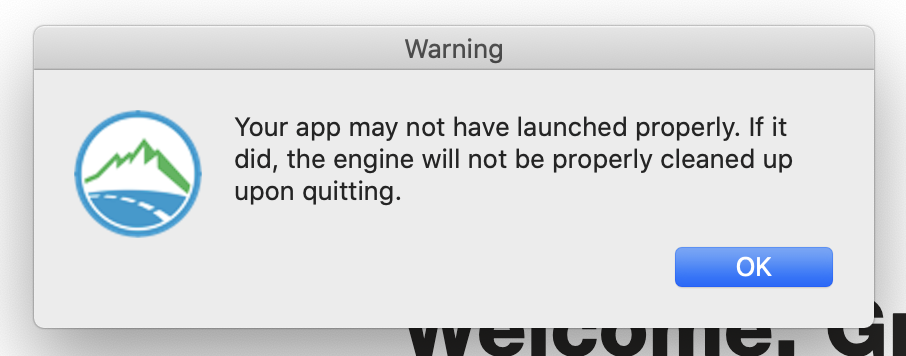
Hi @GrogHills, are you sure you didn't run the app again before capturing this log file? The log shows the app finding a running engine and the cleanup helper launching successfully, which is impossible on a run where it showed that alert....
On a similar note, if not exactly the same, I took an Epichrome app and dragged it from /Applications to my Dock. But when I run it, a second icon shows up in the Dock instead. Is this the "helper" app? This is on 2.3b8 and using the external (Chrome) engine (because I need 1Password and 1PasswordX just frustrates me). Thanks!
(And if you think this should be a separate issue, let me know and I'll raise it as such.)

Hi @GrogHills, I've tried to address the flakiness of Apple's app-launching in beta 9 (up on Patreon in the next day or so), so hopefully this type of error shouldn't happen any more after that.
@peterpk, because of the way Epichrome works, you can't drag an app to the dock if you want it pinned there. You'll get exactly what you described, which is two icons, because the app is actually separate from the app engine. The way to get the dock behavior you want is to run the app you want to live in the dock, and then once it's running, find the icon on the dock, right-click and select Options->Keep in Dock. That should do the trick.
One caveat with that approach: if your system crashes while you have that app open (or in certain other rare cases), the next time you try to launch from the dock, you'll just get a generic browser and not your app. If that happens, just quit, then launch it from the main app once. After that the dock launch should be back to normal.
This has been resolved as best I can in 2.3.0 within the limits of the architecture of Epichrome. It's still possible for the engine to get left in an activated state if the system crashes, or if for some reason the cleanup task doesn't launch successfully, but I've tried to make it as robust as possible. As always, the first solution to try is to launch the main app once (not the engine, which is usually what gets kept in the dock). But if anyone starts experiencing this on every run, despite trying to launch from the main app when it happens, then let me know and we can reopen and look into it again.
Hey @talleux, moving this here to merge with the previous discussions on this issue.
hmmm. i just had the same now (my bloody new MBP 16 like to crash in sleep mode regularly) and starting the app from the /Applications folder didn't help. Even restoring both the folders from /Applications/Epichrome/EpichromeEngines.noindex// and /Users/<USER/Library/Application Support/Epichrome/Apps/ doesn't help. Whichever app i double lick, nothing happens (the windows focus leaves Finder and looks to be nowhere.
In the future, please do not restore anything into the EpichromeEngines.noindex directory. If things are misbehaving, a much better solution is to actually delete the app's subfolder in EpichromeEngines.noindex. If an app finds its engine missing, it will just recreate it, which could fix problems if the engine somehow gets corrupted. You can find an app's engine directory through a symbolic link in its data directory (~/Library/Application Support/Epichrome/Apps/<appID>/Engine).
How can i recover my app?
The question here is whether the main app has become corrupted. If deleting its engine and data directory doesn't help, then the app has somehow become corrupted and probably just needs to be recreated.
Edit: after restarting my mac, i got it to work again - but not straight forward. I will give more infos on that later on.
Please do send more info. I can't quite figure out what's gone wrong with your engines...
Hi @dmarmor my mac crashed again today and all apps that were open at that moment didn't start after rebooting: starting them actually started my default chrome. To clarify: i started the from the dock. To get them into the dock o usually start them via Spotlight (t be correct: mostly using Alfred) and the drag the icon from the running app into the dock place i want (from the right side of the dock to the left part) - this way the dock item links to the app in EpichromeEngines.noindex.
Thanks to your tipp: i even didn't have to delete the app from EpichromeEngines.noindex but just had to start the app direct from the /Applications directory and then they started again. Only the icon had to be fixed.
It was not exactly the same behavior as last time (issue #214). Last time i had to some point this dialog box:

Next time i will to save the log file (~/Library/Application Support/Epichrome/Apps/<AppID>/epichrome_app_log.txt) before restarting the apps

Hi @talleux , sorry this happened. Currently the best solution is the one you did and which appears to have worked.
Did you get that Unable to Run dialog box on 2.3.0 or 2.3.1 or did you get it on one of the betas? In the release I made launching the cleanup process more robust, so hopefully you wouldn't be seeing that commonly (or at all).
@dmarmor i'm on 2.3.1 on all my apps. I got this again yesterday on one app only although - i think - i didn't have a system crash before. I clicked this time on "View Log" - doest this help you?
Yes! I would love to see that log. If you can send me the whole Logs folder that would be ideal. If you don't want to post it here, just message me through Patreon. Thanks!
Hello @dmarmor I had another - disturbing - problem this morning: One of my Apps didn't start. Nothing happened, except that i saw the menu of the app (mac menu on the screen top). This time it didn't help to delete the app folder under "EpichromeEngines.noindex". Starting then the App under /Applications did the same (nothing). Recovering the folder from "Application Support" helped. The problem was there, because i tried again with the original folder from "Application Support", same problem. I used again the version from my backup: it worked again.
I have saved the log file again and i'm trying to send it to you directly but didn't finde a way for that via Patreon (no attachement possible)...
PS: the app was on 2.3.0
2[54994]<AppID>(737)/{open}: The application /Applications/Epichrome/EpichromeEngines.noindex/<USER>/<AppID>/<AppID>.app cannot be opened because its executable is missing. *[54994]<AppID>(737): Error launching app. ![54994]<AppID>(872)/abort(834): Aborting: The app may not have launched properly. If it did, the engine will not be properly cleaned up upon quitting.
Hey @talleux was this meant to go into issue #232? It looks like the same issue.