

 dlrudie
Would like to add a "space" at the end of the text file, while only using Track Format
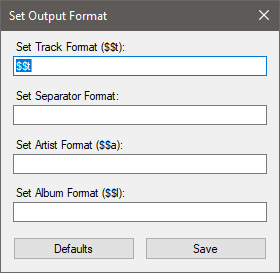 From what I figured, the Separator Format Box only applies when using one of the other three options.... how would I add placeholder text?
Say I wanted to have the text file show
"Song: " In front of every text how might I do this?

Unfortunately I didn't put enough time screwing around with the options, and now I've figured out that the issue is for my "custom" songs that I manually add to iTunes (rather than directly downloaded from iTunes store).
So the issue now is Snip doesn't really output the correct title formatting for the .mp3 files that I've manually added to iTunes
With iTunes the iTunes library itself handles providing the data to Snip.
Snip will get the current playing track:
IITTrack track = this.ItunesApplication.CurrentTrack;
From here I check if the Artist or Track Name fields contain data, and if they do then Snip will use that data to output.
if (!string.IsNullOrEmpty(track.Artist) && !string.IsNullOrEmpty(track.Name) && string.IsNullOrEmpty(this.ItunesApplication.CurrentStreamTitle)) { TextHandler.UpdateText(track.Name, track.Artist, track.Album); }
If the Artist or Track Name fields do not contain data then it will use the "CurrentStreamTitle" provided by iTunes.
TextHandler.UpdateText(this.ItunesApplication.CurrentStreamTitle);
The only reason I can see the output not being how you expect is if the ID3 tags of the imported MP3 file are not correct. If there's some particular songs that exhibit the problem could you take a screenshot of the ID3 tags in the MP3 file and post it here?

Reading back on this if it pulls CurrentStreamTitle the problem with this is that iTunes doesn't know what's what in the MP3. This is usually due to missing/incorrect ID3 tags. When CurrentStreamTitle is used it's literally just one string with no separation as to who the artist is, the song name, etc. Because of this I just output it "as-is" as how it was provided to Snip. This as-is output does not allow formatting simply because it doesn't know what's what.
However, with that being the case, I can probably add some simple support to allow spaces before/after. Just keep in mind you will not be able to split up the track formatting itself though.