

 djlastnight
X axis min and Y axis min together only resulting in Y axis min
As per the title when pressing the keys for X axis min and Y axis min on L stick at the same time to get a diagonal direction are resulting in no L stick output at all into games.
**Once in this state of no L stick output, if either the X or Y axis min is released then the button still being held down will become the L stick output. e.g.: If both are held down, once the x axis min is released the Y axis minimum will register and output. Works either way. But the moment both axis are used simultaneously again zero L stick output is registered.
X axis max and Y axis min works fine as does the other 2 diagonal combinations for the L stick.
**Have edited as I realised today I had reported the problem incorrectly. My apologies about that, hopefully you haven't begun to look into it too far yet.


Strikes me as a little odd given how well this program works, hope it isn't too much to fix. Thanks for your hard work so far in creating this little gem and the fact you are still showing up to support it.
Also I forgot to leave some details for you like version so just confirming I'm on 2.0.0.3. Additionally my splitter_log.txt isn't worth uploading. It only contains loops of Emulation started, successfully unplugged and emulation stopped from the beginning to the end
is this solved Im having the same problem when playing Ashes Cricket 2017 not able to select (Axis X Min & Axis Y Min) (Axis X Min & Axis Y Max) at the same time . Unable to play shots On drive , Hook & Leg glance
please fix this soon Thanks

Nah was never fixed. I deleted the software, bought a controller and forgot this junk.
Hey calm down. I can't seem to replicate your issues. See the screenshots. The app works as it should.


I can't use X-mini and Y-mini at same time(together) in ashes cricket 2017 so I can't play drive shots. Sorry but I'm not good at english so I can't explain more detailed.

I do not own this game. Are you sure the issue is not related to the game itself?
This is not game issue. My friend have this game.plz fix this problem if u can I'm very thankful. My english is not very good sorry for that.☺☺☺
On Jul 27, 2019 5:00 PM, "Ivan Yankov" [email protected] wrote:
I do not own this game. Are you sure the issue is not related to the game itself?
— You are receiving this because you commented. Reply to this email directly, view it on GitHub https://github.com/djlastnight/KeyboardSplitterXbox/issues/12?email_source=notifications&email_token=AMVPALUPOTRENNSQZJKVDDLQBQWTVA5CNFSM4GQQ633KYY3PNVWWK3TUL52HS4DFVREXG43VMVBW63LNMVXHJKTDN5WW2ZLOORPWSZGOD26JX2I#issuecomment-515677161, or mute the thread https://github.com/notifications/unsubscribe-auth/AMVPALU26SWTVHP7ESI4U5DQBQWTVANCNFSM4GQQ633A .
The same problem, it's not working in the game(cricket 19) and with the controller, it's working so please look into the matter and help us out. Thank you

Very Rubbish application .... x-min and y-min are not working together.... I am not able to play specific shots in ashes cricket 17 and this is not a game related issue... please fix this as soon as possible

Wow, thanks for the honest feedback, @cricketlover310!
The app works correctly, so the rubbish is actually your keyboard. Did you ever heard of keyboard ghosting? Try your keyboard here: https://drakeirving.github.io/MultiKeyDisplay/ Try to hold LeftArrow + DownArrow + NumPad4 + NumPad2 Now try A+S+D+W+LeftArrow+RightArrow+DownArrow+UpArrow
So try the following preset and the game will work as it should:
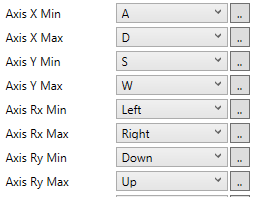
Hi. Thanks for creating this amazing app. I use this app to play Ashes Cricket 19 and I love it. However, like many others, I also face the same problem. I am unable to use the left + right arrow keys simultaneously and missing some important shots in the game. I tried your above fix but it didn't solve the problem. And the issue is also not related to keyboard ghosting either because I used a trial version of reWASD and was able to use the left+right arrow keys simultaneously. I am not a developer but trying to point out the issue hoping someone could solve it.

@vidhan17 please send me your preset and please make sure it is the same as the reWASD one
Thanks for your reply. I am unable to attach the preset file because it is an XML file. Instead, I am providing a google drive link containing both the keyboard splitter and reWASD preset files. Let me know if you have any questions. Thanks again.
https://drive.google.com/drive/folders/1ZIseYC7JUyktY-81TQqu97XpIzYWNFQa?usp=sharing
@vidhan17 please send me your preset and please make sure it is the same as the reWASD one
keyboard splitter works well, excepts the mouse movment and aim, what i would use reWSAD for?

https://store.steampowered.com/app/1028630/Cricket_19/
Here is the demo on steam for cricket 19 @djlastnight

I am expecting a download link for this game, at least for its demo.
Done . I think the issue mentioned is what's happening . X min and y min resulting in y
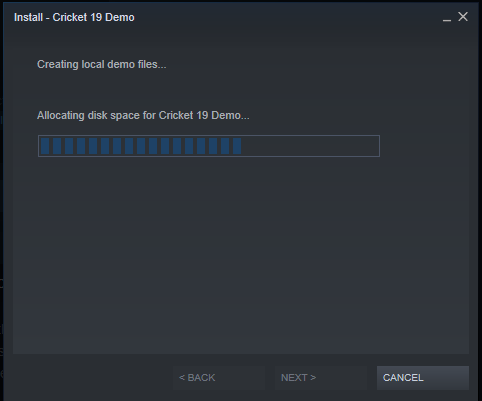
@bukyapavankumar I would need your help. Would you like to see my screen. I can't play this game at all. See your google hangouts when you wake up.
@bukyapavankumar I would need your help. Would you like to see my screen. I can't play this game at all. See your google hangouts when you wake up.
Ya check your hangout
I found a temporary work around for me. I had same issues and I replaced the arrow keys with I,J,K,L keys in keyboard which resolved my problem. Hope this helps someone

I found a temporary work around for me. I had same issues and I replaced the arrow keys with I,J,K,L keys in keyboard which resolved my problem. Hope this helps someone
For me that didn't work too