

 dji-sdk
MSDK build-in simulator module for Mini2
I found the following description in the release notes, but I don't know how to. Is there a document showing how to do this?
Note for DJI Mini 2: 2. Due to hardware limitation, the DA2 simulator cannot be used, please use the MSDK build-in simulator module for debugging.

Agent comment from DJI SDK in Zendesk ticket #58633:
尊敬的开发者,感谢您联系DJI 大疆创新
由于github不是我们主要的咨询渠道,您的问题可能跟进不及时。我们建议您通过填写表单( https://djisdksupport.zendesk.com/hc/zh-cn/requests/new )向我们反馈问题。或者您也可以在论坛发帖,与其它开发者交流。论坛链接:https://djisdksupport.zendesk.com/hc/zh-cn/community/topics
Dear developer, thank you for contacting DJI.
Since github is not our main consultation channel, your questions may not be followed up in time. We recommend that you fill in the form (https://djisdksupport.zendesk.com/hc/en-us/requests/new) to report problems to us. Or you can post in the forum to communicate with other developers. Forum link: https://djisdksupport.zendesk.com/hc/zh-cn/community/topics
°°°

The build-in simulator means simulator module, check this link. Link:https://github.com/dji-sdk/Mobile-SDK-Android/blob/master/Sample%20Code/app/src/main/java/com/dji/sdk/sample/demo/flightcontroller/VirtualStickView.java

@DJI-William Thank you for your reply. I understand the meaning of the simulator.
However, I'm having trouble connecting to Mini2 and I'm stuck on this screen. What should i do? (Of course, the API key has already been added to AndroidManifest.xml.)

com.dji.sdk.sample.internal.view.MainContent: mProduct: null
Have you register app correctly? Could you take a video record show your process? Link:https://pan-sec.djicorp.com/s/HnoSaQ9iSsPqEfx dji123
@DJI-William I record a video and uploaded it. If you can confirm it, please delete the video.
@DJI-William I'm sorry. I didn't understand that I had to simply press "Register APP" after launching the app.
However, the first click does not have enough permissions, so ActivityCompat.requestPermissions() in MainContent.java#checkAndRequestPermissions() is called, but it seems that the process is stopped here.
When I restart the sample app, it passes missingPermission.isEmpty (), so it doesn't seem to cause any problems.
@Lionas The key is correct. But in the video and didn't see you press the Register App so I don't know the error message. Is your Github Sample the latest? Because we just update it end of last week.
The README only state that the APP KEY is needed. But what about the Bundle Identifier??


But solved this by creating an App with the same bundle name as used in the sample app and now the registration succeeds.
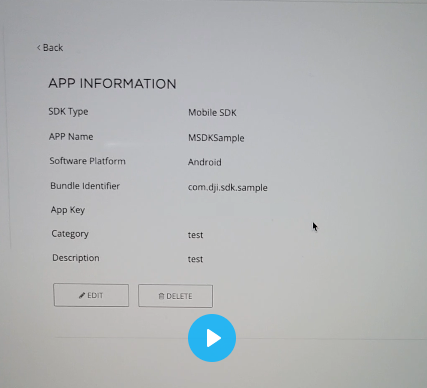 Your bundle identifier is matched with the package name, this is correct. I am not sure if your WIFI is good in signal quality. Maybe change to LTE network and try again.