





David Jones
Great! Thats works. Thanks.  :)
I've implemented expanding menu and Hamburger icon( for mobile that toggles menu visibility) will publish soon if I get enough likes here.
Great. **comment** works nicely! :) How do you use the **debugger** block? Tried it and get : ``` ReferenceError: startDebugger is not defined ``` I guess it is for debugging...
I've written a blog post on the recent updates [here](https://davidjones.sportronics.com.au/softata/Softata-Latest_NetCoreBlockly_Updates-softata.html). The latest version is taking a while to fiulter through so you can find that [here](https://djzblogaccname137.z26.web.core.windows.net/softata/Softata-Latest_NetCoreBlockly_Updates-softata.html)
You could put a note and links on the README.
Using version 8.2024.503.745 OK so have created app with simple function: 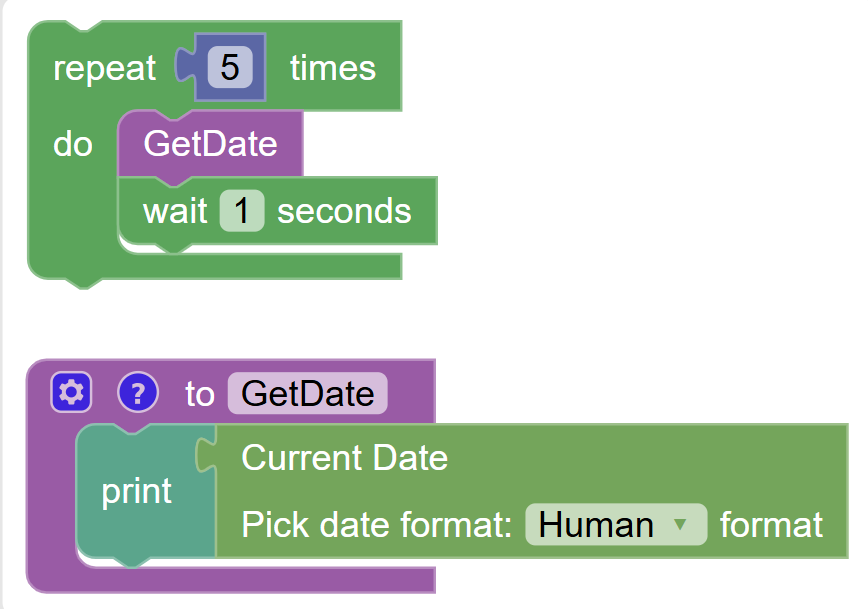 Downloaded that and extracted the function part of it: ```xml ... ... ``` I created a file in...
Thanks that all worked. :) - Using version 8.2024.503.745 - Created folder ``` SoftataWebAPI\wwwroot\BlocklyAutomation\assets\loadAtStartup ``` - Created text file in that folder called: ``` customCategories.txt ``` - Made sure it...
All good now, thanks again. :)
I'll post some images of what I mean. Thx again for your support. PS I tried to email you but it bounced.