

 digraphs
Splash(DotDigraph(D)) doesn't work on windows
gap> D := RandomDigraph(5);
<immutable digraph with 5 vertices, 25 edges>
gap> Splash(DotDigraph(D));
Error, none of the default viewers [ "xpdf", "xdg-open", "open", "evince", "okular", "gv" ] is available, please specify an available viewer in the options record component `viewer`, at /home/samharper/gap-4.11.0/pkg/Digraphs/gap/display.gi:154 called from
<function "Splash">( <arguments> )
 called from read-eval loop at *stdin*:2
type 'quit;' to quit to outer loop
brk> quit;

If you would like to see it, and can't do this on Windows, you can try it online using Jupyter notebooks running on Binder: see https://github.com/gap-system/try-gap-in-jupyter. For example:
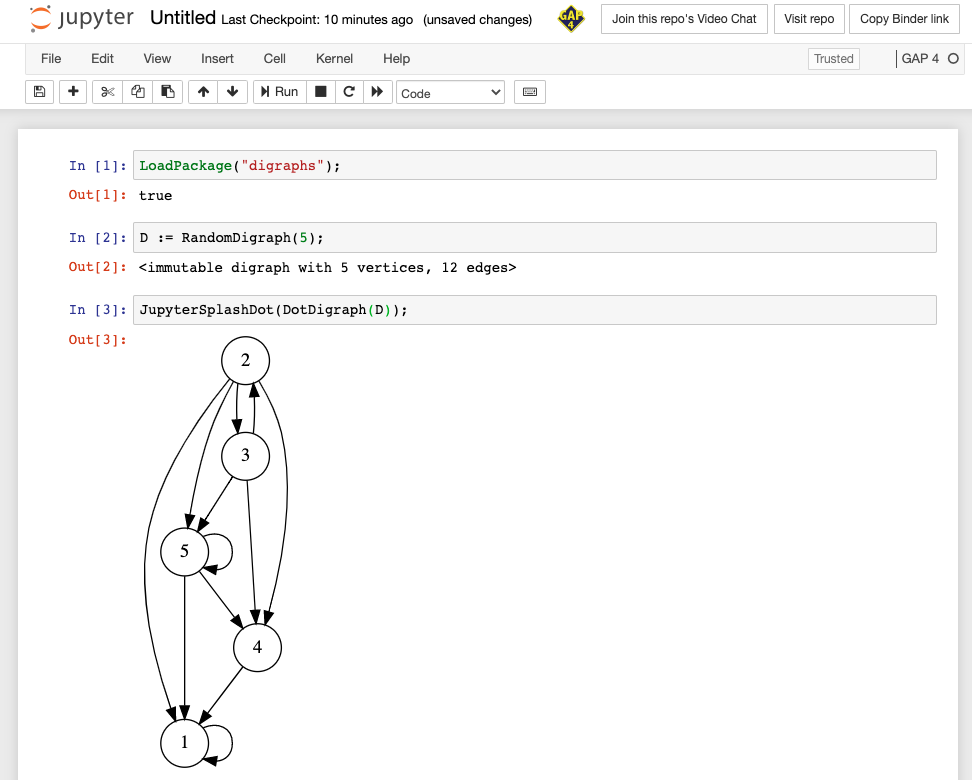
Please be aware that Binder sessions are not persistent, you will have to download results of your calculations and/or images to save them locally.

Great suggestion @alex-konovalov! You don't happen to know what the "correct" viewer name would be for the windows subsystem for linux, do you? Perhaps @ChrisJefferson knows?

So, I'm not aware of a nice single command to do this I'm afraid, as it requires running two command (one to turn the path into a windows path, and a second to then "run" the resulting program).
I use the following tiny shell script, which I call wopen:
#!/usr/bin/env bash

winname=$(wslpath -w "$*")
cmd.exe /C start "$winname"
If you put this somewhere on your path (like as /usr/local/bin/wopen or some such), then using wopen as the viewer works.

![github-actions[bot] avatar](https://avatars.githubusercontent.com/in/15368?v=4 "Published by a pub.dev verified publisher")