

 digital-preservation
Problem with openjdk version "11.0.17" / GUI save or export
Hi
I have tested DROID v6.5.2 with openjdk version "11.0.17". The recognition works as expected.
However, the folder selection display does not work when I save a profile or export the report. There seems to be a problem with the GUI and newer Java versions.
Chlara
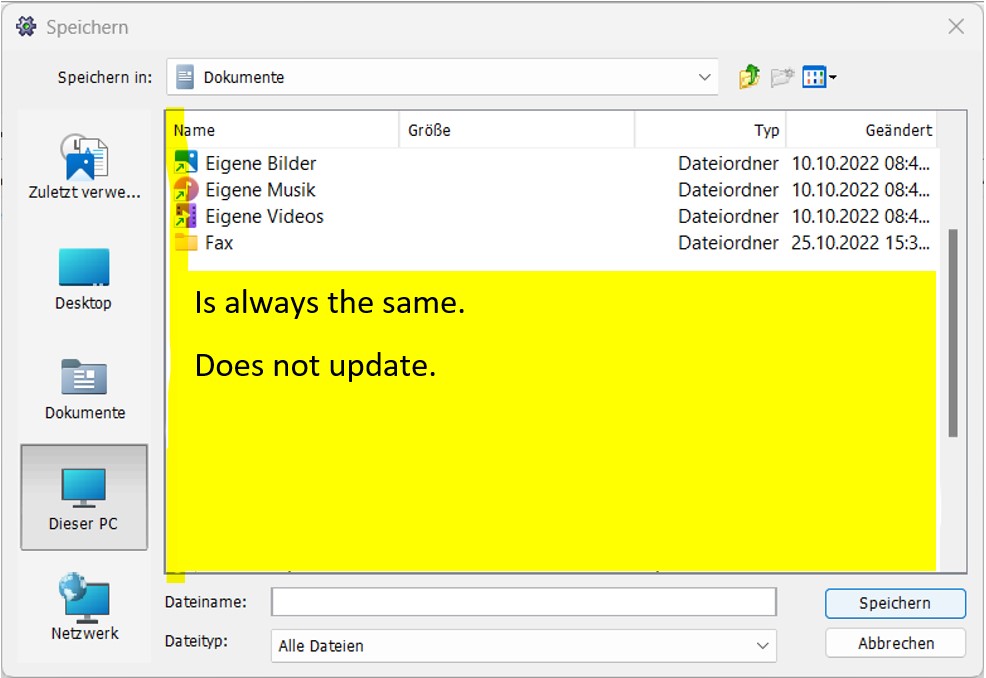

Hi Chlara, Thanks for raising the issue. I'm trying to understand the understand it so I can reproduce it in my test environment with a view to potentially fixing it.
Could you please help us with following information
- Which OS is in use? (Win10 / Win11 or something else)
- Steps to reproduce the issue.
I can see from the screenshot that the folders there are all shortcut folders, Are you suggesting that it does not let you pick any folder other than "Dokumente" in the drop down? Or do you expect it to browse a different folder as soon as the dialog is launched?
If you could please help us with the clarification, we would be able to look into the issue.
Many thanks,
--Saurabh

I've tried DROID 6.5.2 on Windows 10 (64-bit) with OpenJDK 11.0.17+8 and the Report and Profile save dialog boxes seem to work OK for me. It would be great to get some more detail about reproducing this.

https://user-images.githubusercontent.com/1552939/203284772-41f5f3be-bcd9-4eb0-bee9-4e13b4f2770a.mp4
Hi @sparkhi @steve-daly Maybe the video helps to understand my problem. Sorry the cursor is missing but you should see the problem any way. Chlara
Thanks. Do you think this has only started happening in OpenJDK 11.0.7. Is it OK with the 11.0.5 that is bundled with DROID 6.5.2?
it is OK with the bundled AdoptOpenJDK 11.0.7.
but not with bellsoft-jdk or amazonCorretto
Have you tried AdoptOpenJDK 11.0.17? It would be interesting to know whether this is specific to the version of the JDK provider.
i have now testet AdoptOpenJDK 11.0.17 (https://adoptium.net/de/temurin/releases/?version=11) and it does not work.
I have also testet a old Amazon Corretto (amazon-corretto-8.352.08.1-windows-x64-jre) and this works OK like 11.0.5.
With the last test I found, that the problem seems to be a missing refresh. It shows the correct window when you "change the file"... I try to make a new video with AdoptOpenJDK 11.0.17
https://user-images.githubusercontent.com/1552939/203316608-9d306696-d33a-4f12-9586-dba96bc61d0d.mp4
Thanks for this additional information. We can't currently reproduce this, but we're going to try some other machine configurations. Would it be possible for you to try AdoptOpenJDK 11.0.16 and see if the issue is apparent there. That would help us narrow down what change might have caused this. Thanks
I've tried this on a fresh Windows 11 install with DROID 6.5.2 and AdoptOpenJDK 11.0.17+8 and I can't reproduce the issue.
In Googling about this issue, I see a lot of discussion around it occurring with many applications in Win11, in relation to the Quick Access list.
People seem to say that they either found a dead link to a server in their Quick access list, or they followed online instructions for resetting the Quick Access list.
@Chlara Does the dialog box come to life if you press F5 to refresh it?
I have to press F5 for each change I make. But it's OK for me to refresh, when the system can't refresh it by himself.