
react-pdf
 react-pdf copied to clipboard
 diegomura
Error: Cannot find module './zlib_bindings'
hi guys
I have an error with my app it says
Error: Cannot find module './zlib_bindings'
my webpack config
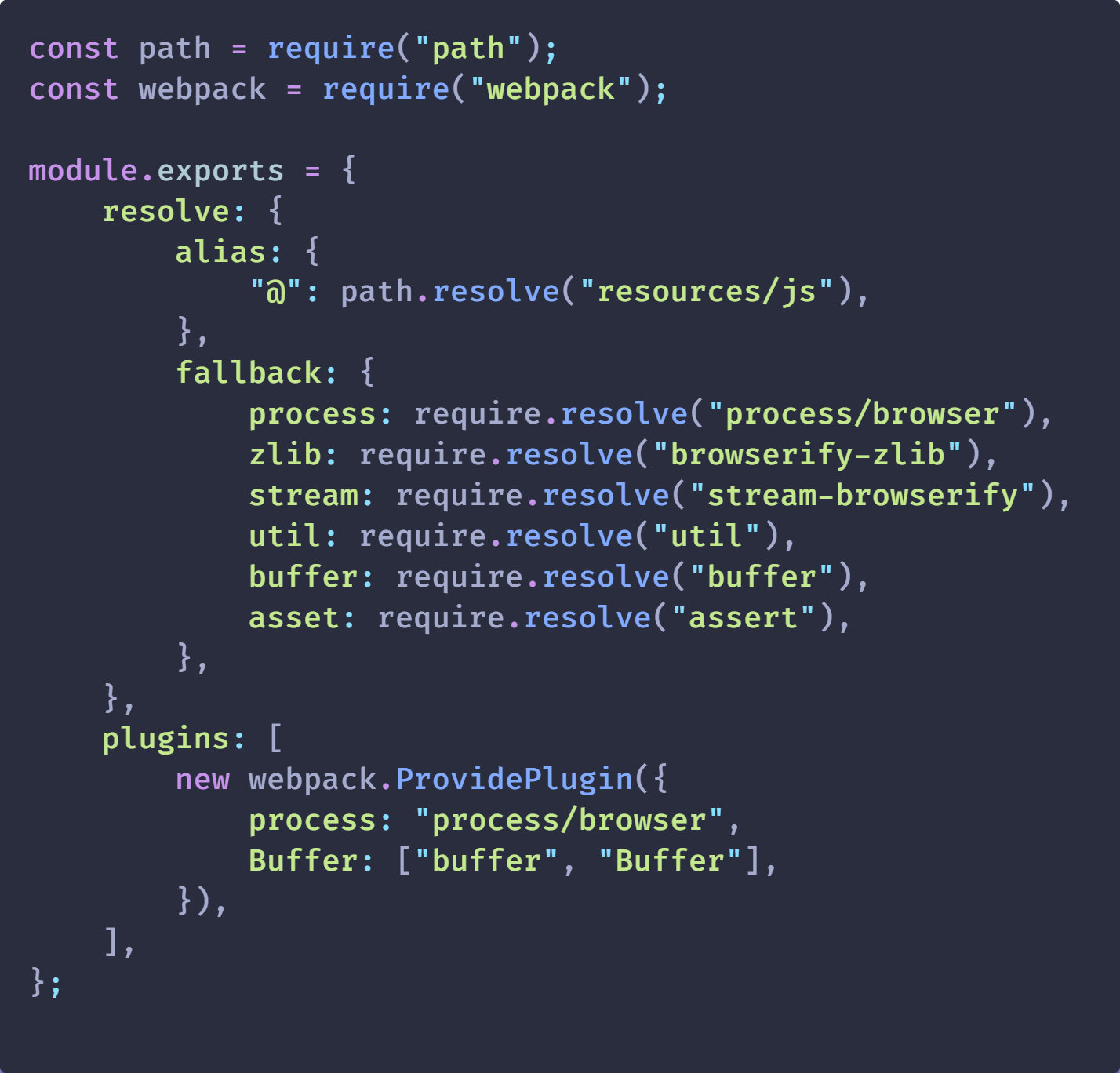


Could you please provide more information about setup and error or create repo with minimal reproduction because this info is limited and I don't know how to help you?

Yes, I will list the steps that I took to get to the issue that I am facing.
- Create a React Project
- yarn add @react-pdf/renderer
issues: - Module not found: Error: Can't resolve 'stream' in 'react- pdf\node_modules@react-pdf\pdfkit\lib' - Module not found: Error: Can't resolve 'zlib' in 'react- pdf\node_modules@react-pdf\pdfkit\lib' - Module not found: Error: Can't resolve 'zlib' in 'react- pdf\node_modules@react-pdf\png-js\lib' - Module not found: Error: Can't resolve 'stream' in 'react- pdf\node_modules\blob-stream' - Module not found: Error: Can't resolve 'stream' in 'react- pdf\node_modules\restructure\src'
- In order to fix these issues I tried doing the "yarn add process browserify-zlib stream-browserify util buffer assert", but the issues were still there.
- That was unsuccessful so I tried to add the following code to webpack.config located inside node_modules/react-scripts.
const webpack = require("webpack");

module.exports = {
  /* ... */

  resolve: {
    fallback: {
      process: require.resolve("process/browser"),
      zlib: require.resolve("browserify-zlib"),
      stream: require.resolve("stream-browserify"),
      util: require.resolve("util"),
      buffer: require.resolve("buffer"),
      asset: require.resolve("assert"),
    }
  },
  plugins: [
    new webpack.ProvidePlugin({
      Buffer: ["buffer", "Buffer"],
      process: "process/browser",
    }),
  ]

  /* ... */
}
- I went through the whole folder and made sure the placement was correct, but when I restarted the project it gave me a webpack error and I was unable to do a yarn start so I removed the changes that I made.
- I went installed each error that I was receiving with the following code:
npm i stream
npm i zlib
npm i stream
- this removed all the errors but the one that says "Error: Cannot find module './zlib_bindings"
- I tried attaching the file to the webpack again, but I am getting the same error.
Please let me know if you need more information.
The latest version of create react app (and really esm) require file extensions for all import paths. Don't know if this is related or not. seems more like random node imports being used on the front-end.

That was unsuccessful so I tried to add the following code to webpack.config located inside node_modules/react-script
I think this is the reason. CRA doesn't provide a way to modify webpack config. You have to run inject or use some other tools that patch it for you.
here is grate guide on how to use react-pdf with CRA and craco tool
https://dev.to/przpiw/react-pdf-rendering-4g7b
I really don't think that makes sense... if its a library meant to be used in the browser, why does it depend on node libraries?
I used the steps given from https://dev.to/przpiw/react-pdf-rendering-4g7b and it also worked. Thank you!
I used the steps given from https://dev.to/przpiw/react-pdf-rendering-4g7b and it also worked. Thank you! thank you sir , worked for me as well

dont need the polyfill...i just renamed zlib/lib/zlib.js to zlib/lib/zlib_bindings.js and removed the code in the file

bare min working online sample in case helps anybody: https://stackblitz.com/edit/react-pdf-demo2?file=src%2Findex.js

I was able to get it to work by using an older version
Which version ? and how to install that kindly tell me.

@faizansohail077 - just wondering if you had trouble applying working sample on stackblitz?
I started from scratch and followed these steps and thankfully it was resolved. Very easy guide too: https://www.alchemy.com/blog/how-to-polyfill-node-core-modules-in-webpack-5

ill try these changes in my code and get back you all ! thank you
From: Kimberley Rogers @.> Sent: Sunday, July 24, 2022 12:18 AM To: diegomura/react-pdf @.> Cc: john cramerec.com @.>; Comment @.> Subject: Re: [diegomura/react-pdf] Error: Cannot find module './zlib_bindings' (Issue #1678)
I started from scratch and followed these steps and thankfully it was resolved. Very easy guide too: https://www.alchemy.com/blog/how-to-polyfill-node-core-modules-in-webpack-5
— Reply to this email directly, view it on GitHubhttps://github.com/diegomura/react-pdf/issues/1678#issuecomment-1193243475, or unsubscribehttps://github.com/notifications/unsubscribe-auth/ASTDM3WNTNOD326OULY46GLVVS7X5ANCNFSM5L6RNFZA. You are receiving this because you commented.Message ID: @.***>
I started from scratch and followed these steps and thankfully it was resolved. Very easy guide too: https://www.alchemy.com/blog/how-to-polyfill-node-core-modules-in-webpack-5
Thank you! This solution works on my project!

I have zlib and browserify-zlib in my devDependencies after I removed zlib everything working fine


I just went in to node_modules/zlib/lib to zlib.js and commented out the code
Yes I am not being able to resolve this issue. Kindly guide me.how to resolved this.
On Tue, May 31, 2022, 7:15 PM Beej @.***> wrote:
@faizansohail077 https://github.com/faizansohail077 - just wondering if you had trouble applying working sample on stackblitz?
— Reply to this email directly, view it on GitHub https://github.com/diegomura/react-pdf/issues/1678#issuecomment-1142194783, or unsubscribe https://github.com/notifications/unsubscribe-auth/AML3YIUFY4HLAV4YS5VYPL3VMYNJPANCNFSM5L6RNFZA . You are receiving this because you were mentioned.Message ID: @.***>
i just checked and my stackblitz sample is still working; now also updated to latest @react-pdf/[email protected]. this sample project shows the exact bare minimum necessary. it is using craco to tweak webpack settings with aliases for zlib etc. make sure to compare your package.json to see what is required to be added to yours.
https://stackblitz.com/edit/react-pdf-demo2?file=craco.config.js
mine was within my react app so i changed my react-scripts version from 5.0.1 to 4.0.2 deleted node_modules and packagelock files and did a npm install . i highly recommend creating a duplicate of your entire directory first
mine was within my react app so i changed my react-scripts version from 5.0.1 to 4.0.2 deleted node_modules and packagelock files and did a npm install . i highly recommend creating a duplicate of your entire directory first
This solution worked for me... Thanks.
