

 diegomura
fontWeight only using first definition
Describe the bug
When defining a fontWeight for a fontFamily you are unable to change the weight in any other components.
To Reproduce
Here is my example code.
import React from 'react';
import { Document, Font, Page, PDFViewer, StyleSheet, Text, View } from '@react-pdf/renderer';
import visbyCFRegular from '../assets/fonts/visby-cf/regular/visby-cf.ttf'
import visbyCFMedium from '../assets/fonts/visby-cf/medium/visby-cf-medium.ttf'
import visbyCFDemiBold from '../assets/fonts/visby-cf/demibold/visby-cf-demi-bold.ttf'
import visbyCFBold from '../assets/fonts/visby-cf/bold/visby-cf-bold.ttf'

Font.register({
  family: 'VisbyCF',
  fonts: [
    { src: visbyCFRegular, fontWeight: 400 },
    { src: visbyCFMedium, fontWeight: 500 },
    { src: visbyCFDemiBold, fontWeight: 600 },
    { src: visbyCFBold, fontWeight: 700 },
  ]
})

const styles = StyleSheet.create({
  page: {
    flexDirection: 'row',
    fontFamily: "VisbyCF"
  },
  section: {
    padding: 20,
    flexGrow: 1,
  },
  regular: {
    fontWeight: 400,
  },
  bold: {
    fontWeight: 700
  }
})

const Demo = () => (
  <PDFViewer style={{ position: 'absolute', border: 0, height: '100%', width: '100%' }}>
    <Document>
      <Page size="letter" style={styles.page}>
        <View style={styles.section}>
          <Text style={styles.bold}>
            Line 1
          </Text>
          <Text style={styles.regular}>
            Line 2
          </Text>
          <Text style={{ fontSize: 20, fontWeight: 400 }}>
            Line 3
          </Text>
        </View>
      </Page>
    </Document>
  </PDFViewer>
)

export default Demo
This is rendering all lines at fontWeight: 700 though other style changes like changing the fontSize on Line 3 still work.
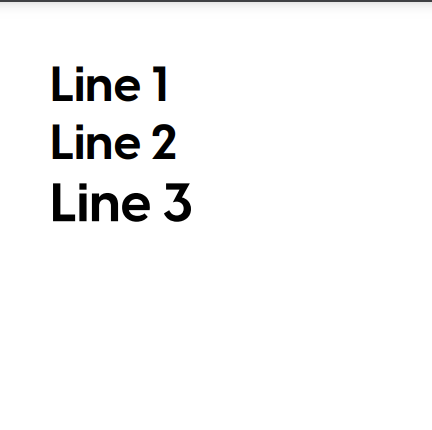 If I change the style for Line 1 to
 styles.regular the fontWeight changes for all lines to 400.
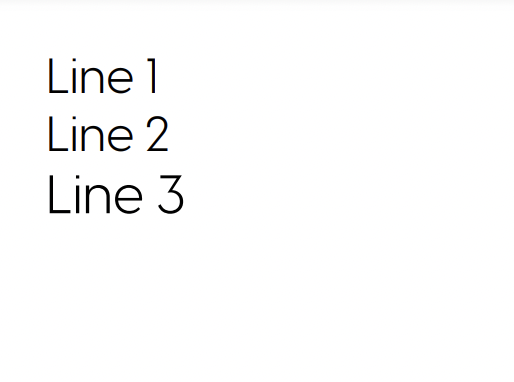
Expected behavior
The fontWeight should change from bold on Line 1 to regular on Line 2 and stay regular but increase size on Line 3
Desktop (please complete the following information):
- OS: macOs 11.3.1 - Big Sur
- Browser Chrome 90 and Safari 14.1
- React-pdf version 2.012

Hey. Couldn't replicate. This is my code and the produced doc below:
const styles = StyleSheet.create({
  body: {
    paddingTop: 35,
    paddingBottom: 45,
    paddingHorizontal: 35,
    position: "relative",
  },
  regular: {
    fontFamily: 'Roboto',
    fontWeight: 400,
  },
  medium: {
    fontFamily: 'Roboto',
    fontWeight: 500,
  },
  bold: {
    fontWeight: 600,
    fontFamily: 'Roboto',
  },
  black: {
    fontWeight: 900,
    fontFamily: 'Roboto',
  }
});

Font.register({
  family: "Roboto",
  fonts: [
    {
      src: RobotoFont,
      fontWeight: 400,
    },
    {
      src: RobotoFontMedium,
      fontWeight: 500,
    },
    {
      src: RobotoFontBold,
      fontWeight: 700
    },
    {
      src: RobotoFontBlack,
      fontWeight: 900
    }
  ]
});


const MyDoc = () => {
  return (
    <Page style={styles.body}>
      <Text style={styles.regular}>Regular text</Text>
      <Text style={styles.medium}>Medium text</Text>
      <Text style={styles.bold}>Bold text</Text>
      <Text style={styles.black}>Black text</Text>
    </Page>
  );
};
d5c44a0e-45e2-4149-bcd7-d800e473e1ec.pdf
Can you provide those fonts so I can test?

I was wondering if it was a problem with the fonts somehow. I have attached them here. Visby Fonts.zip
I'm getting a similar issue - whichever font I register first ends up setting the weights for the entire family, regardless of the weight specified by the component. @diegomura do you mind sharing where your RobotoFonts are coming from, just so I know I'm not crazy?

I'm not sure what is wrong:
  <Text style={{ fontWeight: "bold", fontFamily: "Helvetica" }}>
        Hello
  </Text>
is still render normal weight.

I'm not sure what is wrong:
  <Text style={{ fontWeight: "bold", fontFamily: "Helvetica" }}>
        Hello
  </Text>
is still render normal weight.
Its depend on the font. For Helvetica you need to use like this
  <Text style={{ fontFamily: "Helvetica-Oblique" }}>
        Hello
  </Text>
Check this out https://github.com/diegomura/react-pdf/issues/164#issuecomment-362851861

@JacobGalati I know this was years ago but did you ever find what was going on with your issue?

Pero eso no es lo que realmente se necesita ... ya que el estilo se pierde una vez exista una Etiqueta Text dentro de la misma
si yo quiero cambiar el estilo de del texto que estaba dentro de Text no lo hace

I'm trying to use Albert Sans font and facing similar issue.
Any fix or alternative for this issue to use Albert Sans font?

This should be fixed in latest version. Please re-open if it's not the case