

 dicengine
OpenCV vs DICe calibration results
Hello,
I am trying to verify my calibration results from DICe with the OpenCV calibration camera code (https://learnopencv.com/camera-calibration-using-opencv/), but for the same images, I get very different results, is it normal?
Also, I find it odd that there is no spacing size to put in the OpenCV calibration, while DICe there is.
Can you help me find what is wrong, or different between these two calibration method, please?
Best regards,
Jimmy

Hi Jimmy, the link you have above is for the single camera calibration in OpenCV, DICe uses the stereo calibration tool. They should both give you similar values for the intrinsic parameters like the focal length and image centers, etc. Can you be more specific about the differences you have observed?

Hi, thanks. Indeed I am using the single camera calibration in OpenCV. I also use the single camera calibration tool available in DICe, when selecting the 1 camera mode.
I am observing differences in the k1,k2 and k3 coefficients and the intrinsic parameters. Here is in 3 zip: the images, the result from DICe, and the result from OpenCV ("dist" is the distorsion coefficients k1 k2 p1 p2 p3, and "mtx" is the intrinsic parameters)
Do you think the images have a problem?
Best,
Jimmy
checkerboard-images.zip dice-result.zip open-cv-cal-python-results.zip
Are you using the default calibration options in DICe? I'm wondering if you have the same options going to both DICe and OpenCV.
Hello,
I am using the default calibration options, yes.
This problem arises only with the camera HQ and the 16mm lens. With a different camera (module V2 raspberry), or a different lens (6mm), there is very little difference between DICe and OpenCV. I think that the images could be the origin of the issue, but I can't tell why
Best,
Jimmy
Hi DICe team @dicengine (Dr Turner?)
Thanks a lot for sharing this useful tool.
I found a similar issue when calibrating checkerboard images. The RMS error, as shown below, is as big as 42.7529 pxl. The same set of images were run in the Matlab calibrator, where the RMS is about 0.3pxl.
I am not sure what I have done wrong here in the DICe Camera Calibration GUI. Any advice will be much appreciated.
Also, I wrote a ‘cal.xml’ file using the intrinsic and extrinsic parameters obtained from Matlab; and tried to ‘run stereo’ in DICe. Unfortunately, it failed on the cross-correlation between left and right images, a screenshot below, though I've tried to tune the setting in the options as well.
Many thanks for your advice in advance.
Best wishes Wei
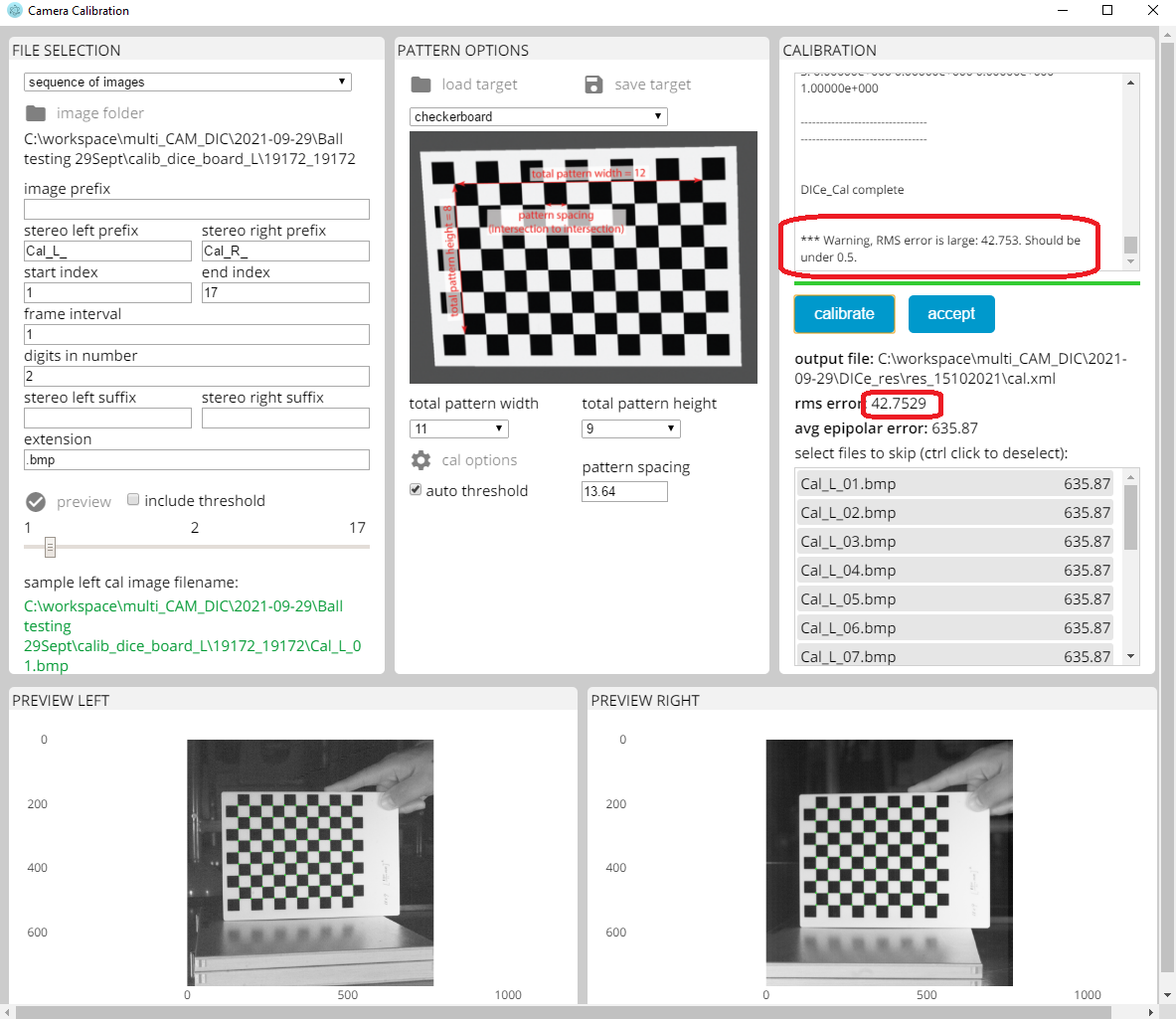


I'm still looking into the issue with the checkerboard patterns, but with regards to the feature matching failing on the cross correlation, are you able to share your cal.xml file with a stereo pair of images so I can see why it's failing?
Thanks @dicengine for your quick reply.
Five pairs of images are included in the following. Left images named 001, 002 etc and right images named 101, 102 etc.
The cal.xml file is in the same folder as well.
Many thanks!
I took a look at the stereo correlation initialization for the images you provided (thanks) and it seems like the calibration may not be very good. Can you upload the calibration images for this case? If I check an epipolar line between the left and right images for points that are easy to identify (for example the corners of the stitched hexagons) using the calibration parameters in your cal.xml file, the points are ten to twenty pixels off the epipolar line suggesting the calibration is not correct.
Thanks @dicengine .
The parameter values in 'cal.xml' were obtained from the Matlab StereoCameraCalibrator. Except for the value of "avg_epipolar_error", because I didn't seem to be able to find this exact parameter in the Matlab calibrator.
The checkerboard images are attached here (17 pairs). Many thanks!
I took a look at your calibration images and for some reason I too cannot get a good calibration out of OpenCV with the checkerboard pattern. Here are a couple things that I noticed while looking at your images:
- The scale for the pattern spacing may be wrong (although this shouldn't affect the calibration procedure). It looks like you are measuring the pattern width as 150mm then dividing by the pattern width. Is the total pattern 150mm wide (inclusive of the entire checkerboard) or is that really the distance of the first corner to the 11th corner?
- OpenCVs calibration tool is very slow for the checkerboard pattern with large images (~2000px or more). Your images are smaller so you shouldn't run into this.
- The first image in your calibration set as RBG color information, but the rest are greyscale. I fixed that and re-ran. It didn't change the poor calibration.
- I converted your image set to .tiff and re-ran. That didn't help.
- I tried a couple of other checkerboard image sets where I knew what the calibration parameter were and the results were spot on from the calibration.
- I can only conclude that there must be something less than optimal about your image set. It could be that the pattern is too far from the camera (doesn't fill up enough of the field of view). Or that you need more images (I typically use at least 20, but most times more).
Sorry I didn't make much progress on this, but I wanted to give you an update.
Are the images really the issue? Maybe the reason for theses differences, is the difference between DICe calibration tool and other calibration tools. In my case, (for one camera calibration) I'm not sure if DICe calibration tool is using exactly the methods used in OpenCV (https://learnopencv.com/camera-calibration-using-opencv/). Is there any way to find out more about the DICe calibration tool logic, besides the cal file? To find out about the differences in the methods used.
In the case of the images provided in checkerboard.zip, the calibration from OpenCV and Matlab are not even close. I would say that even though the OpenCV calibration returns a result, the calibration failed (for example, one of the image centers is negative...). In terms of the differences between the DICe implementation of OpenCVs calibration tools and say using OpenCV directly via python has to be related to the options used and the version of OpenCV used. Everything else is a direct interface. The options used are shown in the cal_input.xml file, any other options are the defaults in OpenCV. How DICe calls OpenCVs calibration routines is here: https://github.com/dicengine/dice/blob/master/src/opencv/DICe_Calibration.cpp
hi @dicengine, I've tried a different calibration pattern in DICe, the one with circular dots. It appears that decent calibration results can be obtained. However, it seems the cross-correlation is still struggling to produce good matches. I tried to check the speckle pattern by running 2D studies on each camera - the speckle pattern works.
Would the curvature of the ball be an issue for cross-correlation? The images are included below.
Another question - in the cal.xml file, what is the exact definition of the parameter 'avg_epipolar_error', please? Many thanks.
calDots6x4_PSexported.zip ballRoll.zip .
The average epipolar error is the distance (on average) away from the epipolar line that the corresponding point in the stereo image is. If the calibration is perfect, the corresponding point in the stereo image will be on the epipolar line. It's a simple way to check how good the calibration is.
I'm still looking into what's going on with the cross correlation
Thanks for clarifying the definition of 'avg_epipolar_error'. Is the parameter needed in the cross-correlation?
The 'avg_epipolar_error' parameter is just a diagnostic output from the calibration, it's not used in the cross-correlation.
I've taken another look at your images and there are some other issues that might be causing problems.
- There seems to be a lot of noise in the images. This might be why the initialization is failing
- The speckle size is too small (for the most part on the order of one pixel). For good performance, you need to have your speckels near three pixels in size. If you can't adjust how you apply the pattern, you may consider moving the cameras closer to make the speckles nearly 3 pixels in size.
- There are also issues with either the cameras not being in focus or the shutter speed not being set right causing image blur.
Any one of these three issues could cause bad DIC results and may be why the cross-correlation is failing. It doesn't seem to be the result of any sort of bugs in DICe. If you are able to address the issues with the images above you may notice that even your calibration error improves.
Just an update that the dot target calibration routine in DICe has been substantially updated to address some issues that could have been causing the difference between the native OpenCV calibration and the calibration from the DICe wrapper of OpenCVs cal tool. There were instances of images that could have misidentified two dots in the same location or a small patch of image noise as one of the marker dots from the target pattern. Both of these were almost undetectable from the debugging images in the GUI tool, but could lead to subtle errors in the calibration. The errors weren't large enough to identify a single image to remove from the calibration set to fix the problem. In the latest release https://github.com/dicengine/dice/releases/tag/v3.0-beta.4 this has been fixed so it shouldn't be a problem with releases from this point on.
Hello,@wvwang Thanks you for discussing stereo calibration.
I have a question about why the calibration of DICe can't read my image when I do calibration, when my image format and naming are the same as the original sample data, but it shows when the folder is empty.
Can you help me find what is wrong, please? Best wishes Ting

I'm not sure I understand what the problem is. Could you describe exactly what error behavior you are experiencing? Also, attaching an image may help.
Thanks for the reply, after asking the question I kept trying and changing, and found that when calibrating, it only reads the left camera, and the problem is that it doesn't fully read my calibration image, I don't know what went wrong.
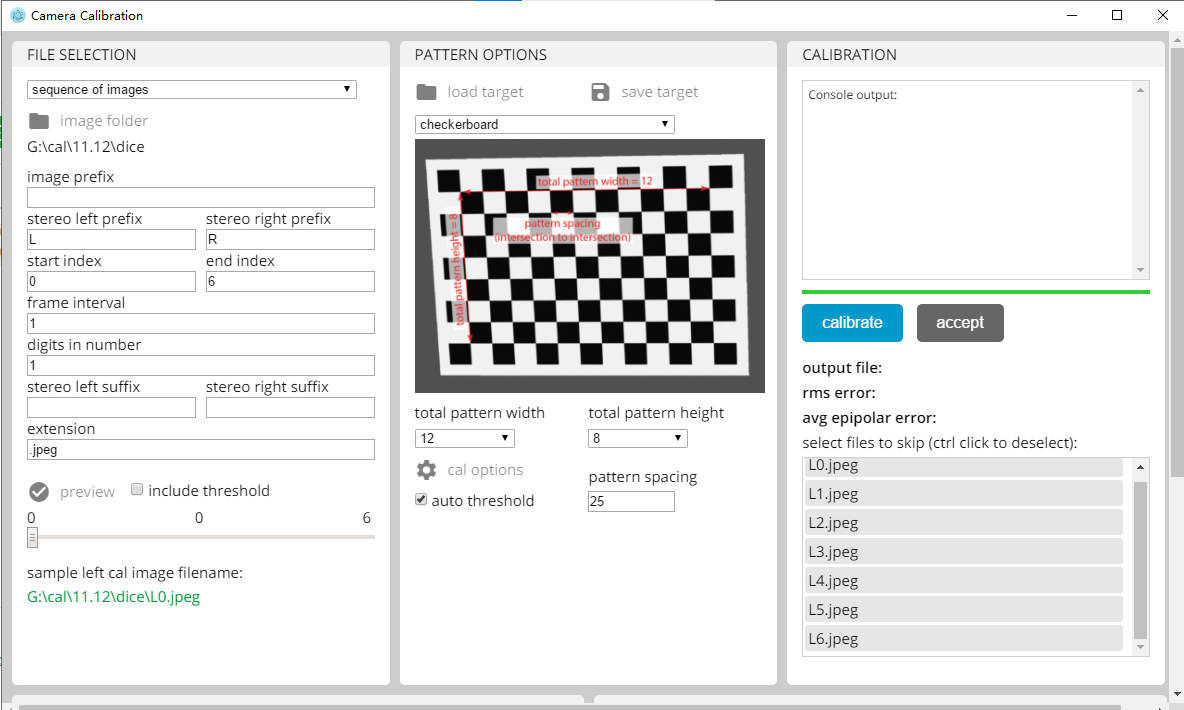
DICe might be aborting before reading the right image because the left image failed. Are you sure that the pattern width and height are correct? Looks like you have the correct values for the example image for the checkerboard pattern, but is your actual pattern the same?
Thanka@dicengine
Yes, after I modified it according to my checkerboard, the result is still the same, I wonder if it has a clear requirement for the format in which the image is read? Because in the example the image format is .jpeg, my picture format is also like this, but it is not read, so I am confused.Below are 6 sets of my calibration images.
dice.zip
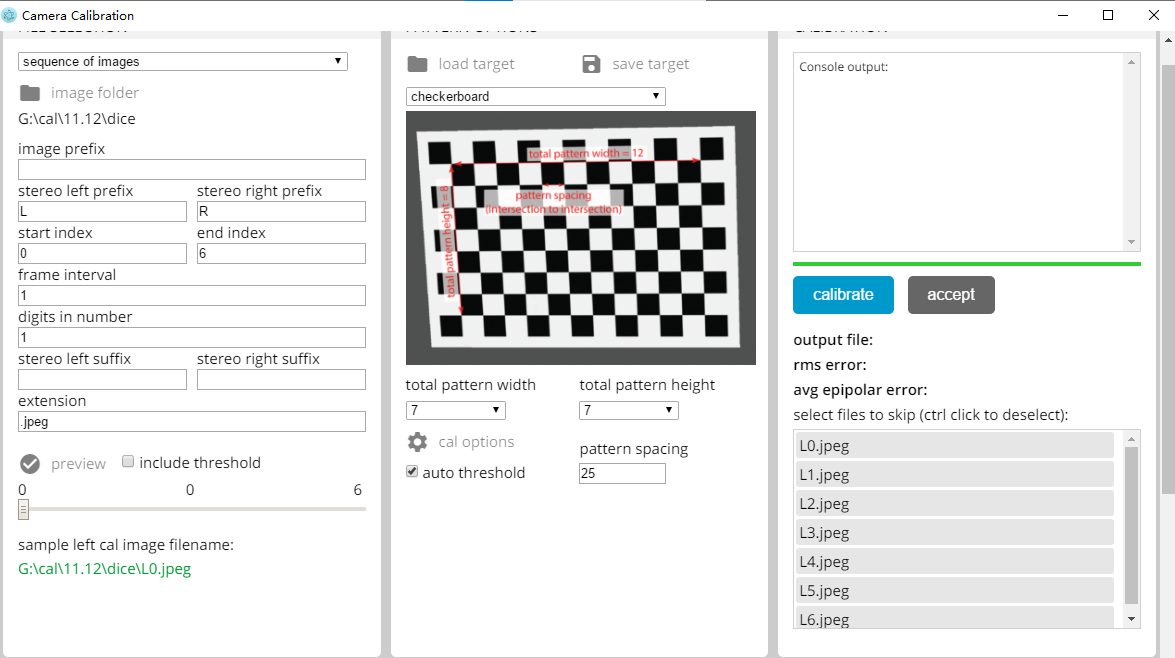
It looks like the calibration is failing only for the first image set which has some sort of speckle pattern background. The rest of the images in the set you posted are reading and calibrating okay for me with DICe version 3-beta.6. The cal images don't have a lot of contrast so that might be introducing a lot of error. Another thing to keep in mind is that the checkerboard pattern is not the greatest for getting an accurate cal. I would use the dot pattern if you are able to.