

 diasurgical
Support locale-dependent font variation for Han characters
Some Unicode code points should be rendered differently depending on the target locale, e.g.:
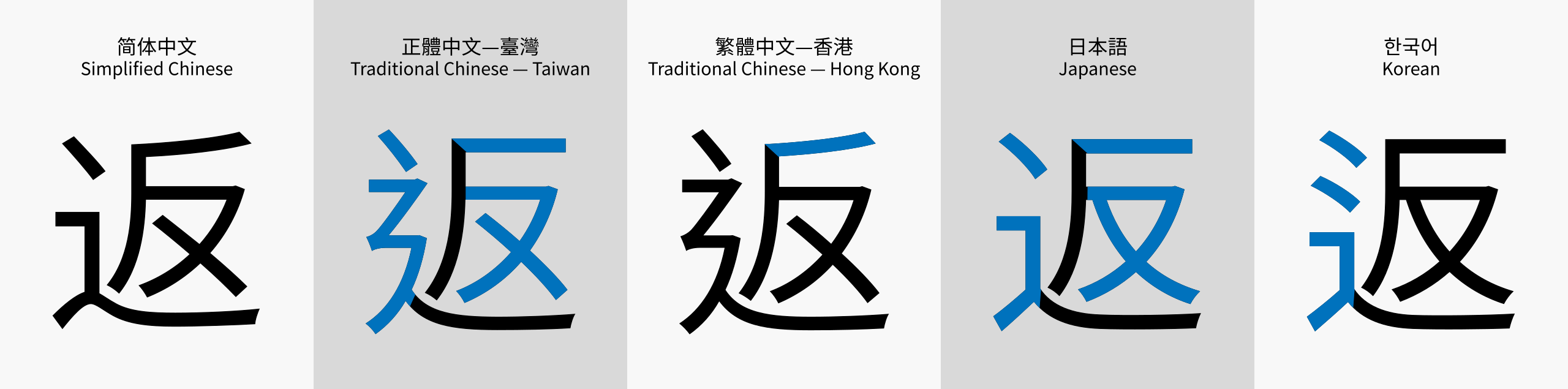
See https://en.wikipedia.org/wiki/Han_unification
One way to address this could be to generate separate font files for each supported locale.
Not sure how pervasive this issue actually is in our translation files
/cc @bubio @tytannial

emmm.....based on what font to be used. Even MS age of empires series also have this problem.


Does that mean that we shouldn't try and do better :)
I think release a font tool for user, generate font what they want. 🙄
Certainly, this is a concern. From a Japanese point of view, it is not unreadable, but it is perceived as not being a "Japanese character".

If it is a separate font there shouldn't be much trouble, if a font supports it and we have the proper source files, together with AJenbo we have more or less the pipeline. I guess a different approach would be if you devise a system of small visual adjustment that same system would also pave the way for Arabic or other constructed languages. Although I see it as something too complex if it is a dynamic system, how would you even approach it, especially if you are working with raster images. Can you transform, bend, stretch them without loosing visual fidelity, what would the starting graphics be?

I was thinking more along the lines of allowing to override font lines with locale-specific ones (e.g. fonts/{locale}/ab-cd.pcx first, then fonts/ab-cd.pcx).
I'm not sure what font we're using currently but most have locale-specific variants, e.g. Noto has 5 variants:
- https://github.com/googlefonts/noto-cjk/tree/main/Sans/SubsetOTF/HK (Hong Kong)
- https://github.com/googlefonts/noto-cjk/tree/main/Sans/SubsetOTF/JP (Japan)
- https://github.com/googlefonts/noto-cjk/tree/main/Sans/SubsetOTF/KR (South Korea)
- https://github.com/googlefonts/noto-cjk/tree/main/Sans/SubsetOTF/SC (Mainland China)
- https://github.com/googlefonts/noto-cjk/tree/main/Sans/SubsetOTF/TC (Taiwan)
Perhaps your pipeline could generate all the lines from the variants into subdirectories and then remove the duplicates? No need to worry about metrics as I believe they're the same for all the variants.
So if I get this right, there is only one unicode code but different faces for the glyph according to its locale?
Is there a some kind of list of the differences between the blocks, that we can use to know which specific blocks need re-rendering in the specific locale font? Or we have to redo everything in the cjk blocks?
@NikoVP The Ideographic Variation Database contains the list of characters with locale-specific variants but it's not guaranteed that the font actually has all of those variants. So I think a simple solution could be: (1) generate all Han blocks for each variant (2) remove files that are identical to the "main" font files.
@glebm @AJenbo Ok, I've re rendered the whole range of Han characters from blocks 4e to 9f using the above mentioned fonts. I tried to look around the Ideographic Variation Database, but couldn't really make heads or tails where to look. So I think I'll need help to identify which of the fonts should be used as a base (hence having all its blocks) and how to find out which blocks for the other locales aren't needed. The font I used (without actually paying attention to locale versions) for the current version is actually the Japanese version of Noto CJK. I have some ideas how to adjust the colors so they match the current European languages set, but need the blocks names so I minimize the amount of files being converted. I'll need to adjust the colors on the 46 version before re-rendering the smaller fonts, so basically everything is going to be re-rendered. Ithink I'll be able to adjust the fonts to be the same 1px offset from the left edge as the current ones so in theory no change to the bin files should be needed if AJenbo hasn't done anything to them after I passed them to him.
@NikoVP We could do it like this:
- Use the font with the largest number of characters (rows) as base. If they all have the same number of rows, it doesn't matter which one is base, Japanese is fine.
- Remove files that are bitwise-identical to the base from the other 4 variants. To check if the files are identical in Linux is simply:
cmp --silent $a $b || echo "files are different"
Gentle ping a year later :) @NikoVP Can you open-source the script used to generate the fonts?
@glebm I'm not sure this was the latest verison: template.zip It's a PSD file so you need PhotoShop or something very capable of handling it's format and actions (GIMP is not it).
@glebm Hi, as AJenbo stated there are no scripts for this. There's an option to automate the generation through photoshop batch options. I already have all the fonts rendered and the last thing I remember to have worked on was colour correction so the files match the Latin counterparts. I will try to finish them in the coming week and share them.
Thanks @NikoVP, I don't have photoshop so I wouldn't have been able to do it myself!
Thanks @NikoVP, I don't have photoshop so I wouldn't have been able to do it myself!
GIMP. I think it worked.
It might be able to open the basic image portion, but it won't have the layer effect, or the text to graphics automated actions avalible
Also Unifont has a Japanese variant these days, and the latest version of Unifont comes with improvements for Greek and Korean.
The Photoshop template opens just fine in a recent version of the open-source Krita editor and I think it displays correctly! 🎉
The settings are:
I haven't been able to cleanly export the texture so far but it should be possible.
I was able to extract the texture (via layer effects on 100x100 image followed by Save as PNG):
Hi, I am actually revising the files, I used to create the characters although I rendered the 5 versions. I will probably have to rerender them because the fonts had few updates in the last year. Will try to see if I can get the process running again since I have lost some of the steps due to change of hardware. I can provide help with textures and palette if you want to get it running on open source alternatives.