

 dgreif
Motion Sensor's Active State
Feature Request
Description
Would be great if you could set the motion sensor's "active state" like you can in other homebridge plugins like homebridge-focamcamera. By toggling a camera/doorbell's alarm/motion sensor active state, you can effectively control motion alerts throughout the day per device. Using scenes you could manually disable notifications when people are in the back yard. Or set up location based scenes to disable motion alerts for indoor cameras when I'm home and enable when I'm away.Describe the solution you'd like
I'm not sure how the motion sensor's active state is exposed, but I think it has to do with enabling a "security state" for each camera. By adding this option, you could create an automation to turn on motion status for all indoor cameras when Ring Alarm is enabled. This partly mirrors Ring's Mode Settings, but doing it in a way that's HomeKit controlled and allows an option to use just HomeKit motion notifications. I'd still keep doorbell alerts coming from Ring to answer the doorbell, etc. but I think this would be a welcome upgrade for motion alert control in HomeKit.Attachment
Example showing how homebridge-foscamcamera added a camera alarm and motion options in HomeKit.
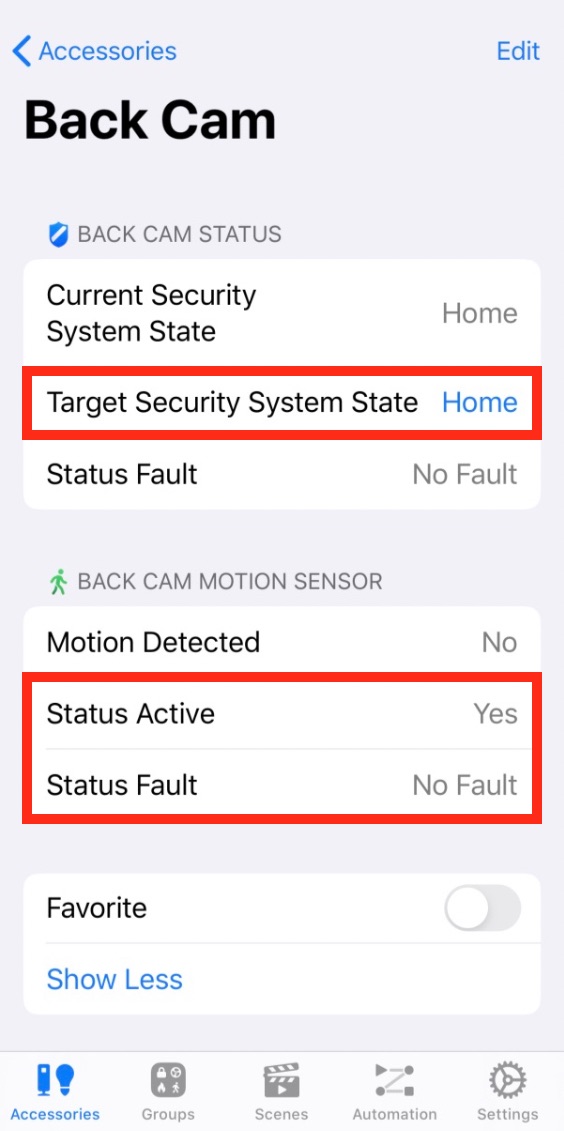

@fancypants66 sorry it took so long to look into this. I didn't realize that there were so many additional features supported by HomeKit cameras!
I wanted to clarify, does the foscam plugin allow you to directly set Status Active, or is it controlled by changing Target Security System State?
Would you expect that changing Target Security System State only impacts that one camera, or all the cameras at that location (like Ring Modes does)?
Can you elaborate on the issues with Ring Modes that this change would improve apon? Modes does allow you to prevent motion detection based on mode. I am not 100% certain, but I believe that setting should prevent motion alerts from making their way into HomeKit as well
For my own reference, here is the Status Active implementation in foscam: https://github.com/luisiam/homebridge-foscamcamera/blob/cb04851365637d1cbdaad86ef2950f1babfa70dc/index.js#L202-L203

Hi @dgreif thanks for the follow up!
To clarify - Yes, using the foscam plugin and changing Target Security System State to "Disabled" automatically toggles Status Active to "No" which disables HomeKit notifications for that single camera. All other valid Target Security System State values "Home", "Away", and "Night" automatically toggle Status Active to "Yes".
With the foscam plugin, each camera's options can be further defined in the config where you can set what each state means per camera. For example, "Home" state may record snapshots, but does not record video, while "Away" may record video and send emails when triggered. I know Ring doesn't have different recording modes, but it's an example of how the framework could potentially be used for more granular controls per device. Perhaps it could be used to define Motion Detection, Live View, and Notification options per camera?
Because the Target Security System State is exposed per camera, the expected behavior is for this setting is to only affect that single camera. What I've done with the foscam plugin is to use HomeKit scenes to set multiple cameras' Target Security System State in various ways to control notifications, recording, snapshots, etc per scene (Night scene, Away scene, Mute the backyard scene, etc).
Because I'm approaching this feature request primarily as a way to control Ring motion alert notifications in HomeKit (which I find much more useful than Ring app notifications), this potentially provides something Ring Modes does not cover - which is the ability to control/mute notifications while still recording events in Ring (if defined by config). It also provides the ability to set up infinite scenes independent of Ring Alarm modes. And... heck, it would be nice to control camera modes on the fly in HomeKit or using Siri.
I hope this helps. Thanks for the reply and keep up the excellent work!
As far as I can tell, this section of the code is the one responsible for the behavior you're describing.
// Method to start polling for motion
FoscamPlatform.prototype.startMotionPolling = function (mac) {
  var self = this;
  var thisFoscamAPI = this.foscamAPI[mac];
  var thisCamera = this.cameraInfo[mac];

  // Clear polling
  clearTimeout(thisCamera.polling);

  // Start polling if armed
  if (thisCamera.currentState !== 3) {
    thisFoscamAPI.getDevState().then(function (state) {
      if (state.motionDetectAlarm === 2) self.motionDetected(mac);  //// <--- here
    });

    // Setup next polling
    thisCamera.polling = setTimeout(this.startMotionPolling.bind(this, mac), 1000);
  }
}
Note that this line:
if (thisCamera.currentState !== 3)
Refers to DISARMED.
export class SecuritySystemCurrentState extends Characteristic {

  // The value property of SecuritySystemCurrentState must be one of the following:
  static readonly STAY_ARM = 0;
  static readonly AWAY_ARM = 1;
  static readonly NIGHT_ARM = 2;
  static readonly DISARMED = 3;
  static readonly ALARM_TRIGGERED = 4;
The point is, that this behavior is not built into HK.
The same could be done by exposing an on/off switch added per camera for ding alerts and motion alerts, and then those could be checked in the polling code. And/or, maybe another 'global' on/off switch for ding alerts and motion alerts to make it easy. Too many switches? 😆
If the switch was off, any alerts would be skipped (as per the code sample).
Overall, this could be a little bit confusing given that motion/ding alerts can already be turned off within HK for an individual camera (and on a per-user basis), but those alerts can't be automated. In other words, if there was a switch, you could turn it on/off using an automation rule -- e.g., by whether someone was home or away.
Modes does allow you to prevent motion detection based on mode. I am not 100% certain, but I believe that setting should prevent motion alerts from making their way into HomeKit as well
I think it does, but the difference is that the motion alert is prevented by Ring itself. So, no alert would come through the API and the plugin functions normally.
I'm trying to think of a situation where overriding the HK behavior (but not the Ring behavior) could be useful.

@fancypants66 I finally got time to circle back to this issue, sorry for the long delay. After reviewing everything again, I agree with @dxdc that a "notifications" switch is really all that would be needed in this case. Normally, notifications can be toggled based on household members being home/away, as well as by using Ring Modes. The only additional use case you seem to be proposing is disabling notifications for a single camera if you know that you will be active in that area. Does that sound accurate?
Maybe I missed this but I didn't see it mentioned but would it be possible to include a camera's motion snooze into the enhancement request? If not can we separate out this request? If exposed, we could then possibly automate that in HomeKit.
