

 devspace-sh
Devspace should have the ability to start sync with an existing helm deployment
Is your feature request related to a problem? No
Which solution do you suggest?
- Devspace should have a flag that permits continuous file sync to an existing deployment. Currently, devspace deploys an app and starts syncing with each file change. Enabling devspace to start syncing without creating a new deployment should increase developer velocity (the user should be able to select the existing deployment to begin syncing with).
- An option to let the developer decide when the files should be synced. Currently, devspace syncs file with the container as soon as it detects a change.
Which alternative solutions exist? Nothing I can think of
Additional context This feature might help avoid syncing files
- During intermediate saving while working on a large number of changes.
- During development that involves changes in multiple files. In the above situations, sync would result in the deployment of a broken application.
This also can help you integrate devspace right into the IDE. So once a developer is satisfied with the changes, s/he can sync the changed files into an existing container without a large number of sync operations or a container re-deployment.

Hi @sreepathy-tl Thanks for reporting this.
Just being curious, what devspace command are you using for the development? Devspace has a dev command which is pretty useful for live development on k8s. If you are using deploy command, it will deploy the code with helm and may lack sync feature(I am not really sure about this though).
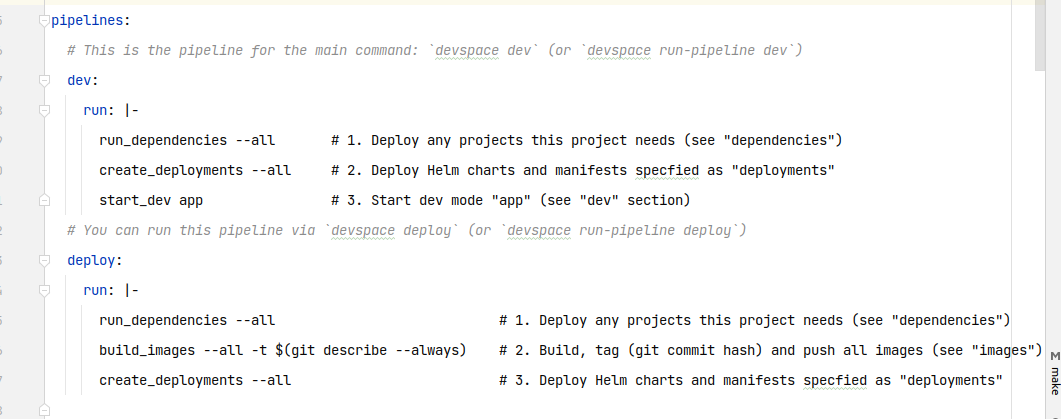
If you are using devspace v6, you can configure the behaviour of deploy command in pipelines as shown in below screenshot.

I am currently using devspace dev command. The problem with this command is that it cannot start code sync with currently deployed containers. So an additional option to start code sync with a running container would be useful. This allows a developer to run helm install and then probably a devspace dev --sync-only to use only the code sync feature.
@sreepathy-tl I assume you are looking for hot-reload. If you are using nodejs, nodemon can be used in the terminal which gets opened when you fire devspace dev command [nodemon node index.js]. Similar to this, you can try using hot-reloading tool for the language you are using.
Currently devspace syncs code from host to container. To reflect the changes, you have to kill the command in terminal opened by devspace dev. You can avoid this by using hot-reloading tool
I think I have confused you. I am NOT looking for a hot reload (in which the page reloads automatically with server-side code change). I was asking about syncing the code changes in the local development machine with the code running inside the container. To be more specific, I don't want devspace to deploy a new container and start file sync; instead, I wish I had an option just to use the file sync feature on my existing running container deployed with my custom helm chart (without devspace creating one more brand new deployment and opening the devspace shell).
Hi @sreepathy-tl As we discussed on slack, you are facing below two problems with devspace.
Issue 1: devspace dev creates a new container and starts sync. Is it not possible for devspace to start just file sync to an existing container?
This simply can be avoided by not changing the imageSelectors in devspace.yaml. A change in imageSelectors and labels will lead to have a new pod spawned.
Issue 2: devspace dev syncs file with every change. This is messy sometimes. I have a change involving multiple files. I want the sync to happen only after I am done with all the changes. So can I instruct devspace to stop sync now and sync all the changes together when I issue some command?
We will get back to you on this as how can this be supported.
@sreepathy-tl could you provide us your devspace.yaml? Its definitely possible to only start syncing without replacing the container. Also DevSpace syncs multiple changes together and packs them as a gzip archive.

@FabianKramm It is absolutely fine for devspace to sync multiple files as a gzip arhive. But this sync happens in near realtime with every change. As a developer I might need to sync the changes only after I am completely done with the changes (in one file or all the files I intend to change), but syncing the files with every save might crash the container as the code might be incorrect.
@sreepathy-tl ah I see, so you actually want to trigger the sync with some sort of command to make sure its only updated when needed. Thats definitely an interesting idea.