

 devspace-sh
Export Helm Charts
Is your feature request related to a problem? Yes, currently when using devspace Component Helm Charts there is no way to get access to the temporary generated values.yaml file or to explicitly export the entire helm chart to a directory for manual modification or publishing.
Which solution do you suggest?
It would be really awesome if there was an export function similar to devspace render where it outputs a helm chart folder and all the related values and helmcharts sufficient to manually run helm install or to then change the devspace.yaml to use this new exported helm chart to manually tweak it.
Which alternative solutions exist? None really.
Additional context The simplest thing would be, getting access to the generated values file since it currently goes to a temp file which is immediately deleted, but it would be cool to go further and provide a full "output to helm chart" command.
/kind feature

The component-chart is not really generated. It's a regular helm chart and you can download it from here: https://github.com/loft-sh/component-chart
The values for the chart are also just whatever you put in values or what is provided via valuesFiles in devspace.yaml, so I'm not sure if we need a separate export command for that.

The component-chart is not really generated. It's a regular helm chart and you can download it from here: https://github.com/loft-sh/component-chart
The values for the chart are also just whatever you put in
valuesor what is provided viavaluesFilesindevspace.yaml, so I'm not sure if we need a separate export command for that.
Right but there is no way to convert it into a helm chart folder that includes the component-chart plus the values from your devspace.yaml automatically which you can then invoke helm install yourself right?
The closest I can tell is that when you render you get the config but not the values, and when you hit dev or deploy it creates a temp file with the values, but as I said above its deleted before you can extract it.
@madhavajay you can just do a:
git clone https://github.com/loft-sh/component-chart
and then use
helm install my-app ./component-chart -n my-namespace -f values.yaml

@madhavajay you can just do a:
git clone https://github.com/loft-sh/component-chartand then use
helm install my-app ./component-chart -n my-namespace -f values.yaml
Just to clarify, you are implying that to do this without at duplication, I would put all the variables from devspace.yaml into an external values.yaml? Aren't all the component charts settings kind of intertwined with the devspace.yaml? Do you have an example of what you are suggesting where I can run helm install against an existing devspace.yaml without having to maintain an entirely separate values.yaml?
I ended up here searching for a way to use ArgoCD with devspace. ArgoCD just wants to point to git repo with a final, rendered helm chart for example. But seems I can't get that out of "devspace deploy" hmmmm. Devspace deploy is "push" and ArgoCD is "pull".

I think you could include devspace render as a command via a argocd plugin: https://argo-cd.readthedocs.io/en/stable/user-guide/config-management-plugins/#environment
Alternatively, you could set up a Github action or something that runs something like devspace render >/manifests.yaml && git commit && git push and have argocd watch and deploy manifest.yaml.
@str11ngfello Would any of these options make sense to you? If something is missing on the devspace side to make this happen, let me know.
Wow, actually I have to admit I just started using devspace a few nights ago. Hadn't seen "render" command yet. Render into a manifest file and commit it. Brilliant. Thank you for pointing me to that.
Just a quick followup. ArgoCD allows me to remove the need for kubectl in my Gitlab runner. Devspace looks like it tries to use kubectl to get namespaces by default? This won't work anymore because I don't have/want a valid kube context since ArgoCD will handle that. Any suggestion? I'm excited to pair devspace with GitOps and I'm getting close. See my gitlab runner fail because in the screenshot below because "devspace build" tried to get namespaces with kubectl. Thanks!
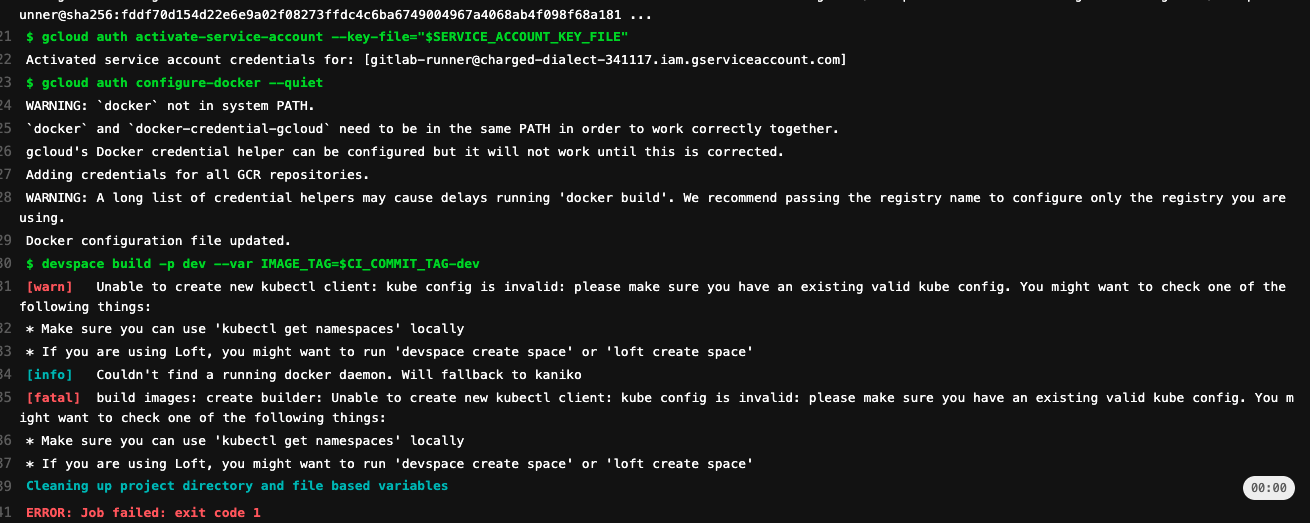
Ah, I found this - https://github.com/loft-sh/devspace/pull/1771
Kaniko in cluster build eh? Okay, makes sense then. Perhaps I need to use dind.
I might be mistaken but doesn't the proposed solution require devspace to be installed? I think the intention of the issue is that devspace shouldn't need to be installed in order to function.
I've been looking at a few different solutions over the past few weeks and the name "Component Chart" confuses me because there is no chart to speak of. You do describe components but there's no chart, hence nothing to publish. There's an extra dependency here that requires extra setup in order to use. It's unorthodox compared to how charts are normally deployed.
