

 devoxx
"Required RAG Services" doesn't populate
I'm using IntelliJ 2024.3.2.2 on Ubuntu 24 (Java 21) and when I try to enable the RAG feature, the "RAG Required Services" table does not render anything at all (I installed a docker image of ChromaDB already and I even downgraded it to 0.6.2 but still nothing).

DevoxxGenie will try to pull/start ChromaDB, same for pulling Nomic embed model from Ollama. Can you share some screenshots and/or logs?

I use ubuntu 22.04, devoxxgenie 0.4.16 (works on my machine :-)), it should show something like below (probably you need to pull the chroma image or models if not yet present)

Window is empty.
idea.log shows the following error:
025-02-08 22:56:23,214 [ 125578] SEVERE - #c.i.o.a.i.FlushQueue - Unable to locate JNA native support library java.lang.UnsatisfiedLinkError: Unable to locate JNA native support library at com.sun.jna.Native.loadNativeDispatchLibrary(Native.java:1018) at com.sun.jna.Native.<clinit>(Native.java:221) at com.github.dockerjava.transport.DomainSocket.<clinit>(DomainSocket.java:54) at com.github.dockerjava.transport.UnixSocket.get(UnixSocket.java:29) at com.github.dockerjava.httpclient5.ApacheDockerHttpClientImpl$2.createSocket(ApacheDockerHttpClientImpl.java:154) at org.apache.hc.client5.http.impl.io.DefaultHttpClientConnectionOperator.connect(DefaultHttpClientConnectionOperator.java:125) at org.apache.hc.client5.http.impl.io.PoolingHttpClientConnectionManager.connect(PoolingHttpClientConnectionManager.java:409) at org.apache.hc.client5.http.impl.classic.InternalExecRuntime.connectEndpoint(InternalExecRuntime.java:164) at org.apache.hc.client5.http.impl.classic.InternalExecRuntime.connectEndpoint(InternalExecRuntime.java:174) at org.apache.hc.client5.http.impl.classic.ConnectExec.execute(ConnectExec.java:135) at org.apache.hc.client5.http.impl.classic.ExecChainElement.execute(ExecChainElement.java:51) at org.apache.hc.client5.http.impl.classic.ExecChainElement$1.proceed(ExecChainElement.java:57) at org.apache.hc.client5.http.impl.classic.ProtocolExec.execute(ProtocolExec.java:172) at org.apache.hc.client5.http.impl.classic.ExecChainElement.execute(ExecChainElement.java:51) at org.apache.hc.client5.http.impl.classic.ExecChainElement$1.proceed(ExecChainElement.java:57) at org.apache.hc.client5.http.impl.classic.HttpRequestRetryExec.execute(HttpRequestRetryExec.java:93) at org.apache.hc.client5.http.impl.classic.ExecChainElement.execute(ExecChainElement.java:51) at org.apache.hc.client5.http.impl.classic.ExecChainElement$1.proceed(ExecChainElement.java:57) at org.apache.hc.client5.http.impl.classic.ContentCompressionExec.execute(ContentCompressionExec.java:128) at org.apache.hc.client5.http.impl.classic.ExecChainElement.execute(ExecChainElement.java:51) at org.apache.hc.client5.http.impl.classic.ExecChainElement$1.proceed(ExecChainElement.java:57) at org.apache.hc.client5.http.impl.classic.RedirectExec.execute(RedirectExec.java:116) at org.apache.hc.client5.http.impl.classic.ExecChainElement.execute(ExecChainElement.java:51) at org.apache.hc.client5.http.impl.classic.InternalHttpClient.doExecute(InternalHttpClient.java:178) at org.apache.hc.client5.http.impl.classic.CloseableHttpClient.execute(CloseableHttpClient.java:67) at com.github.dockerjava.httpclient5.ApacheDockerHttpClientImpl.execute(ApacheDockerHttpClientImpl.java:206) at com.github.dockerjava.httpclient5.ApacheDockerHttpClient.execute(ApacheDockerHttpClient.java:9) at com.github.dockerjava.core.DefaultInvocationBuilder.execute(DefaultInvocationBuilder.java:228) at com.github.dockerjava.core.DefaultInvocationBuilder.get(DefaultInvocationBuilder.java:202) at com.github.dockerjava.core.exec.PingCmdExec.execute(PingCmdExec.java:26) at com.github.dockerjava.core.exec.PingCmdExec.execute(PingCmdExec.java:12) at com.github.dockerjava.core.exec.AbstrSyncDockerCmdExec.exec(AbstrSyncDockerCmdExec.java:21) at com.github.dockerjava.core.command.AbstrDockerCmd.exec(AbstrDockerCmd.java:33) at com.devoxx.genie.service.rag.validator.ChromeDBValidator.isDockerRunning(ChromeDBValidator.java:77) at com.devoxx.genie.service.rag.validator.ChromeDBValidator.isValid(ChromeDBValidator.java:26)
Oh yeah, the underlying error is this:
java.lang.NoClassDefFoundError: Could not initialize class com.github.dockerjava.transport.DomainSocket
It looks like your JRE is missing the JNA library. Which JRE are you using to start IntelliJ?
Found something like this, seems like the exact same problem: https://github.com/docker-java/docker-java/issues/2171
BTW, don't know if it's relevant, but I'm running IntelliJ as a normal user and the user does not have access to the Docker socket.
Maybe you can try this code in a standalone Java app using Gradle dependencies :
    implementation("com.github.docker-java:docker-java:3.4.0")
    implementation("com.github.docker-java:docker-java-transport-httpclient5:3.4.0")
or maven...
and then run the getDockerClient method logic. And see if you can connect, if not then you know the problem.
package com.devoxx.genie.util;

import com.github.dockerjava.api.DockerClient;
import com.github.dockerjava.core.DefaultDockerClientConfig;
import com.github.dockerjava.core.DockerClientBuilder;
import com.github.dockerjava.core.DockerClientConfig;
import com.github.dockerjava.httpclient5.ApacheDockerHttpClient;
import com.github.dockerjava.transport.DockerHttpClient;

import java.time.Duration;

public final class DockerUtil {

	private DockerUtil() {}

	/**
	 * Instantiate a docker client with dockerjava
	 *
	 * @return a docker client
	 */
	public static DockerClient getDockerClient() {
		DockerClientConfig config = DefaultDockerClientConfig.createDefaultConfigBuilder().build();
		DockerHttpClient httpClient = new ApacheDockerHttpClient.Builder()
				.dockerHost(config.getDockerHost())
				.sslConfig(config.getSSLConfig())
				.maxConnections(100)
				.connectionTimeout(Duration.ofSeconds(30))
				.responseTimeout(Duration.ofSeconds(45))
				.build();
		return DockerClientBuilder.getInstance(config)
				.withDockerHttpClient(httpClient)
				.build();
	}
}
After I added my user to the docker group, it started working. It seems the JNA thing in the docker library might just be broken and only triggers if for some reason it can't access the Unix socket in the first place.
However, now when I do "start indexing", the count says "indexed segments: 0". Nothing is recorded in the logs. Any idea what the issue could be?
I just came across this plugin and installed it to use with a local project to find a similar problem where the view is not populated compared to your example images. Using Android studio on OSX here.
Just a question, Im wondering why you are forcing the user to have these installed locally? For example, I have a home server for these kind of things so that my laptop can be utilised for other things.
Would it make sense to just allow the user to specify where chromadb is running via port and hostname? That way your plugin becomes simpler (not having to worry about docker or anything else) and removes the need for a user to have docker running.
Maybe Im missing something here thats necessary for this configuration but I just thought Id ask as Im not really going to install docker on my laptop just for this functionality which seems rather important for such a plugin.

Adding a hostname+port where ChromaDB is installed could ofc also work, we accept PR's :)
However, now when I do "start indexing", the count says "indexed segments: 0". Nothing is recorded in the logs. Any idea what the issue could be?
@pwilkin I am now facing the same issue. Did you manage to resolve it on your machine?
edit: @stephanj is it possible, that in the ProjectScannerService a fileScanner.scanDirectory(this.projectFileIndex, startDirectory); was missed? It resets the fileScanner, then inits the gitIgnore file but to my analysis doesn't repopulate the included files before adding them to the scanContentResult on line 53

ProjectScannerService
The scanProject uses scanContent method which in its turn does the scanDirectory calls. So I guess this is correct. But you can easily debug this in your own environment and step through the process to see what's going on...
public ScanContentResult scanProject(Project project,
                                         VirtualFile startDirectory,
                                         int windowContextMaxTokens,
                                         boolean isTokenCalculation) {

        if (this.projectFileIndex == null) {
            this.projectFileIndex = ProjectFileIndex.getInstance(project);
        }

        ScanContentResult scanContentResult = new ScanContentResult();
        ReadAction.run(() -> {
            fileScanner.reset();
            fileScanner.initGitignoreParser(project, startDirectory);
            fileScanner.getIncludedFiles().forEach(scanContentResult::addFile);

=>            String content = scanContent(project, startDirectory, windowContextMaxTokens, isTokenCalculation);

            scanContentResult.setTokenCount(tokenCalculator.calculateTokens(content));
            scanContentResult.setContent(content);
            scanContentResult.setFileCount(fileScanner.getFileCount());
            scanContentResult.setSkippedFileCount(fileScanner.getSkippedFileCount());
            scanContentResult.setSkippedDirectoryCount(fileScanner.getSkippedDirectoryCount());
        });
        return scanContentResult;
    }
    public @NotNull String scanContent(Project project,
                                       VirtualFile startDirectory,
                                       int windowContextMaxTokens,
                                       boolean isTokenCalculation) {
        // Initialize projectFileIndex if it's null
        if (this.projectFileIndex == null) {
            this.projectFileIndex = ProjectFileIndex.getInstance(project);
        }

        StringBuilder directoryStructure = new StringBuilder();
        String fileContents;

        if (startDirectory == null) {
            // Case 1: No directory provided, scan all modules
            VirtualFile rootDirectory = fileScanner.scanProjectModules(project);
            directoryStructure.append(fileScanner.generateSourceTreeRecursive(rootDirectory, 0));
            // Use the stored projectFileIndex instead of getting it again
            List<VirtualFile> files = fileScanner.scanDirectory(projectFileIndex, rootDirectory);
            fileContents = extractAllFileContents(files);
        } else if (startDirectory.isDirectory()) {
            // Case 2: Directory provided
            directoryStructure.append(fileScanner.generateSourceTreeRecursive(startDirectory, 0));
            // Use the stored projectFileIndex instead of getting it again
            List<VirtualFile> files = fileScanner.scanDirectory(projectFileIndex, startDirectory);
            fileContents = extractAllFileContents(files);
        } else {
            // Case 3: Single file provided
            return handleSingleFile(startDirectory);
        }

        String fullContent = contentExtractor.combineContent(directoryStructure.toString(), fileContents);

        // Truncate if necessary
        return tokenCalculator.truncateToTokens(fullContent, windowContextMaxTokens, isTokenCalculation);
    }
No, didn't manage to resolve it unfortunately :(
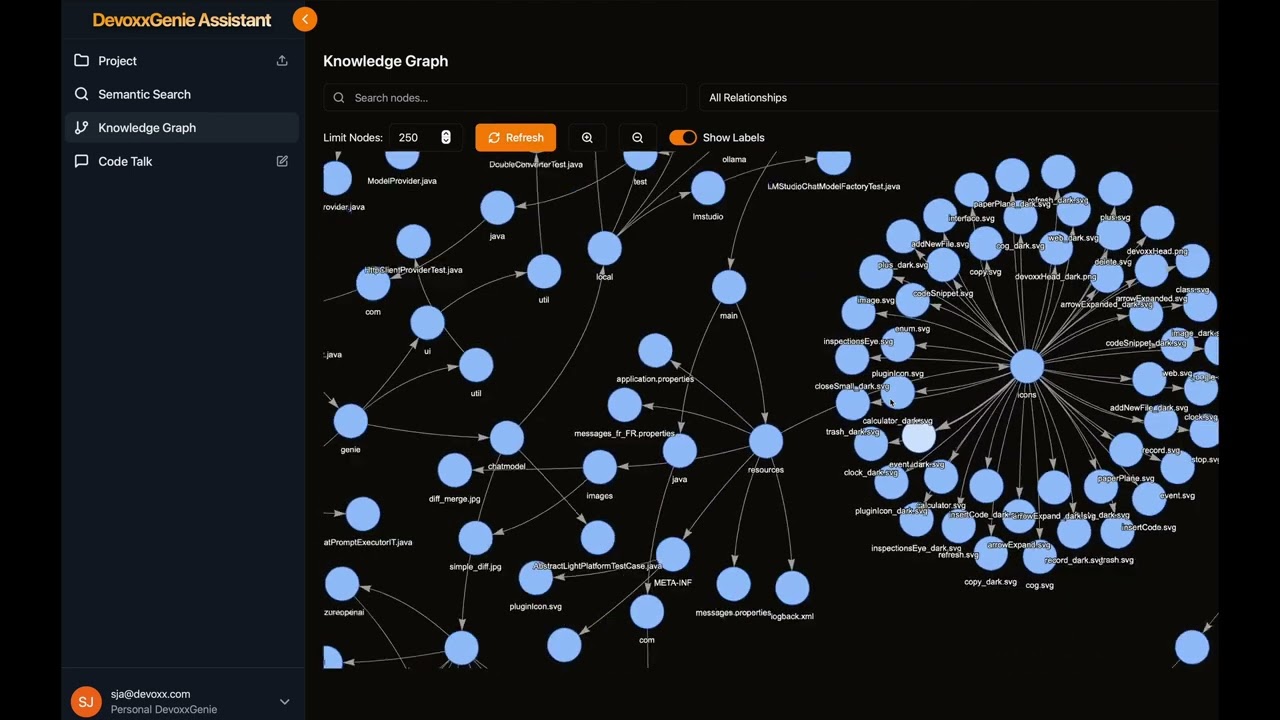
I've made a new (standalone) RAG prototype implementation using GraphRAG and Neo4J which will replace ChromaDB. This is why I'm not focusing on improving or fixing the first (naive) RAG implementation currently available. Just need to find time to integrate this in the plugin because March is very busy month presenting my findings at several different events.
https://www.youtube.com/watch?v=dxTUZ--k648
Hi @stephanj ,
as you correctly highlighted, there is already a scan project functionality executed, but it is only after iterating over all included files. I changed the order and tested the indexing functionality locally with success and finally created a PR with this small change: https://github.com/devoxx/DevoxxGenieIDEAPlugin/pull/559. As in the existing tests, the order was already different to the actual implementation, I did not see the need for an additional test. Also I understand with your rework, there is a lot changing. To which I am looking forward to, of course 😉
I also understand if you do not want to merge the change, but I thought, @pwilkin might be interested in making the existing RAG indexing working locally.
Please don't catch and ignore Throwable as it is a super class of Error, which contains irrecoverable errors. Refer to Javadocs as example: https://docs.oracle.com/javase/8/docs/api/java/lang/Error.html
If you think it is sensible to ignore an Error subclass in a scenario, catch that specific Error type.

@pretyman
Right indeed at this point i did observe two kinds of specific errors UnsatisfiedLinkError and NoClassDefFoundError but even if we catch those two specifics errors it will remain a bad pattern no?
