

 desktop
Add ability to filter the changes list
Please describe the problem you think should be solved TL;DR: Please add a way to filter the changes list so I can find the files I want to commit.
Hello friends! I'm a big fan of The Thing Aboout Git. As such, I'll often go on manic sprees of making changes, maybe a few search and replaces throughout my code.
When I come up for air, I'm ready to make nice clean commits of logical groups of changes. The only problem is I have tons of changes, which is noisy. It makes it hard to find the changes I care about. I'd like a way to filter the changes.
[Optional] Do you have any potential solutions in mind?
Boy do I!
If you click on the History tab, you already have a nice text filter.
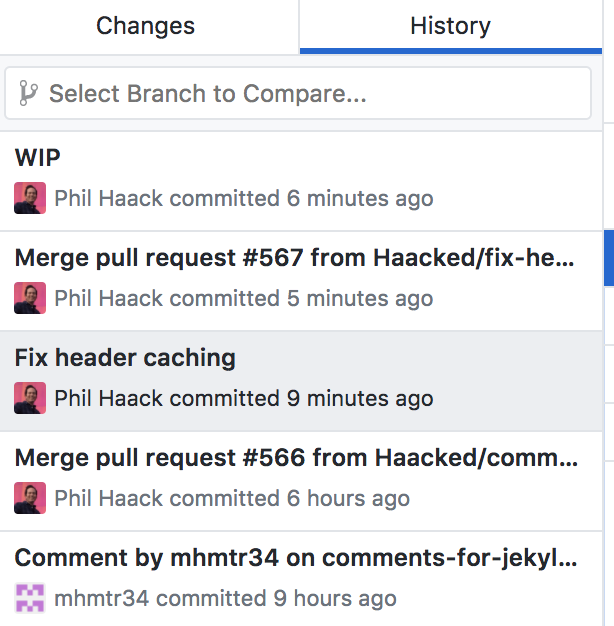
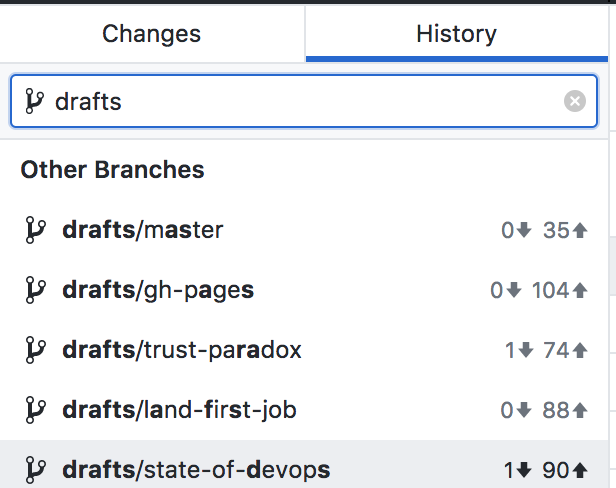
It'd be nice to replicate that approach when you click on the Changes tab. Add a text box that filters the list.
You could get fancy with it and only show it when you have more than some number of changes (like 20).
For EXTRA CREDIT add the ability to filter on the type of change. For example, I sometimes want to filter out all deleted files when crafting a commit.
Thanks for your consideration. Big fan of the Desktop product!

Hi @Haacked! Thanks so much for filing this issue. 💜 These seems useful to me (and mirrors a feature on dot com for pull requests). I'm going to mark this for design to take a look when they can. 😄 Thanks again.

I'd like to see a find/search option so that I can find the files I'm interested in amongst thousands when I move/refactor a folder full of source - in a java project all the package names also change and its impossible to find specific files to check.


I think this is a really valuable feature! Anyone who works with large repos with large amounts of changed files, would consider this a feature a total must have!

I would love for this to be implemented. I would use it on the regular.


@syxcools requested this in https://github.com/desktop/desktop/issues/8578.

One thing that would be very helpful for this feature is a simple wildcard filter. For example, when I'm making a large commit, I often want to look at all the *.csproj files to make sure I didn't add anything to the wrong project. A filter on file extension works just as well.
It's been almost 2 years now. Any news or updates? Anyone who's worked on any project of substantial size knows this is basically an essential feature... Wildcards and extras would be great, but even just the most basic text filtering would be a big help. Please add it.

I was just about to file a request for this. Thought I'd search for it first.
No surprise that it's been sat on for 3 years (original issue not this one). That seems to be par for the course with this app and useful features needed and suggested by the community of users. Oh well!
Scenario I want to look at the changes in one file out of hundreds in my pending commit
Expected be able to filter by filename
Actual I have to scroll the list to find it

This would really be great when dealing with hundreds or thousands of changes -- many of which you don't currently want to commit. I work in Unity a lot, and it can randomly decide to update assets. Sometimes you want to keep these updates, and sometimes not. Being able to temporarily filter to just source code would be a great addition. It's extremely painful to dig through a thousand changes (I kid you not) to find the two files you need to check in.

For two years, the developers have not been able to add the simplest filtering function. A feature that would save users a lot of time. Are you sadistic? Those you can add filtering functionality to the branches section. Although there are fewer branches in most projects than fingers on a hand. But you cannot add search by commits or by changes, which are typed in thousands. Do you use your own product at all?

I think they do use it, but are only interested to add features that support their own workflows (where they probably have multiple branches per dev and multiple devs).

Thanks everyone for the feedback here! We discussed this today and I wanted to share some thoughts and ask a question about how you'd expect this to work. One consideration we're trying to think through is what happens when you have a filter applied. You see the changes that meet the filter criteria, but then the rest of the files will not be shown, so it's tricky to figure out what will actually be committed if you're committing in a filtered state.
For the filter itself, based on this issue, it seems like it's worth supporting both file name and extension filtering. So you can type .md and all markdown files will show up, or you can type README and your README.md file will show up (but only files that actually have changes, obviously).
We've got a few options for how we handle committing when a filter is applied:
Anything goes (commit everything in and out of the filter)
The benefit of this is that you're in control over your selection. But I think the downside risk is too great that you aren't able to see what files will actually be committed if for example, there are some files selected, then you filter, then select a few more, then commit. It makes it too unclear what's actually going to be committed and that feels like too many dragons.
Don't allow commits when the filter is applied
This would have the benefit of making it more explicit what's being committed and that the filter is only for finding and selecting things. But the downside is convenience - you'd have to cancel the filter in order to commit.
From a filtered state, only commit files that show up in your filter
This is an attempt to mesh the two. Only the changes shown would be committed, and changes from files not included in the filter would not be included in the commit. This has a similar downside as the first option except in the opposite direction. If you think it's going to commit everything, including what's in and out of the filter, then you'll be surprised that it only committed the changes that were part of the filter.
If you have other ideas about how this might work, we'd love to hear them. Regardless of the approach we take, it'll be important to communicate the expectation so people understand what will happen if they try to commit a filtered list of changes.

Personally, I think the correct process is the last one -- only commit files that are visible. I would go further and say to make it easier you could just clear the selection when applying the filter. The purpose of this, at least for me, is to filter out all the chaff, so I can see what I want to commit. I could not care less about the unfiltered data. I would never want to commit those items. Here is my preferred workflow:
Enter *.cs in the filter box to display only code changes. Select the ones I want (probably all of them), and hit commit, committing just those items.
While not exactly ideal, the "Don't allow commits when the filter is applied" option definitely makes the most sense, at least for my use cases, and it's the solution that would cause the least confusion and be the least user error prone, I would think. I personally don't think there is a particular time where I would want to only commit a set of filtered items, or if so, very rarely. Even in the event that was the case though, you could still do this with the "Don't allow commits when the filter is applied" option, you would just have to [clear any currently selected items] enter your filter, select all the items (preferably with a simple checkbox as seen in my mockup below), clear the filter (by clicking the x in the filter box), and commit.
For my case, when I have hundred(s) (or even thousands) of changed files, and I may be looking for specific files to commit. Let's say I have 500 changed files, and I've already selected 50 files I want to commit, but can't find another 20 or so I'm looking for; I would just type a filter, maybe something as simple as pie.js, select the file, then change the filter, repeat until I have all the files I'm looking for selected, then commit the changes. So it would be just like it is now, but make finding certain files quicker/easier, and that should be the goal, to me.
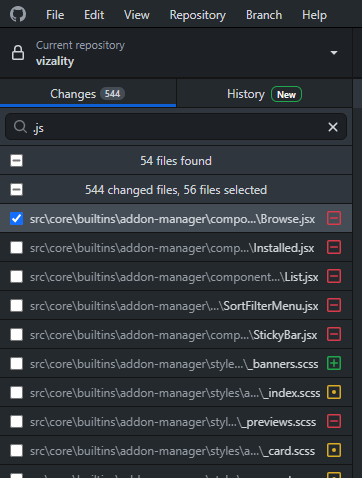
One possible UI for such a thing would be to have the "main" section collapse (or "appear" to be collapsed) to the bottom when the user enters anything in the filter search bar, and a new section header would appear under the filter search bar with how many filtered files are found, and a checkbox to deselect/select all found filtered items. I also added a "x files selected" to the main category header to be able to easily tell how many files are currently selected to be committed which should help clarify things to the user and avoid confusion.
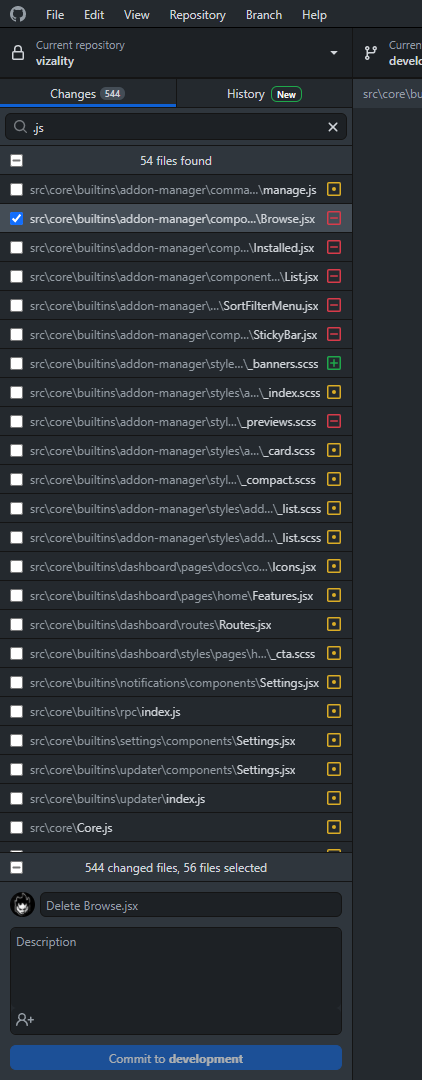
With this setup, you could potentially even have the "Anything goes (commit everything in and out of the filter)" work, if you have the section headers here be like collapsible accordions--- i.e. clicking the "544 changed files, 56 files selected" header could expand to right below the filter header, collapsing the filtered section. I feel like just having the "x files selected" info in the main section header should make it much more clear to the user what they're committing, at least in a ballpark sense.
When using Desktop, I think of the GUI as being similar to staging a commit. So to create a commit, I might apply one filter, select some files or changes in files, then apply another filter, and select more changes. When I commit, I'd expect everything I selected to be committed, whether I was currently in a filter or not. To me, a filter is a just a filtered view of my changes and shouldn't change the underlying state of the commit that I'm crafting. In the same way the changes that aren't visible because you scrolled down (when there are too many commits to fit on the screen) are still included in the commit. So I'm in favor of option one or two.
Option one could work if the text above the commit box that summarizes the number of changes being committed also included the number of changes hidden by the current filter that will be included. That would let the user know they're not seeing the full commit because of a filter.
Option two could be less onerous if the commit button becomes a "Clear filter" button. Click it, then click it again to commit. No modals.
Since filters help you craft a commit, it may make sense to clear the filter when you create the commit no matter which option you end up implementing.
If you plan to have invisible selected items, it's imperative that the user knows about them when committing. Already the application will preselect changes for you. If you forget to clear them before filtering, you will end up committing a bunch of changes you don't expect to. Maybe it's best if the filter shows all selected items + whatever the filter is. Or you have a dialog when committing that says "You have N unshown items selected that will be committed" But personally, I think committing invisible items is a bad idea.
@billygriffin another option to consider. A filter on the changes list never hides changes. Instead, it sorts the changes - first those that match the filter followed by those that don't - and applies different styles to those that match and those that don't match the filter.
Render the changes that don't match in a less prominent style (reduced opacity, greyed out, etc) so it's obvious that they don't match the filter. Obviously the changes that match the filter should be more prominent to make it obvious they do match.
This addresses the use case I care about which is being able to find the changes I'm concerned about as they will rise to the top. But it also doesn't change how committing works. You can still select the filtered out changes for inclusion in the commit.
Really need this feature. When refactoring large projects it's really a must have!
Don't allow commits when the filter is applied
This makes the most sense I think, because it would be dangerous to commit selected files that are not visible. That's not an obvious action for a user unkown of the functionality.
Maybe even a better approach:
Don't allow commits when the filter is applied AND 1 or more invisible files are selected, otherwise, allow it.

From #15036,
The feature request
Hello, will be great to have a select menu (or some similar) to filter by type. I need to see only removed file... updated or added.
Many thanks for your hard work :)
Dario
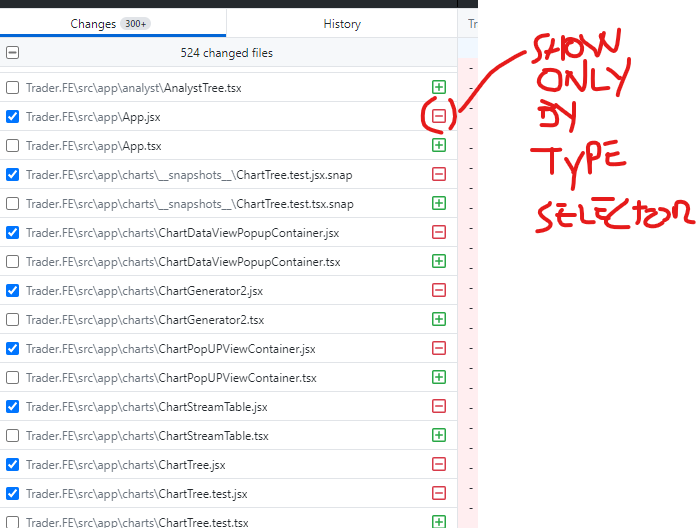
Proposed solution
Have a select menu or radio button to show/hide toggle by type at top UI

Was going to request a filter changes feature, then found this thread. Would be super useful! Are there any plans to add this?

I'd like to also throw my input into the ring if that's ok.
I use Perforce (Helix? P4? it seems to have a few names) in my day job, and that's designed around the concept of "changelists", which is basically a way of grouping changes for ease of management and submission.
The concept of "changelists" runs through the core of Perforce and inhabits every action you do. Git of course is a very different beast. But there's no reason why we can't take the concept of grouped changes and simply apply it to a gui interface (like Github desktop).
The way it would work is that the changes tab would be a tree. To start with you'd have one root node called "Default" into which all new changes automatically fall.
At any time, a user can create a new group (which will become a new root node), and changes (files) can be dragged and dropped between the groups.
Groups can have their own summaries and descriptions, which means you can fill those out when the group is created (if that's more convenient to the user) and simply submit when the changes are ready to go.
Users can submit a whole group, or individual files. If a group is submitted, just remove it from the list as changes do currently, but if individual files are submitted, then you need to decide what to do with the remaining files in the group. You could either send them back to the default changelist and delete the group they were in, or simply keep the group around. My preference would be for keeping the group, but perhaps erasing the summary and description unless the user explicitly chooses not to.

From #15403,
if i have a long list of changed files (10-100s), there isn't the ability to jump to a specific file in that list that I could find. I have to select all the files, right click, copy paths to a text editor, search there, and then try to correlate the line number to the actual list back in my GH desktop (OSX).
I'd really love to have a way to filter by extension in the history/changes tab as well. Mine is flooded with thousands of project .yy file changes from gamemaker studio because they're IDE has an issue where it shows changes just for opening your project that are not really substantial changes worth noting.
PLEASE, PLEASE, PLEASE can you add this as a feature?

+1 Looking for this again today. I have 158 changed files, and I can't even sort them alphabetically (by file name not path), let alone search them.


Man, we're almost at half-a-decade since this this request was opened (and the pain was probably around prior to this), with no progress
This feels like such a willful blindness to a core pain point for anyone who uses the GitHub Desktop UI
