

 desktop
What could a better pull request experience in Desktop be?
As pull requests have become a larger part of the regular workflow for more and more projects on GitHub, I think there's a lot of opportunity for Desktop to incorporate them in a more first-class way. This is a first stab at laying out some of the problems and opportunities I see, but I'm sure this isn't exhaustive, so feedback welcome.
Problem 1: I can't see the delta between my PR branch and the branch that it's proposed to be merged into.
The idea here is for this to serve as the equivalent of the "Files changed" tab on dotcom, where you can see the entirety of the diff between the two branches. Currently, Desktop only gives you the diff by commit, which isn't really what you want in the case of considering whether to merge one branch into another.
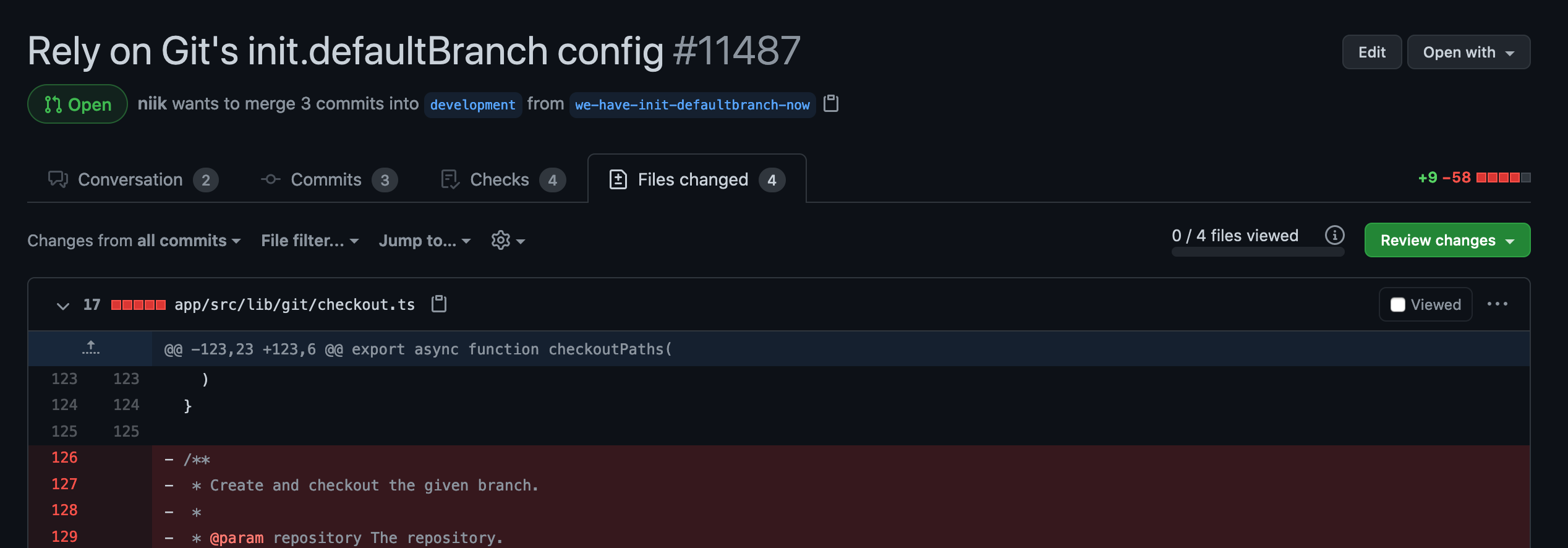
This is somewhat captured in https://github.com/desktop/desktop/issues/6757, though that's a request for a broader diff not just excluded to PRs. @rafeca and I also did a hack day exploration of this, which resulted in this branch: https://github.com/desktop/desktop/compare/hack/diff-prs It's half-baked for sure but provides a starting point for when we start working on this.
Problem 2: If I check out a PR to build it and review it locally, I have to then go back to GitHub.com to actually add my review
There's nowhere in Desktop today to just approve a PR or request changes, despite being able to check out a PR very easily. This could optionally involve some incorporation of actual code review comments and/or suggested changes, but I'm more ambivalent about the question of whether that belongs in Desktop or not.
Problem 3: It's challenging to actually get to the PR on dotcom from Desktop
There's a keyboard shortcut to view the PR on GitHub, but that's not very discoverable, and it's strange that there's not a natural place in the app to get to the PR page as it's something I do regularly (though the need for this might be partially mitigated if we solve some of the other problems, because there's less need to go back and forth if you can do more with PRs in Desktop).
This is captured in https://github.com/desktop/desktop/issues/8152
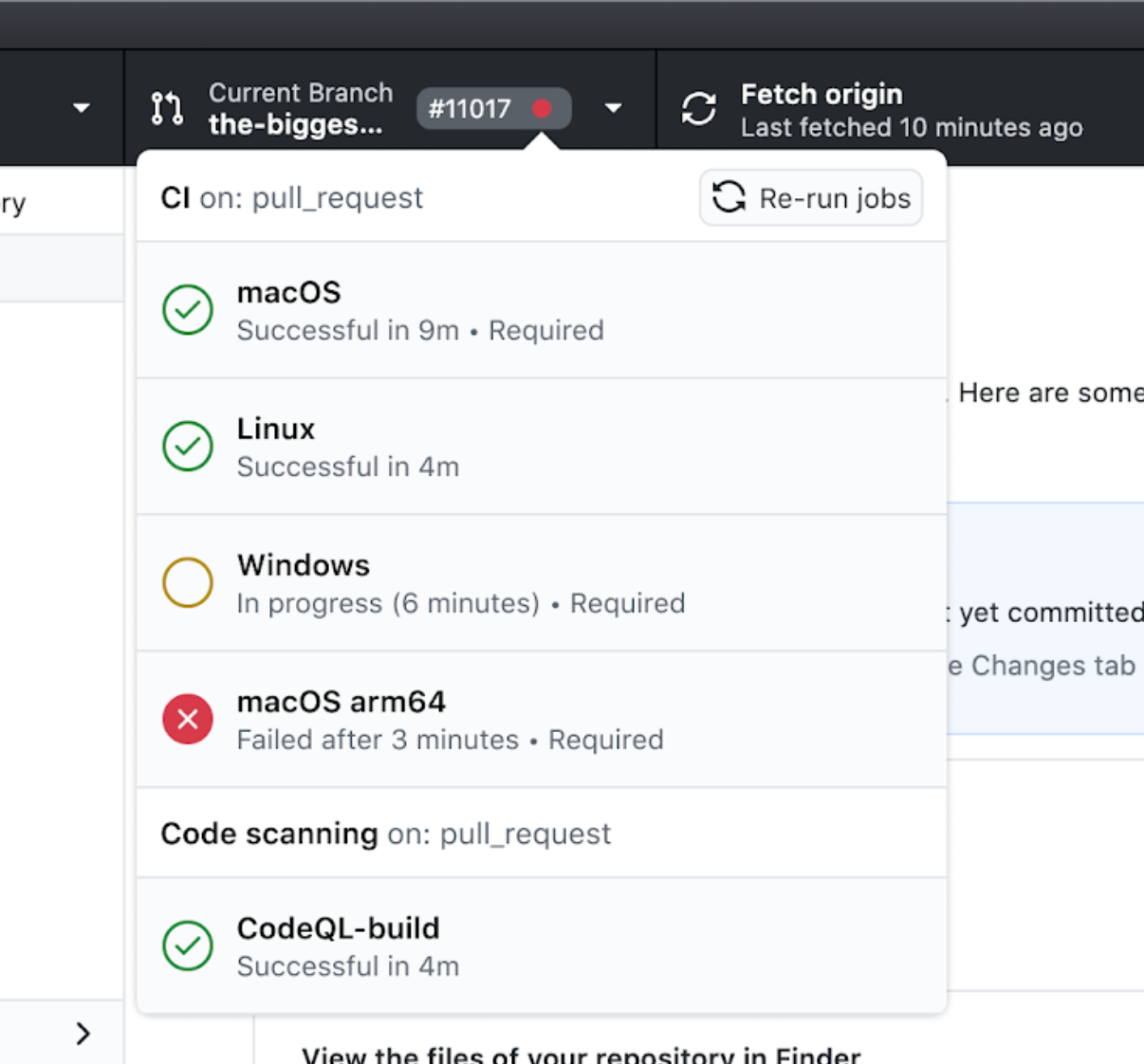
Problem 4: I can't see any additional context about checks other than whether the entire suite passed, or if something failed (for example, which checks failed)
It's nice to see the top level green check or red x for everything passing or something failed, but it's not sufficient if I want to know anymore detail about what failed, or potentially re-run a failing check.
Here's a design of a possible solution for showing more granularity in checks:
Problem 5: If a check failed, I have no way of re-running the check without going to the PR page on dotcom
A possible exploration of this is included above, but basically this is about just being able to quickly re-run things without having to push an additional commit.
Problem 6: I can't create a PR in Desktop. I'm forced to go to dotcom and fill out the PR info there before coming back to Desktop.
The old macOS app used to have in-app PR creation, and I think this could be interesting to explore, but I'm not 100% sold it's the best idea. It does feel weird to do all the work and use Desktop to push it, then have to leave. One of the concerns we had several years ago was needing to keep feature parity with dotcom's PR page, and that's still an issue, but I think it's stable enough and there's precedent with mobile and CLI that we should be able to do this if it's the right choice.
This is also captured in https://github.com/desktop/desktop/issues/295, and there's some context here like PR templates and the like that make this not quite as simple as just having text fields and sending them to the API to create the PR.
Problem 7: I can't view anything about a PR other than the title and overall checks status
If the PR is mine, and someone requested changes on that, I have no way of seeing that request in Desktop itself (or even that the person requested changes or approved it!). We need to have some way to let people view this, potentially ephemerally through a notification of some kind, and then persistently through a way of visualizing a PR more broadly.

Thank you for this really nice write up @billygriffin !! :heart_eyes:
Here you have my 2c in sections so it's easier to process 😆
Using Desktop vs dotcom
In general, I share the same concerns as you regarding creating and reviewing PRs from Desktop: both tasks are quite feature-rich (drag&drop or copy&paste images, use of templates, collapsing/resolving comments in a PR, comment threads, changing labels, assignees, request reviewers…), which means they're really complex, and we'd need to keep up with dotcom.
All that unless… we decided to offer a much limited subset of features from Desktop, somehow being super explicit about that intention. Something Markus mentions in #295 is that maybe we use all those features, but probably most of our users don't (or at least they don't depend on them).
Just like the old app seemed to do, we can offer a way to quickly create the PR from the app and just set a title and a description. No templates, no image upload, no labels/assignees/reviewers, no preview mode, no helpers to write markdown/rich text, just a bare minimum that could be useful for many people. This is an extreme example, we might decide that minimum also has some of the features I mentioned. And the same idea could be applied to the PR review process.
Of course, we should always provide a way to jump to dotcom and have the fully-fledged UI for creating or reviewing PRs. Something to consider is whether we want to (or even can) transfer to dotcom in-progress work the user did on Desktop.
Personally, I could buy the idea of a consciously limited version of dotcom for these two tasks that is useful for many people (assuming it is). However, bloating the app with many/most of the features from dotcom feels like you're trying to replace something that you already have accessible from your machine (and is probably better, more polished, more up-to-date… since they're leading the changes and have a whole team specifically for that).
PR deltas from Desktop
Regarding seeing deltas of a PR branch (equivalent to the Files tab): while I really like the idea, I'd love if we could detach it from PRs and allow seeing deltas of any set of commits (just like you and Rafa did in that hack branch).
Other ideas
Finally, one piece I feel missing that might be out of this scope, but is closely related, is how we start the flow of contributing to a repo from Desktop. I think many users start working from an Issue, so I miss something like…
- Browsing a list of issues from Desktop and click the one I want to work on. Alternatively, an
Open in GitHub Desktopkind of button for Issues in dotcom would work too. - Desktop will create a
issue/12345branch where I can start working. - Desktop will suffix my commits with
#12345to make sure the issue keeps track of them. - When I create the PR from Desktop, it already mentions/links
12345in some way (e.g., adding aCloses #12345text at the top of the description).

Great discussion starter!
Thinking about my flow of submitting a PR (obviously not representative of all, just my view point 😄 )
- Push my final changes
- Go to .com
- View my diff to double check my changes
- Fill out title and description (appreciate the templates)
- Submit it
- Request reviewers
Problem 1: I can't see the delta between my PR branch and the branch that it's proposed to be merged into. and Problem 6: I can't create a PR in Desktop. I'm forced to go to dotcom and fill out the PR info there before coming back to Desktop.
I am completely on board with! Obviously I am not representative of all users, but my normal flow when I go to submit a pull request is first thing - check the diff. Thus, if there was a convenient way (Problem 6) to submit a PR from the Desktop app, I would not use it without being able to see the diff.
When I first started using Desktop in these last couple months, I was excited to find the compare feature on the history tab to then be disappointed that it wasn't a diff. A feature from other git clients that I most definitely miss.
Looking at it from a beginners perspective - not having visibility of the changes I am submitting in PR would be scary and prone to unintentionally submitting something only to go on to github.com to look at the diff (or get a review) and have to go run a commit to fix it (read... I left a console.log or debugger in there whoops...).
From a more advanced user perspective - being able to look at diffs was something I did semi regularly in past jobs to try to track down what caused a bug to be introduced. I personally really like this feature.. and wish it was more prominent in git clients in general.
My preference would be to implement a diff feature and have a way to quickly go to the diff for the PR.
Problem 6: I can't create a PR in Desktop. I'm forced to go to dotcom and fill out the PR info there before coming back to Desktop.
I concur with the concerns of recreating the PR section of github.com within the app. We already have a pretty established flow of leaving the app when another tool exists that can complete the task in a better way. Additionally, I feel it is a fairly established process to open pull requests from a website.
That being said, I like the idea of having a lite version of this and being explicit about it being lite - something like a button/message - "Missing advanced .com features? Submit this PR on github.com!". Tho, I bet even with being explicit if we implement a lite version we will soon get features requests for github.com functionality.😄 -- an opportunity to track the features that people end of going to github.com for in a PR flow.
As stated above tho, I would probably not use this feature without a diff so show what I am submitting. Minimum features to me are title, description, and diff. Two other features (based on personal exp) I feel would be requested are being able to request reviewers and templating. On past teams, your PR would not be reviewed until you requested a review.. thus in that case would still be forced to go to .com. Templating is just really useful for consistency and straight up remembering things.
Another thought that comes to mind with having a PR lite flow is that people may avoid advanced features that would be useful to them just because they can get by without going to .com. Be a bummer to take away good experiences...
Problem 4 Problem 4: I can't see any additional context about checks other than whether the entire suite passed, or if something failed (for example, which checks failed)
and
Problem 5: If a check failed, I have no way of re-running the check without going to the PR page on dotcom
I love the idea of a quick popover for more info especially if there was a button on the failures to be able to jump to see the log on the github.com. But the actions tab feels like a separate entity to me, being able to re-run the jobs would be feel odd to me without being able to see the reason it failed, especially considering they get rerun if I commit a change to hopefully fix the issue. I wonder how much the re-run feature would get used?
Problem 3: It's challenging to actually get to the PR on dotcom from Desktop
Just agree 😄 . It would be nice if there was button. I did actually try to click on the hashtag pr number when I first saw it in attempt to open the PR.

dotcom, where you can see the entirety of the diff
@billygriffin No, you cannot. You only get to see a few wordwrapped lines above and below the changed part unless you click a bunch of times on the expanders. Show me the whole file and scroll the change to be in view so I can focus on it, but don't effectively hide the rest of the code file or otherwise change the authors presentation of it (word wrapping decreases readability, especially in a diff view where changed lines are getting wrapped).
If I check out a PR
I can check out a branch or files but not a PR. A pull request is not interchangeable with a branch, they are logically different things. A pull request should have a branch and commit, status checks, reviewers, submitters, comments, etc. The conflation of branch and PR in your implementation has led to some frustrating problems. Please try to avoid conflating the two things in discussions.
I concur with the concerns of recreating the PR section of github.com within the app
I concur but for the reason of the dotcom version of the tool being so difficult to conduct any kind of proper review in. The desktop should instead create a better PR tool.
This issue is a great example of why issues need to have threads.

#13262
Currently there is not way for a person to review, comment or approve a pull request.
Adding this basic feature in GitHub Desktop will make it much more functional and would lessen the need to use the browser version. As things stand now it is annoying to have to open the desktop version AND the browser version in order to manage a repository.
Problem 3: It's challenging to actually get to the PR on dotcom from Desktop
Just agree 😄 . It would be nice if there was button. I did actually try to click on the hashtag pr number when I first saw it in attempt to open the PR.
I personally use Ctrl + R to "open a PR" to open the URL in my browser to view a PR. Though yes there should be a button IMHO.

Very limited value of Desktop for pull requests if I can comment on lines.

@steveward Why is this closed as not planned? It is clearly a needed feature, as one of the main reasons that people use GitHub is code review, and it is currently impossible to do code review on GitHub Desktop.

@jhwheeler this isn't on our roadmap at the moment, but closing this issues does not mean it's something that we won't ever revisit again in the future. We've added a number of improvements to the experience (like PR previews and statuses) since this was opened as well.

@jhwheeler this isn't on our roadmap at the moment, but closing this issues does not mean it's something that we won't ever revisit again in the future. We've added a number of improvements to the experience (like PR previews and statuses) since this was opened as well.
Thank you for the prompt reply. I understand that there must be a lot of issues and features on your current roadmap. I'm not sure what the intended use case of GitHub desktop is for most users; for what it's worth, I was expecting to be able to replace the web version of GH with the desktop version. Since my team's main usage of GitHub web is code review, and GitHub desktop does not provide a code review user experience, my team will not be able to use desktop. The web version is adequate, so there's not really a big blocker here for our workflow. I hope this feedback is useful for you.
Thanks for that feedback. GitHub Desktop is not intended to be a 1:1 replacement for using GitHub in the browser, but we are always interested in hearing how we can improve.