

 derf
derf
Exif info is double-spaced
Since Ubuntu 18.04, the exif info ( --info ) and the file path info ( -d ) is double-spaced. I upgraded an older system to 18.04 and first experienced the problem so then I did a clean install of Ubuntu 18.04 using lubuntu desktop and have the same problem.
The command I'm using is:
feh \
	--info "exifgrep '(ImageDescription|UserComment|DateTimeOriginal)' %F | cut -d . -f 4-" \
	-xrzd  \
	-FD60 \
	/mnt/path/to/files/ \
	&
Thank you for your help!
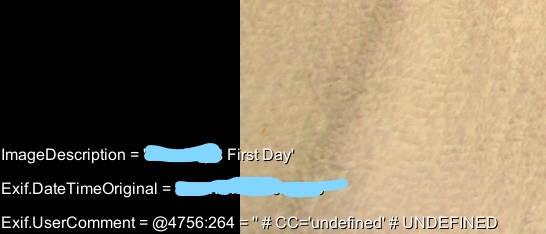

What do you mean with 'double-spaced'? The whitespace in there looks pretty normal to me

I'm sorry, I didn't mean to make you defensive. I'm talking about the extra line between each printed line. The examples you provide on your website, are single spaced and the exif data I was showing prior to the upgrade were single spaced. I suspect something about the upgrade is causing feh to double-space the exif info.
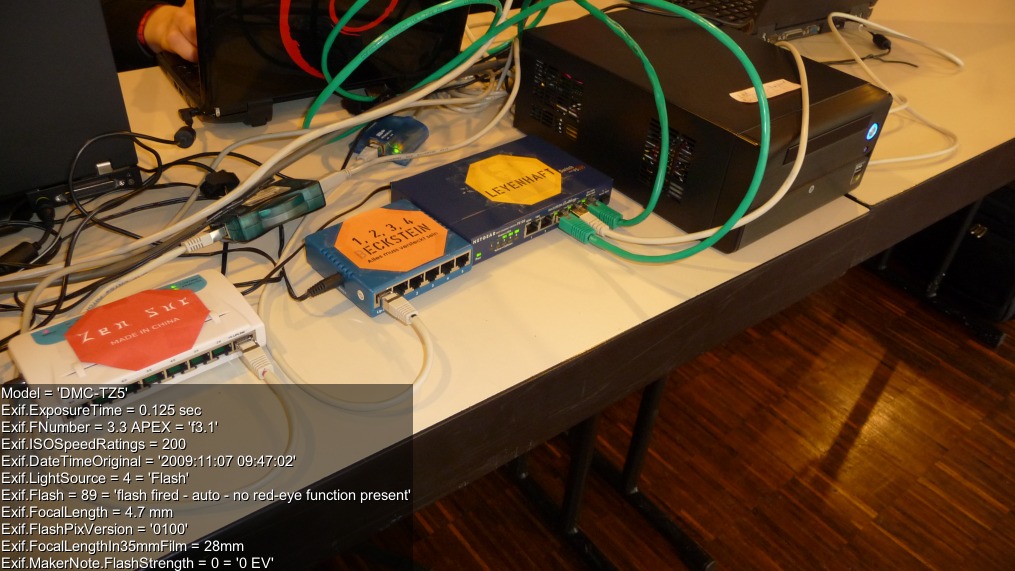
Ah, that was a misunderstanding on my part. Now I see what you're referring to.
I can't reproduce that here, though, so first I'd like to determine whether feh or exifgrep is responsible for the double newlines / extra spacing.
Could you run exifgrep '(ImageDescription|UserComment|DateTimeOriginal)' some/file/with/data.jpg | cut -d . -f 4- in a terminal and check whether it has extra spacing or not?
No problem!
openconsole@basement:/mnt/path/to/files$ exifgrep '(ImageDescription|UserComment|DateTimeOriginal)' IMGP6246.JPG | cut -d . -f 4-
produced the following in a terminal, single-spaced:
ImageDescription = 'Another Snow Day at Nana and Papa's House'
Exif.DateTimeOriginal = '2019:01:21 14:51:08'
Exif.UserComment = @2041:57 = 'The kids go sledding on nana and papa's driveway.' # CC='ASCII' # UNDEFINED
Thank you for your time.
I dug into this today, and ultimately traced it down to the font you're using. That is, some fonts have large vertical spacing and some have more compact vertical spacing.
Here are some details:
feh is determining the height of each line of text. That starts in gib_imlib_get_text_size(). The call stack goes like this:
gib_imlib_get_text_size() -> imlib_get_text_size() -> __imlib_font_query_size()
And the height in that final function is calculated with:
*h = __imlib_font_max_ascent_get(fn) - __imlib_font_max_descent_get(fn);
Those "max ascent" and "max descent" functions only consider the font itself, not the actual text being rendered. So a font with large ascent and/or descent will have a large height for each line of text, regardless of the text itself.
I found that the default yudit font results in the double-spacing described in this issue. Using --fontpath /usr/share/fonts/opentype/noto --font 'NotoSansCJK-Regular.ttc/20' also caused significant double-spacing.
But these two fonts appeared much more normal (that is, without big double-spacing):
--fontpath /usr/share/fonts/truetype/dejavu --font 'DejaVuSansMono/20'
--fontpath /usr/share/fonts/truetype/noto --font 'NotoSansMono-Regular/20'
So I would say there isn't an issue to resolve here. It's just a characteristic of the font being used. (I don't know what happened in Ubuntu 18.04 that triggered a change in appearance.)

Ah, now I see what changed. The feh source itself contains an old truetype yudit font. See https://github.com/derf/feh/tree/master/share/fonts.
However, the debian packaging does not install that yudit.ttf file. Instead it links to a yudit.ttf supplied by the distro in the yudit-common package.
$ ls -l /usr/share/feh/fonts/yudit.ttf
lrwxrwxrwx 1 root root 27 Nov 12  2024 /usr/share/feh/fonts/yudit.ttf -> ../../yudit/fonts/yudit.ttf
$
That's happening in the feh.links file in the debian packaging at https://sources.debian.org/src/feh/3.10.3-1/debian.
You can confirm this by downloading https://github.com/derf/feh/blob/master/share/fonts/yudit.ttf onto your system and then running feh with --fontpath /path/to/directory/containing_the_ttf --font 'yudit/12'. When I do that using the yudit.ttf in the feh source, the double-spacing problem does not happen.
Tried the downloaded yudit font, also tried compiling current feh from source, now it's worse.
My command is:
/usr/local/bin/feh \
        --fontpath /usr/share/feh/fonts/ --font='yudit/12' \
        --info "exiftool -imagedescription -datetimeoriginal -usercomment %F | sed 's/^.*\(: \)//'" \
        -xrzdY  \
        -FD60 \
        /mnt/md0/220nicklaus/piclibrary/ \
        &
and my output is:
feh WARNING: couldn't load font yudit/12, attempting to fall back to fixed.
feh WARNING: failed to even load fixed! Attempting to find any font.
feh WARNING: couldn't load font yudit/12, attempting to fall back to fixed.
feh WARNING: failed to even load fixed! Attempting to find any font.
feh ERROR: Couldn't load font to draw a message
One pair of warning messages is caused by --info and the second pair of warning messages is caused by -d. Using fontpath and font seem to have no effect and after installing yudit.ttf I can no longer start feh unless I omit --info and -d.
@Tiogaplanet - In your example above that fails, do you have this file?:
/usr/share/feh/fonts/yudit.ttf
with size 57708
and SHA256 (yudit.ttf) = 59917763f1f8fce487e92a27038bea1f883bae59b70e00c3bcaff45e37a01560
Affirmative.
ls -l /usr/share/feh/fonts
total 60
-rw-r--r-- 1 root root 57708 Nov 19 15:58 yudit.ttf
sha256sum /usr/share/feh/fonts/yudit.ttf
59917763f1f8fce487e92a27038bea1f883bae59b70e00c3bcaff45e37a01560  /usr/share/feh/fonts/yudit.ttf
Hmmm... I'm not sure what's going on with your setup, but I can provide details on the setup that is working for me. Here's a shell session showing all the details.
$ strings /sys/firmware/devicetree/base/model
Raspberry Pi 5 Model B Rev 1.1
$ lsb_release -a
No LSB modules are available.
Distributor ID: Debian
Description:    Debian GNU/Linux 13 (trixie)
Release:        13
Codename:       trixie
$ dpkg -l | grep -w feh
ii  feh                                  3.10.3-1                             arm64        imlib2 based image viewer
$ which feh
/usr/bin/feh
$ feh --version
feh version 3.10.3
Compile-time switches: curl exif inotify verscmp xinerama
$ pwd
/tmp/fehtest
$ ls -l fonts pics
fonts:
total 64
-rw-r--r-- 1 myuser myuser 57708 Nov 19 14:19 yudit.ttf

pics:
total 96
-rw-rw-r-- 1 myuser myuser 93175 Feb  6  2019 moon.jpg
$ feh --fontpath /tmp/fehtest/fonts --font 'yudit/12' --info 'echo "line1-apple\nline2-banana\nline3-cherry"' /tmp/fehtest/pics
$
And here's the resulting picture view showing the single-spaced lines using that yudit font in the feh project:
I'm embarrassed to tell you. Specific flavor of Ubuntu shown below is Lubuntu with LXDE.
$ sudo dmidecode | grep -A3 '^System Information'
System Information
        Manufacturer: Dell Computer Corporation
        Product Name: DIM4400
        Version:
$  lsb_release -a
No LSB modules are available.
Distributor ID: Ubuntu
Description:    Ubuntu 18.04.6 LTS
Release:        18.04
Codename:       bionic
$ which feh
/usr/local/bin/feh
openconsole@basement:~$ feh --version
feh version 3.11.2
Compile-time switches: curl verscmp xinerama
$ feh --fontpath /usr/share/feh/fonts --font 'yudit/12' --info 'echo "Hello"' /mnt/md0/220nicklaus/piclibrary/2025/11/04/IMG-20251106-WA0000.jpg
feh WARNING: couldn't load font yudit/12, attempting to fall back to fixed.
feh WARNING: failed to even load fixed! Attempting to find any font.
feh WARNING: couldn't load font yudit/11, attempting to fall back to fixed.
feh WARNING: failed to even load fixed! Attempting to find any font.
feh ERROR: Couldn't load font to draw a message
For now I have figured out that if I cd feh-3.11.2/ and make install-font I can get feh running with feh --fontpath /usr/local/share/feh/fonts/ --font='yudit/12' --info "exiftool -imagedescription -datetimeoriginal -usercomment %F | sed 's/^.*\(: \)//'" -rzxdY -FD60 /mnt/md0/220nicklaus/piclibrary/ &.
But if I stop feh and re-run it or try to run the feh command from a script, it goes back to the original warnings and error about being unable to load the font.
Real ugly but works for now.
All of this is for a dedicated machine running a slideshow of 24,000 photos.
Added user openconsole to sudoers to run ~/feschript without a password. Edited existing LXDE autostart entry to run as sudo: @sudo /home/openconsole/fehscript. Edit my fehscript to do clean install of font from source package.
#!/bin/bash

cd /home/openconsole/feh-3.11.2/share/fonts
make install-font
feh --fontpath /home/openconsole/feh-3.11.2/share/fonts --font='yudit/12' --info
 "exiftool -imagedescription -datetimeoriginal -usercomment %F | sed 's/^.*\(: \
)//'" -rzxdY -FD60 /mnt/md0/220nicklaus/piclibrary/ &