

 derailed
Remove padding when in fullscreen log mode

Is your feature request related to a problem? Please describe. I really like the fact that we can directly dive into application logs and also control how they appear (with wrap, scroll and fullscreen). However, often I find myself in a situation where I want to copy specific lines from the logs and in these cases the whitespace padding that is still present in fullscreen mode often messes up formatting.
Describe the solution you'd like In regular mode, display borders with padding, in fullscreen mode remove borders and padding. My assumption is that there are no real use-cases for a fullscreen mode that still has the padding (i.e. either you want to display everything nicely and visually appealing or you want to get the most out of your screen size).
Describe alternatives you've considered
I currently have to exit k9s (or switch the tmux pane) and construct a kubectl logs command in order to copy logs. Alternatively there are other tools like stern which I could use but I'd prefer to stay within k9s for that in order to benefit from all the other features (like the resource navigation)
Additional context
Here's an example of the padding in the visual selection mode from tmux:
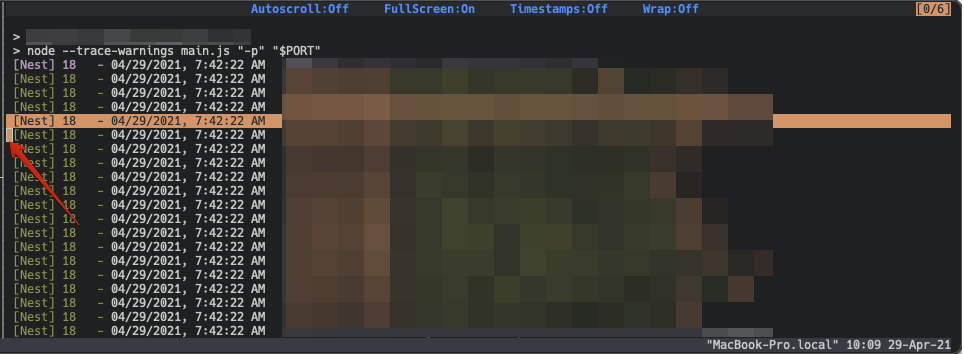


When wrap-mode is enabled, it still copies line breaks and lots of spaces at the end of the wrapped line. Is it possible to fix that, too?

@CoolDuke not sure what you mean with "lots of spaces", but you're absolutely right about the line breaks. Thanks for pointing it out!
To illustrate that:
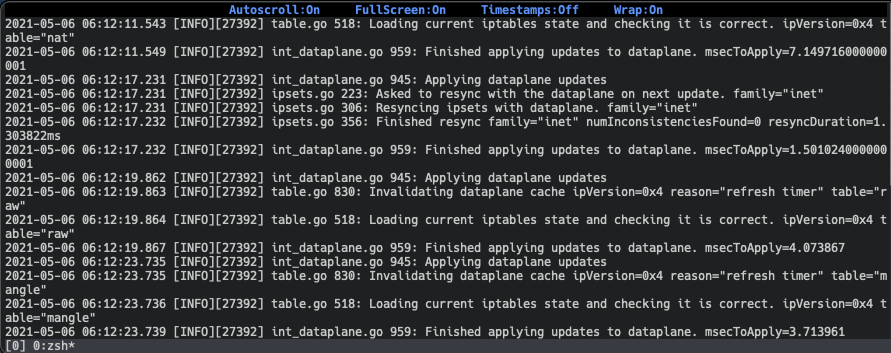
When I copy the text from the above screenshot, I get something like this:
2021-05-06 06:12:17.232 [INFO][27392] int_dataplane.go 959: Finished applying updates to dataplane. msecToApply=1.501024000000
0001
2021-05-06 06:12:19.862 [INFO][27392] int_dataplane.go 945: Applying dataplane updates
2021-05-06 06:12:19.863 [INFO][27392] table.go 830: Invalidating dataplane cache ipVersion=0x4 reason="refresh timer" table="r
aw"
2021-05-06 06:12:19.864 [INFO][27392] table.go 518: Loading current iptables state and checking it is correct. ipVersion=0x4 t
able="raw"
2021-05-06 06:12:19.867 [INFO][27392] int_dataplane.go 959: Finished applying updates to dataplane. msecToApply=4.073867
2021-05-06 06:12:23.735 [INFO][27392] int_dataplane.go 945: Applying dataplane updates
2021-05-06 06:12:23.735 [INFO][27392] table.go 830: Invalidating dataplane cache ipVersion=0x4 reason="refresh timer" table="m
angle"
2021-05-06 06:12:23.736 [INFO][27392] table.go 518: Loading current iptables state and checking it is correct. ipVersion=0x4 t
able="mangle"
Whereas we ideally would like to have this:
2021-05-06 06:12:17.232 [INFO][27392] int_dataplane.go 959: Finished applying updates to dataplane. msecToApply=1.5010240000000001
2021-05-06 06:12:19.862 [INFO][27392] int_dataplane.go 945: Applying dataplane updates
2021-05-06 06:12:19.863 [INFO][27392] table.go 830: Invalidating dataplane cache ipVersion=0x4 reason="refresh timer" table="raw"
2021-05-06 06:12:19.864 [INFO][27392] table.go 518: Loading current iptables state and checking it is correct. ipVersion=0x4 table="raw"
2021-05-06 06:12:19.867 [INFO][27392] int_dataplane.go 959: Finished applying updates to dataplane. msecToApply=4.073867
2021-05-06 06:12:23.735 [INFO][27392] int_dataplane.go 945: Applying dataplane updates
2021-05-06 06:12:23.735 [INFO][27392] table.go 830: Invalidating dataplane cache ipVersion=0x4 reason="refresh timer" table="mangle"
2021-05-06 06:12:23.736 [INFO][27392] table.go 518: Loading current iptables state and checking it is correct. ipVersion=0x4 table="mangle"
I'm not familiar with the implementation of k9s but I could imagine that this is not as easy as the previous fix (i.e. removing the padding), because k9s probably uses some kind of TUI framework that is doing the soft-wrapping internally by injecting line breaks in the content instead of just letting the terminal emulator wrap the text. But this is just a guess. @derailed what's your take on this? Should we create a new issue for that?
Edit: also one minor regression bug I just noticed: the header bar (where the "Autoscroll: on" [...] labels are) is pitch black instead of the default terminal color (since 0.24.8). I can file a separate issue for that as well, if you like to keep that out of this discussion.
@CoolDuke @Gerrit-K I am not sure there is anything k9s can do?? When you select lines directly from the screen and hit copy the formatting will remain to exactly what's on the screen since the copy does not flow thru k9s.
Best I can offer here is leverage the filters and then hit c this allows k9s to clean out the selections prior to copying to the clipboard. Does this make sense or am I missing it?
@derailed it's not quite as you describe. If a terminal prints a line that exceeds the width, it wraps it. But most terminals account for that when you use their select-and-copy modes, so there will not be any new line introduced by the soft wrapping.
k9s however has a pseudo-graphical interface, realized using plain characters. And if I'm not mistaken, it has concepts of "panes" and "boxes" that you can fill with text (as you do, for instance, for the logs). However, these boxes' widths do not necessarily rely on the terminal width (i.e. they can be smaller than fullscreen), so they also cannot re-use the terminal wrapping and need to implement their own wrapping - by introducing line break characters.
That's my theory of what's happening here. The only thing I can think of that would be possible would be to not use such a pane/box for fullscreen logs, and "simply" print the contents to the screen. I assume however (if my theory holds true, that is), that this will not be "simple" at all.
Having that in mind, I think your suggestion (using the internal copy function by hitting c) is the best we can get right now.
@derailed this is a quality ticket, I support it. Why is it closed? The issue @Gerrit-K explained in the last comment is still relevant and clear...
The following selection copies with a line break introduced by k9s wrapping (there is no line break if you turn wrapping off, but even then you cannot copy an entire line if it exceeds visible terminal width). I get it works "as intended", but it would be fantastic if it accounted for these line breaks, as logs get really messy once you copy a larger data block.

payment-worker-monthly-manual-jk4-cjklj:payment-worker-monthly-bonecrusher {"time":"2021-09-22T15:12:46Z","logger":"c.h.c.p.s.PaymentCalculatorService","lev el":"WARN","msg":"The billing for the customer: 50184 is invalid, and can not be processed "}
(note the "lev el" above -- it is padded on the wrapped line - which is great for visibility, but again, bad for copying)

agreed. it is messed up when selecting/copying lines directly from terminal screen and pasting it to somewhere else like Email / Chat window...

@Gerrit-K What about a function to pipe the logs to your preferred viewer (less for example) and do everything you want in it ?
Personnaly, I pimped my Vim to copy the block selection to clipboard, so I sometimes open my logs in Vim.
This would also extend the functionnalities of k9s in a UNIX way.
EDIT : idea already mentionned in https://github.com/derailed/k9s/issues/1229

@leorolland At first thought, I had my doubts in terms of usability (because I was assuming you suggested to replace the current viewer by less or your favorite pager), but if it's implemented as described in the idea you've linked, I think it would be really helpful and would probably solve this use-case. Thanks for linking it :)
My workaround is to save the screen (CTRL+S) and then copy/paste from the saved file.
See utility script at https://github.com/orange-cloudfoundry/orange-cf-bosh-cli/blob/master/bosh-cli/k9s-screen.sh to easily list the last saved screens and display them.

I fully support this. Copying log snippets out of k9s is a major pain as there is always padding included. My expectation would be: When fullscreen is enabled, and wrapping is enabled k9s should not add it's own text-wrapping logic but simply dump the text to the terminal. The terminal is responsible for wrapping in that case and copy/paste will work perfectly fine.

Can also confirm this, it's really broken. :/
On copy:
--max_connections=2000 --innodb-buffer-pool-s
ize=12G --query-cache-type=1 --query-cache-size=2G --innodb-buffer-pool-instances=16
Notice the --innodb-buffer-pool-s in the first line.
