

 dequelabs
Test for color-contrast of OPTION elements
Expectation:
<option style="color:#fff;background-color:#fff"> triggers an error.
Actual: No error is triggered.
Motivation: Chromium based browsers support setting color and background-colors of OPTION elements.
axe-core version: 3.5.7
browser-plugin: 4.5.3 (Chromium on Linux)

Interesting. I'm not seeing Chrome setting the color or background color of the option element.


Odd, I can:
<html>
<style>
.a {
  color: red;
  background-color: green;
}
.b {
  color: blue;
  background-color: red;
}
</style>
<select>
<option>-</option>
<option class="a">item 1</option>
<option class="b">item 2</option>
</select>
</html>
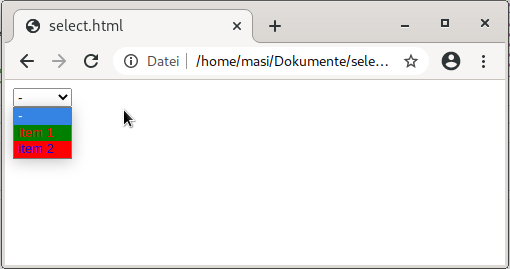
What browser/system/versions are you using? Any flags enabled?
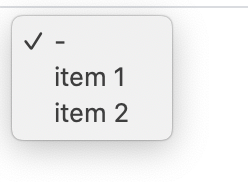
I'm using Chrome 85.0.4183.83 on Mac Catalina 10.15.6, no flags. Can't see colors on options.
Version 85.0.4183.83 (Offizieller Build) (64-Bit) on Fedora (Linux) Version 84.0.4147.125 (Offizieller Build) (64-Bit) on Windows 10
I assume that macOS has a stronger policy regarding the styling of system widgets.
IE11 can set the colours on Windows 10. Firefox 80.0 will set the colours on Windows 10 but not on Linux.
Alright, did some testing of this:
- Mac
- Chrome- no support
- Safari- no support
- Firefox- supports
- Win10
- Chrome - supports
- Firefox - supports
- IE11 - supports
- Edge - supports
So it seems Chrome and Safari on Mac are the only ones not supporting it.
The main problem I foresee is that there is no way to tell if the current browser supports the pattern. Doing window.getComputedStyle(document.querySelector('.a')).color results in rgb(255,0,0) even if the browser doesn't support it. So if we report a color contrast violation on the option in Chrome, a user may be a bit confused as to why as the browser isn't rendering it.
How about telling the user that the problem may not be visible depending on browser and operating system with the information of the reported combination of colour and background colour.
Chrome 135 will be releasing with full support for fully customizable select elements. This includes being able to add span elements inside option elements and changing their color / background color.
Docs: https://developer.mozilla.org/en-US/docs/Learn_web_development/Extensions/Forms/Customizable_select