dendron
 dendron copied to clipboard
 dendronhq
HTML Output: <code> in headings breaks the formatting
Please select the area your bug applies to. (Multiple selections are Possible. You can leave blank if you're not sure.)
- [ ] Workspace. VSCode workspace, vaults, Intellisense/autocomplete, Dendron settings
- [ ] Lookup. Dendron's Lookup Command
- [ ] Views. Dendron Preview, Tree View, Side Panels in the UI
- [ ] Schema. Dendron Schemas
- [x] Pod. Data import from / export to Dendron
- [x] Publish. External Site Publish
- [ ] Markdown. Markdown features, such as syntax support and features
Describe the bug
When the HTML containing headings (h1...) that use code the output gets screwed up. This is because the headings' CSS are using "display: flex". This can either be fixed by using "display:block" instead (which doesn't seem to introduce any problems with other parts of the heading.) Otherwise, the header content can be wrapped inside a .
To Reproduce
Look at the documentation's FAQ and go to the section "What can I do with the root note?". There are no spaces around the word "root".
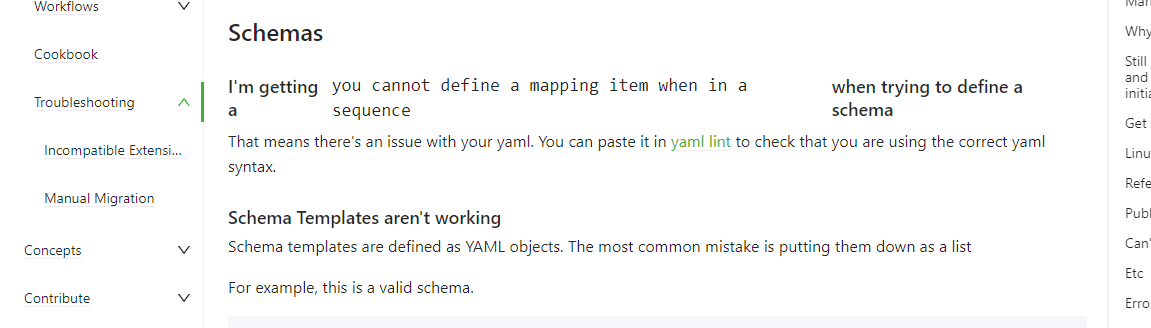
A worse example can be found on the "Troubleshooting" page. The "Schemas" section has a heading where the code part is line-wrapped in the middle of the header. I've included an image that shows the problem.
Expected behavior
Headers should display correctly even if they contain things like code blocks.
Screenshots
If applicable, add screenshots to help explain your problem.
Desktop (please complete the following information)
- OS: Windows 11
- Chrome 104.0.5112.8
- Versions (all that apply to bug):
- Dendron Extension: 0.106
- VS Code version: 1.69.2
- Dendron CLI: 0.106
Additional context
Add any other context about the problem here.
Dendron Log file
Please attach the output of > Dendron:Dev: Open Logs here
 dendron.log