

 deinstapel
Hide tray icon
Hi. First of all I'd just like to say what a great extension this is.
Now the reason I'm opening this issue is because I can't hide the tray icon. I've found an old closed issue (https://github.com/martin31821/cpupower/issues/42) that has the same intention but it was closed because the solution was a workaround using a separate extension which in my opinion is not a solution since this can be implemented. There was a PR that implemented the "hide icon feature" alongside some other things (arrow and clock speed) https://github.com/martin31821/cpupower/pull/93. This PR has done that but the tray "icon" still exists just without an icon. Here is a screenshot showing what I mean.
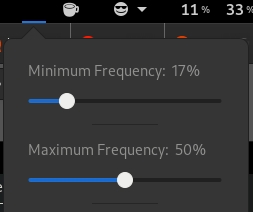
It'd be great if this feature could be implemented because I prefer to have as little as possible tray icons.
System info:
- Fedora 32
- Gnome 3.36.5
- CPU Power Manager 9.0.2

How would you use this extension without its menu? Only auto-switching and no manual profile selection?

Yes. I don't plan to change the profiles that much rather let auto-switching handle it for me. But if I needed to change the profile, I'd show the menu. On that note, it'd be cool if user could change the profile in the extension settings so there wont be a need to show the menu if it's hidden.

I am not quite sure how the UX should look like without the menu. Maybe someone could provide mockups or user stories? PRs are also welcome.
Well, the basic idea is not to have the tray icon. In the picture from the original post, there is no icon and arrow visible but the tray icon is present since there is space that can be clicked and the menu shows. My thought was to not show tray icon at all so there is no possible way to open the menu from tray. All of the settings in the tray menu can be managed in extension settings which can be opened through Gnome Extensions app.
As I've stated in my previous comment, I'd rather open the extension settings and have the dropdown menu for picking the profile there too instead of just in the tray menu. That way I could use only extension settings.
I know this is what I would use and might not be in roadmap for this project however, though I have never worked on Gnome extensions, I could try to help. I have a lot of experience in JS so the language won't be a problem. I suspect that the starting point for this would be the docs?
Unfortunately, Gnome Shell really lacks documentation and your mostly up to reading the Gnome Shell source code. However, I think what you are suggesting would not need any code for the Gnome Shell, but instead just use the GTK preferences window, right?
I think there are several questions still open:
- How would the preferences window appear to users which use the tray menu? Should they also be able to change the profile in the preferences?
- Should the preferences windows only cover profile selection? This can get tricky, as the hardware tends to reset the configured frequencies and turbo boost states, which will invalidate the profile selection without you noticing. Also, a previously selected profile will be unselected on the next startup of the preferences window. This will look like a bug to users, which in fact cannot be avoided. If the hardware says to change the frequency we have no choice but to accept that. We need solutions to this UX problem. Maybe notifications?
- What about the other controls except the profile selection. Would these make sense in the preferences window?
- Would this still require a Gnome Shell Extension or could it be a standalone application instead? Many users from other desktop environments would like to also use this extension, but they currently can't. I am not sure how this extension could also be integrated into a standalone application while sharing code. Maybe it would be best to split out the
cpufreqctltool into a separate repository and base this extension and another GTK/Qt/whatever application on thecpufreqctltool. Maybe, thecpufreqctlscript is too much of an overhead for a standalone application, which in fact could directly utilize polkit for setting CPU frequencies (this extension can't, therefore thecpufreqctlscript).
If you are looking for what I described in (4), you might actually be better of using apps like
Thanks for the very detailed response! Actually, the use case that I was describing fits cpupower-gui perfectly.
Now to answer the questions:
-
Yes. My idea was to have a profile picker in the preferences just like in the tray menu.
-
No. The idea was to have, alongside all existing options, a menu to pick the profile that will be used now. Just like in the tray menu.
-
I didn't think of anything else. The I like how the extension is simple yet functional right now.
-
As I said, cpupower-gui might be a better option for me. Thanks for mentioning it!
You're welcome! Please let us know if cpupower-gui solves this issue for you after testing it. We could then e.g. place a hint in the readme or even in the preferences window for other users with the same use case.
I use the extension's automatic mode so I don't need to have the shortcut in the tray menu. If I need to change any configuration of the extension I do it through the configuration button found either on the Gnome Extensions website or in the extensions application.
It would be in addition to not showing the icon also not showing the empty space
This extension has exactly what we are asking for https://extensions.gnome.org/extension/1849/screen-word-translate/
Ok, but I think this is out-of-scope for this extension. It would lead to a situation where there is only the preference window with some logic running in the background. This is not the kind of functionality a Gnome Shell extension should provide. This kind of UX is usually provided by normal applications.
The extension still works but without showing the icon in the tray menu and if you need to change any settings just use the Gnome Extensions website
That's actually not quite the case. The extension will only work, if all the functionality from the tray menu is duplicated in the preferences window, which would make the preferences window a full-grown application. This is not what we are targeting for. There are other projects which implement exactly this behavior as a standalone application.
I think this would inevitably break UX and users would expect the tray menus functionality to be available in the preferences window when the tray menu is hidden...
@mastercaution @martin31821 what's your opinion on this?
I also think that we should separate the use cases of a desktop application and a Gnome Shell extension. The main reason to have a Gnome Shell extension is the integration into the shell. In our case it's only the tray icon and the popup menu. If you don't want the icon and the popup menu, you basically don't want a gnome shell extension and therefore, cpupower-gui seems to be a good alternative (I don't know if it has the auto switching feature)

Ohhh I'm realizing, that if cpupower-gui lacks the auto switching feature (I still don't know ^^) and this is what you want to use but without the tray icon, then cpupower-gui is not a perfect alternative ... hmmm.
I think we can try it out. We can mark it as an experimental option and a disclaimer that you have to turn back on the tray icon to manually select a profile (in fact: to get back full functionality).
Or maybe it is possible to implement a button in the preferences window which opens the popup window (probably it'd be necessary to display the tray icon for as long as the menu is open). This sounds easy to implement, easy to use, preserves full functionality also without tray icon and without breaking UX and we are still a Gnome shell extension ^^
I think if it's only about the auto-switching feature, a system service or daemon would be the clean approach. cpupower has a daemon mode, so in principle cpupower-gui is capable of implementing a "Auto-Switch" feature. @caseca Have you checked if cpupower-gui can solve your problem?
Nevertheless, let's look into integrating this into this extension:
I think we can try it out. We can mark it as an experimental option and a disclaimer that you have to turn back on the tray icon to manually select a profile (in fact: to get back full functionality).
This sounds feasible. However, users might get confused on how to get to the preferences window again after disabling the tray icon. I think most users access the preferences window over the tray icon. Not all users have the gnome-tweak-tool installed. Although, the preferences would be still accessible over the extensions website. The disclaimer should include information on how to get back to the preferences window.
Or maybe it is possible to implement a button in the preferences window which opens the popup window (probably it'd be necessary to display the tray icon for as long as the menu is open). This sounds easy to implement, easy to use, preserves full functionality also without tray icon and without breaking UX and we are still a Gnome shell extension ^^
I don't know if this is necessary as the user could as well just re-enable the tray icon. The additional button would at least seem confusing to other users who do not disable the tray icon.