

 deepinsight
AssertionError:assert 'detection' in self.models
I want to extract 512-D Feature Embedding. I download the pretrained model and run the /insightface/deploy/test.py, but
 what should I do?

https://github.com/deepinsight/insightface/blob/master/python-package/README.md
Starting from insightface>=0.2, we use onnxruntime as inference backend, please download our antelope model release from onedrive, and put it under ~/.insightface/models/, so there're onnx models at ~/.insightface/models/antelope/*.onnx.

Please update insightface to >=0.2, see readme at https://github.com/deepinsight/insightface/tree/master/python-package

I have downloaded the antelope and put it under ~/.insightface/models/. And my insightface version is 0.2.1 (0.2.0 version.I tried, too). But the same error is displayed.
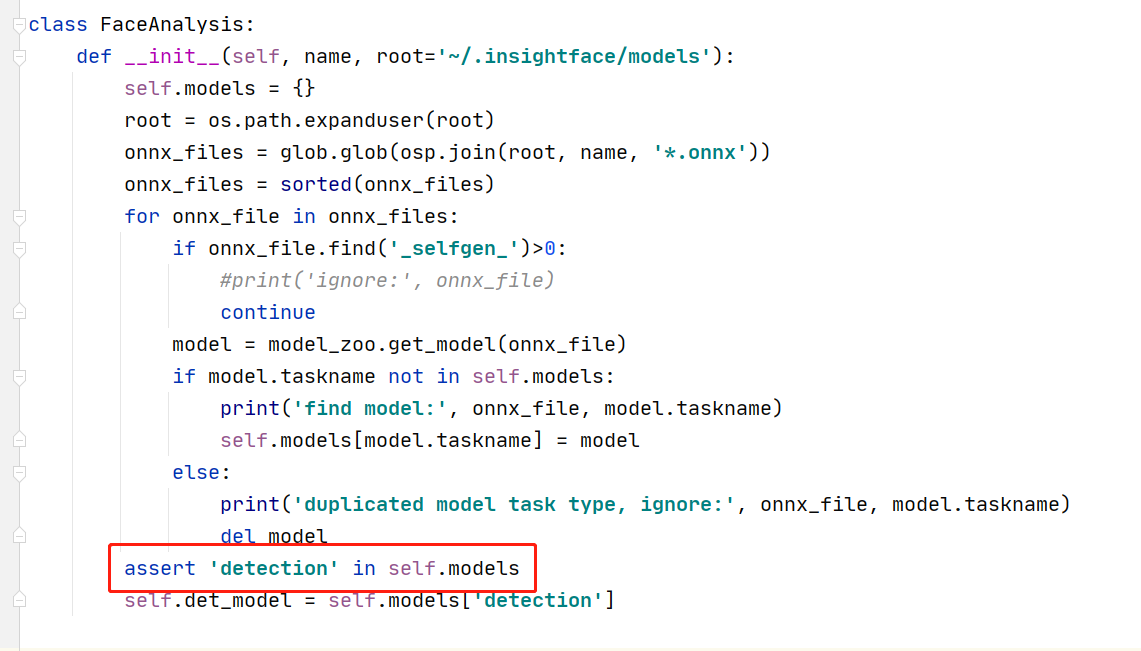 According to the prompt, I think this line is wrong.
Please confirm that the file ~/.insightface/models/antelope/scrfd_10g_bnkps.onnx exists
Path is ~/.insightface not insightface workspace.
You can try app = FaceAnalysis(name="antelope", root=insightface_workspace_path)
 My image size is (147,117,3)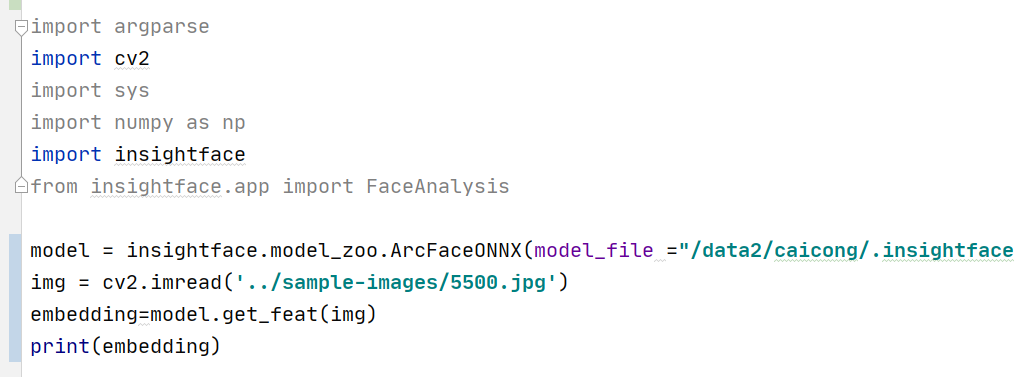
I just want to extract Feature Embedding. I have extracted face, don't need to detect and face_align.

i also had the same problem when running the executable.
Error displayed: Exception has occurred: AssertionError
exception: no description
File "E:\DataTraining\insightface-master\insightface-master\deploy\test.py", line 16, in
app = FaceAnalysis(name='antelope')
i have followed the suggestions above but its still not fixed, what should i do? thanks

you can change your root directory. I don't know if the path like '~/.insightface' can work well on windows os.
you can change your root directory. I don't know if the path like '~/.insightface' can work well on windows os.
I've tried it but still can't fix that error. "antelope" still exists in models but I still don't know why it doesn't work.
When running terminal with command :python test.py
the results give:
E:\DataTraining\insightface-master\insightface-master\deploy> python test.py
Traceback (most recent call last):
File "test.py", line 22, print
app = FaceAnalysis('antelope')
File "C:\Users\nhatd\AppData\Local\Programs\Python\Python36\lib\site-packages\insightface\app\face_analysis.py", line 51, print init
assert 'detection' in self.models
AssertionError
I have tried many ways like changing face_analyst.py file in python36 and also face_analyst.py in python-package belonging to source ROOT $insightface but the result is not very satisfactor
On Windows, replace the root parameter in the FaceAnalysis Class with the complete or absolute path to the insightface folder. remember to create a model folder and place the **onnx model ** in it.
e.g root=r'C:\Users\OneDrive\Desktop\insight\insightface\Lib\site-packages\insightface'
onnx model path will be .
r'C:\Users\OneDrive\Desktop\insight\insightface\Lib\site-packages\insightface\model\antelope\*.onnx

我说一下我的解决方法给各位参考,我发现comfyui在安装该插件时,在https://github.com/deepinsight/insightface/releases/download/v0.7/antelopev2.zip处下载了文件到“D:\AITools\ComfyUI-aki-v1.4\models\insightface\models\”这个目录下,然后进行解压安装,解压后的路径是“D:\AITools\ComfyUI-aki-v1.4\models\insightface\models\antelopev2\antelopev2\”,然后我将这个路径下的文件全部剪切到了“D:\AITools\ComfyUI-aki-v1.4\models\insightface\models\antelopev2\”这里,然后重启就正常了。说明在软件进行解压时,多了一层目录导致。
I'd like to share my solution for your reference. I noticed that when installing the plugin in ComfyUI, it downloaded a file from https://github.com/deepinsight/insightface/releases/download/v0.7/antelopev2.zip to the directory "D:\AITools\ComfyUI-aki-v1.4\models\insightface\models" and then proceeded with the extraction and installation. After extraction, the path was "D:\AITools\ComfyUI-aki-v1.4\models\insightface\models\antelopev2\antelopev2". Then, I cut all the files from this path and pasted them into "D:\AITools\ComfyUI-aki-v1.4\models\insightface\models\antelopev2". After restarting, it worked normally. This indicates that during the software's extraction process, an extra directory layer was created, causing the issue.

我说一下我的解决方法给各位参考,我发现comfyui在安装该插件时,在 https://github.com/deepinsight/insightface/releases/download/v0.7/antelopev2.zip 处下载了文件到
D:\AITools\ComfyUI-aki-v1.4\models\insightface\models\这个目录下,然后进行解压安装,解压后的路径是D:\AITools\ComfyUI-aki-v1.4\models\insightface\models\antelopev2\antelopev2\,然后我将这个路径下的文件全部剪切到了D:\AITools\ComfyUI-aki-v1.4\models\insightface\models\antelopev2\这里,然后重启就正常了。说明在软件进行解压时,多了一层目录导致。I'd like to share my solution for your reference. I noticed that when installing the plugin in ComfyUI, it downloaded a file from https://github.com/deepinsight/insightface/releases/download/v0.7/antelopev2.zip to the directory
D:\AITools\ComfyUI-aki-v1.4\models\insightface\modelsand then proceeded with the extraction and installation. After extraction, the path wasD:\AITools\ComfyUI-aki-v1.4\models\insightface\models\antelopev2\antelopev2. Then, I cut all the files from this path and pasted them intoD:\AITools\ComfyUI-aki-v1.4\models\insightface\models\antelopev2. After restarting, it worked normally. This indicates that during the software's extraction process, an extra directory layer was created, causing the issue.
is work for me

@ychess thank for help, i face this issue just now, your solution is helpful
Prompt executed in 0.01 seconds got prompt !!! Exception during processing !!! Traceback (most recent call last): File "C:\Users\user\Music\ComfyUI_windows_portable_nvidia\ComfyUI_windows_portable\ComfyUI\execution.py", line 323, in execute output_data, output_ui, has_subgraph = get_output_data(obj, input_data_all, execution_block_cb=execution_block_cb, pre_execute_cb=pre_execute_cb) ^^^^^^^^^^^^^^^^^^^^^^^^^^^^^^^^^^^^^^^^^^^^^^^^^^^^^^^^^^^^^^^^^^^^^^^^^^^^^^^^^^^^^^^^^^^^^^^^^^^^^^^^^^ File "C:\Users\user\Music\ComfyUI_windows_portable_nvidia\ComfyUI_windows_portable\ComfyUI\execution.py", line 198, in get_output_data return_values = _map_node_over_list(obj, input_data_all, obj.FUNCTION, allow_interrupt=True, execution_block_cb=execution_block_cb, pre_execute_cb=pre_execute_cb) ^^^^^^^^^^^^^^^^^^^^^^^^^^^^^^^^^^^^^^^^^^^^^^^^^^^^^^^^^^^^^^^^^^^^^^^^^^^^^^^^^^^^^^^^^^^^^^^^^^^^^^^^^^^^^^^^^^^^^^^^^^^^^^^^^^^^^^^^^^^^^^^^^^ File "C:\Users\user\Music\ComfyUI_windows_portable_nvidia\ComfyUI_windows_portable\ComfyUI\execution.py", line 169, in _map_node_over_list process_inputs(input_dict, i) File "C:\Users\user\Music\ComfyUI_windows_portable_nvidia\ComfyUI_windows_portable\ComfyUI\execution.py", line 158, in process_inputs results.append(getattr(obj, func)(**inputs)) ^^^^^^^^^^^^^^^^^^^^^^^^^^^^ File "C:\Users\user\Music\ComfyUI_windows_portable_nvidia\ComfyUI_windows_portable\ComfyUI\custom_nodes\ComfyUI_InstantID\InstantID.py", line 217, in load_insight_face model = FaceAnalysis(name="antelopev2", root=INSIGHTFACE_DIR, providers=[provider + 'ExecutionProvider',]) # alternative to buffalo_l ^^^^^^^^^^^^^^^^^^^^^^^^^^^^^^^^^^^^^^^^^^^^^^^^^^^^^^^^^^^^^^^^^^^^^^^^^^^^^^^^^^^^^^^^^^^^^^^^^^ File "C:\Users\user\Music\ComfyUI_windows_portable_nvidia\ComfyUI_windows_portable\python_embeded\Lib\site-packages\insightface\app\face_analysis.py", line 43, in init assert 'detection' in self.models ^^^^^^^^^^^^^^^^^^^^^^^^^^ AssertionError Prompt executed in 0.01 seconds got prompt !!! Exception during processing !!! Traceback (most recent call last): File "C:\Users\user\Music\ComfyUI_windows_portable_nvidia\ComfyUI_windows_portable\ComfyUI\execution.py", line 323, in execute output_data, output_ui, has_subgraph = get_output_data(obj, input_data_all, execution_block_cb=execution_block_cb, pre_execute_cb=pre_execute_cb) ^^^^^^^^^^^^^^^^^^^^^^^^^^^^^^^^^^^^^^^^^^^^^^^^^^^^^^^^^^^^^^^^^^^^^^^^^^^^^^^^^^^^^^^^^^^^^^^^^^^^^^^^^^ File "C:\Users\user\Music\ComfyUI_windows_portable_nvidia\ComfyUI_windows_portable\ComfyUI\execution.py", line 198, in get_output_data return_values = _map_node_over_list(obj, input_data_all, obj.FUNCTION, allow_interrupt=True, execution_block_cb=execution_block_cb, pre_execute_cb=pre_execute_cb) ^^^^^^^^^^^^^^^^^^^^^^^^^^^^^^^^^^^^^^^^^^^^^^^^^^^^^^^^^^^^^^^^^^^^^^^^^^^^^^^^^^^^^^^^^^^^^^^^^^^^^^^^^^^^^^^^^^^^^^^^^^^^^^^^^^^^^^^^^^^^^^^^^^ File "C:\Users\user\Music\ComfyUI_windows_portable_nvidia\ComfyUI_windows_portable\ComfyUI\execution.py", line 169, in _map_node_over_list process_inputs(input_dict, i) File "C:\Users\user\Music\ComfyUI_windows_portable_nvidia\ComfyUI_windows_portable\ComfyUI\execution.py", line 158, in process_inputs results.append(getattr(obj, func)(**inputs)) ^^^^^^^^^^^^^^^^^^^^^^^^^^^^ File "C:\Users\user\Music\ComfyUI_windows_portable_nvidia\ComfyUI_windows_portable\ComfyUI\custom_nodes\ComfyUI_InstantID\InstantID.py", line 217, in load_insight_face model = FaceAnalysis(name="antelopev2", root=INSIGHTFACE_DIR, providers=[provider + 'ExecutionProvider',]) # alternative to buffalo_l ^^^^^^^^^^^^^^^^^^^^^^^^^^^^^^^^^^^^^^^^^^^^^^^^^^^^^^^^^^^^^^^^^^^^^^^^^^^^^^^^^^^^^^^^^^^^^^^^^^ File "C:\Users\user\Music\ComfyUI_windows_portable_nvidia\ComfyUI_windows_portable\python_embeded\Lib\site-packages\insightface\app\face_analysis.py", line 43, in init assert 'detection' in self.models ^^^^^^^^^^^^^^^^^^^^^^^^^^ AssertionError

I solved this problem, comfyui automatically downloaded and put the .onnx inside antelopev2/antelopev2/.onnx. Move the onnx files into the parent folder: antelopev2/*.onnx

On my windows system, altough files have been downloaded, it does not find them, since it does not look in the right folder
in face_analysis.py file, replace
onnx_files = glob.glob(osp.join(self.model_dir, '*.onnx'))
with onnx_files = [osp.join(dirpath, f) for dirpath, dirnames, files in os.walk(self.model_dir) for f in fnmatch.filter(files, '*.onnx')]
and add at the file beginning: import os import fnmatch

When you first run code you have download onnx models
app = FaceAnalysis(name='antelopev2', root=".\onnx_models", providers=['CUDAExecutionProvider', 'CPUExecutionProvider'], allowed_modules=['detection'])
but model download as
if you would run project more then 2 time
change
antelopev2 to antelopev2/antelopev2
app = FaceAnalysis(name='antelopev2/antelopev2', root=".\onnx_models", providers=['CUDAExecutionProvider', 'CPUExecutionProvider'], allowed_modules=['detection'])
This problem is related to unpacking the zip archive


I solved this problem, comfyui automatically downloaded and put the .onnx inside antelopev2/antelopev2/.onnx. Move the onnx files into the parent folder: antelopev2/*.onnx
can't believe after all these years no one fix it

I solved this problem, comfyui automatically downloaded and put the .onnx inside antelopev2/antelopev2/.onnx. Move the onnx files into the parent folder: antelopev2/*.onnx
can't believe after all these years no one fix it
this is a default file unzipping issue. The code may have been tested on Linux/macos, but not on windows
Fixing the code helps to fix the error https://github.com/deepinsight/insightface/issues/2702
I solved this problem, comfyui automatically downloaded and put the .onnx inside antelopev2/antelopev2/.onnx. Move the onnx files into the parent folder: antelopev2/*.onnx
can't believe after all these years no one fix it
this is a default file unzipping issue. The code may have been tested on Linux/macos, but not on windows
Fixing the code helps to fix the error #2702
thanks for quick reply and thank you for all you did, but what i mean is I can't believe they haven't merged fixes like yours after all these years----this issue was opened back in 2021. and btw in fact it's not a Windows-only issue, i encountered this on my mac, and i assume we can also have this on linux.
I'd like to share my solution for your reference. I noticed that when installing the plugin in ComfyUI, it downloaded a file from https://github.com/deepinsight/insightface/releases/download/v0.7/antelopev2.zip to the directory "D:\AITools\ComfyUI-aki-v1.4\models\insightface\models" and then proceeded with the extraction and installation. After extraction, the path was "D:\AITools\ComfyUI-aki-v1.4\models\insightface\models\antelopev2\antelopev2". Then, I cut all the files from this path and pasted them into "D:\AITools\ComfyUI-aki-v1.4\models\insightface\models\antelopev2". After restarting, it worked normally. This indicates that during the software's extraction process, an extra directory layer was created, causing the issue.
very good! Thx!
