

 deepfence
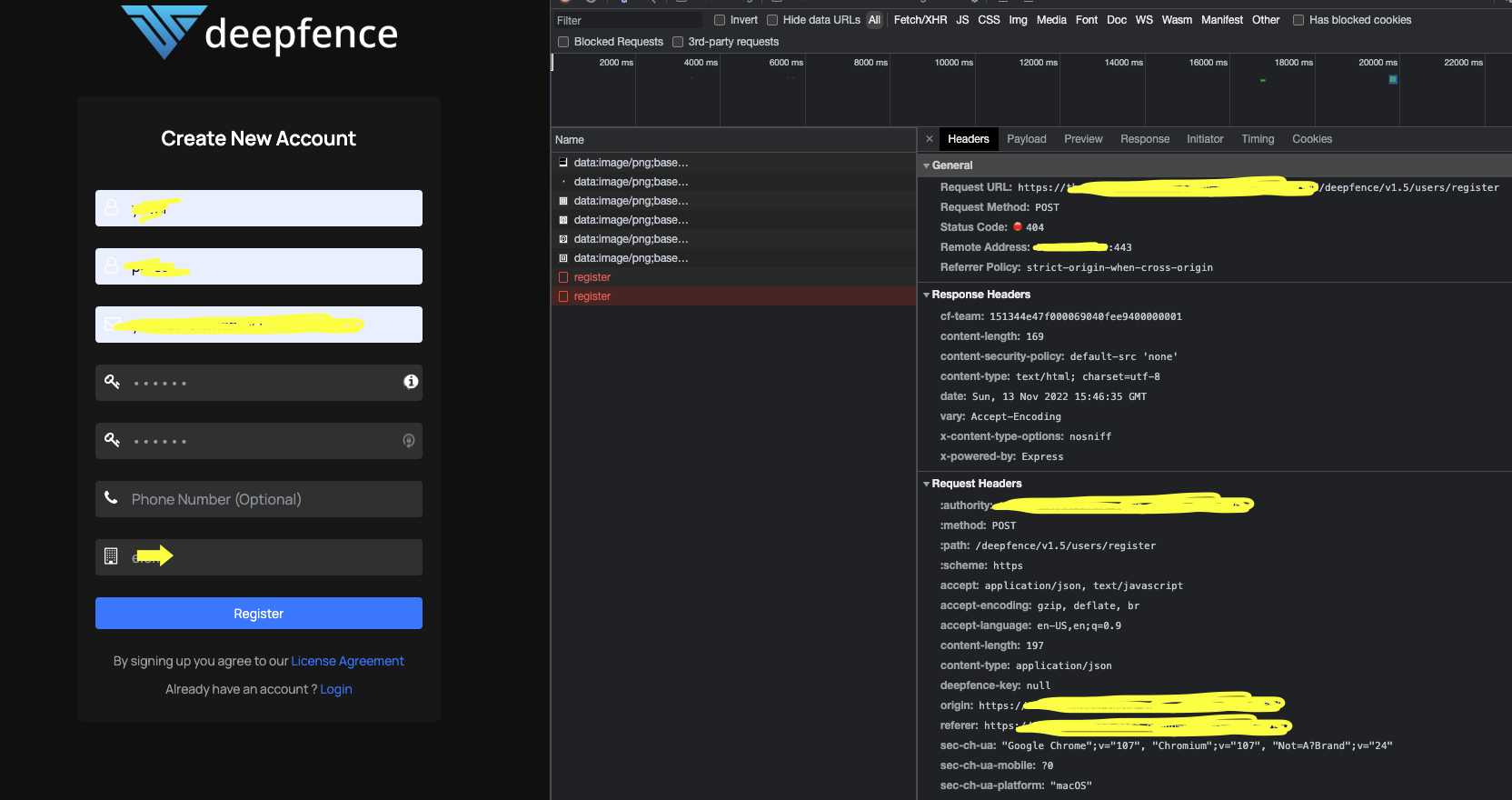
Can't register to system, receives 404
Describe the bug After installing the deepfence-console chaert (v1.4.7) and modifying it's value so it'll feet our needs, the register function returns code 404 both when trying to access port-forwarding and when trying to access from the registered domain name.
To Reproduce Steps to reproduce the behavior:
- Set the TLS map in the values.yaml file to use an existing certificate secret
- Deploy the chart to the kubernetes cluster
- Set port-forwarding to to the deepfence-ui service on port 4042
- Try to register
- See the error
Expected behaviour Expected behaviour is to be registered and being able to log in
Screenshots
Components/Services affected
- [ ] UI/Frontend
- [ ] API/Backend
Additional context I don't see anyone else is experiencing this issue. I also tried to deploy an older version (v1.4.0) with no success.
I have a Traefik IngressRoute facing the deepfence-ui service and it's exposed fine.
When I tried to access the following path: "deepfence/v1.5/users/register" under the deepfence-api service I received a response, is it possible there's a problem with the internal-router service?
Also, no logs are produced in the deepfence ui when I'm accessing it, though the UI under path "/" is reachable.

Thank you for reporting this issue, @OpsBurger . The Traefik ingress router should technically face the deepfence-router service. We will look into this one and post the updates here.

Hi @shyam-dev , I've already tried it and it resulted in timeout when trying to reach "/" as it's not a path published through it. Sorry for failing to mention it before.
Hi,
Tried it now and I get a timeout error. Also, when you say it's fine - you mean you can register? or you can access? because I can access the main console page "/".
Thanks, Yuval
On Mon, Nov 14, 2022 at 6:21 AM Ramanan Ravikumar @.***> wrote:
Hi @OpsBurger https://github.com/OpsBurger,
I have a Traefik IngressRoute facing the deepfence-ui service and it's exposed fine.
Can you change it to point to deepfence-router pod? Or you can deploy deepfence-router https://docs.deepfence.io/docs/threatmapper/console/kubernetes helm chart as ClusterIP and point Traefik IngressRoute to deepfence-router service
— Reply to this email directly, view it on GitHub https://github.com/deepfence/ThreatMapper/issues/674#issuecomment-1313077050, or unsubscribe https://github.com/notifications/unsubscribe-auth/AZXMANHCIMGL7SJP3A42IL3WIG427ANCNFSM6AAAAAAR7C5IXA . You are receiving this because you were mentioned.Message ID: @.***>
Hi @OpsBurger
make sure you have deployed deepfence-router helm chart in the same namespace as that of the console, set service type to ClusterIP for router service
helm install router threatmapper/deepfence-router --set service.type=ClusterIP
deepfence threatmapper consoles uses self-signed certificates if no certificates are provided traefik ingress shows internal server error for self signed certificates
you can skip servers tls cert verification in traefik as shown in this issue by passing "--serverstransport.insecureskipverify=true" to traefik by updating deployment.
or
you can try to use below ingress route with threatmapper
---
apiVersion: traefik.containo.us/v1alpha1
kind: Middleware
metadata:
  name: threatmapper-headers
spec:
  headers:
    sslRedirect: true
    customRequestHeaders:
      X-Forwarded-Proto: "wss,https"
---
apiVersion: traefik.containo.us/v1alpha1
kind: ServersTransport
metadata:
  name: threatmapper-transport
spec:
  serverName: threatmapper
  insecureSkipVerify: true
---
apiVersion: traefik.containo.us/v1alpha1
kind: IngressRoute
metadata:
  name: threatmapper
spec:
  entryPoints:
    - web
    - websecure
  routes:
  - match: PathPrefix(`/`)
    middlewares:
      - name: threatmapper-headers
    kind: Rule
    services:
    - name: deepfence-router
      port: 443
      serversTransport: threatmapper-transport
      passHostHeader: true
verified on traefik version 2.9.4

Hi @OpsBurger
make sure you have deployed deepfence-router helm chart in the same namespace as that of the console, set service type to ClusterIP for router service
helm install router threatmapper/deepfence-router --set service.type=ClusterIPdeepfence threatmapper consoles uses self-signed certificates if no certificates are provided traefik ingress shows internal server error for self signed certificates
you can skip servers tls cert verification in traefik as shown in this issue by passing "--serverstransport.insecureskipverify=true" to traefik by updating deployment.
or
you can try to use below ingress route with threatmapper
---
apiVersion: traefik.containo.us/v1alpha1
kind: Middleware
metadata:
  name: threatmapper-headers
spec:
  headers:
    sslRedirect: true
    customRequestHeaders:
      X-Forwarded-Proto: "wss,https"
---
apiVersion: traefik.containo.us/v1alpha1
kind: ServersTransport
metadata:
  name: threatmapper-transport
spec:
  serverName: threatmapper
  insecureSkipVerify: true
---
apiVersion: traefik.containo.us/v1alpha1
kind: IngressRoute
metadata:
  name: threatmapper
spec:
  entryPoints:
    - web
    - websecure
  routes:
  - match: PathPrefix(`/`)
    middlewares:
      - name: threatmapper-headers
    kind: Rule
    services:
    - name: deepfence-router
      port: 443
      serversTransport: threatmapper-transport
      passHostHeader: true
verified on traefik version 2.9.4
This seems like a bad solution, instead of just adding the TLS field for the ingress configuration in the chart.
