

 deckerst
Pure white screen.
Describe the bug The app simply shows a pure white screen, no icons, menus or images.
To Reproduce Steps to reproduce the behavior:
- Open the app. (Of course)
- Accept the permission to access storage.
- Pure white screen, unable to do anything but exit the app.
Expected behavior I don't really know, but I assume I should be seeing SOMETHING.
Screenshots Should be unnecessary, as stated the screen is completely white.
System information and logs: Can't actually get into the app to see the instructions, I assume they ARE posted on here somewhere I simply couldn't find them. (Long day) I'd be happy to provide them.
Additional context Happens on both Github's download and the download from the playstore if that is at all relevant.

Thanks for following up.
I don't see any Crashlytics error reports matching your issue. Have you enabled automatic error reporting when you launched Aves the first time? If you haven't done so, please reset the app (in the Android app settings > "clear data", or uninstall/reinstall), launch, enable reporting, and relaunch it a couple of times.

Okay just stopped restarting. Left it running for about 5 seconds every time.
I still don't see reports, there must be something really wrong with the initial loading :/
If you're willing to try it, I made a special build: https://drive.google.com/file/d/1WoafmXE4JJ48Kd7VfuN50XSjUhim7z-f/view?usp=sharing
After installing and launching this build, it should automatically prompt to save the log file, after 2 seconds on the white screen. If the file is saved correctly and it's not empty, could you please attach it here? If you don't see the prompt to save the file, I'll need to find yet another way to debug this.
By the way, you're using a Huawei P Smart, on Android 9, right? Are you using a custom ROM? Also, I thought Huawei devices couldn't use the Play Store. Is it actually possible?
This is an older device from when play store still came built in! And yeah P smart Android 9. Thanks for all the help, I'll download it and get everything here asap.
I'm afraid there's no prompt. Opened it up and let it run for a minute three times now, nothing. I'll give downloading it from Huawei's store a try. I'll react with a thumbs down on this post if that doesn't work either, which seems like the more likely scenario.
Thank you for giving it a try. It's much appreciated. I'll come back to you if I can devise a new debugging strategy.
Here's another special build: https://drive.google.com/file/d/197xEpUcSg1uBtXfWGgFA9XW1o4Kgpj6i/view?usp=sharing
Instead of the pure white screen, you should see something like this:
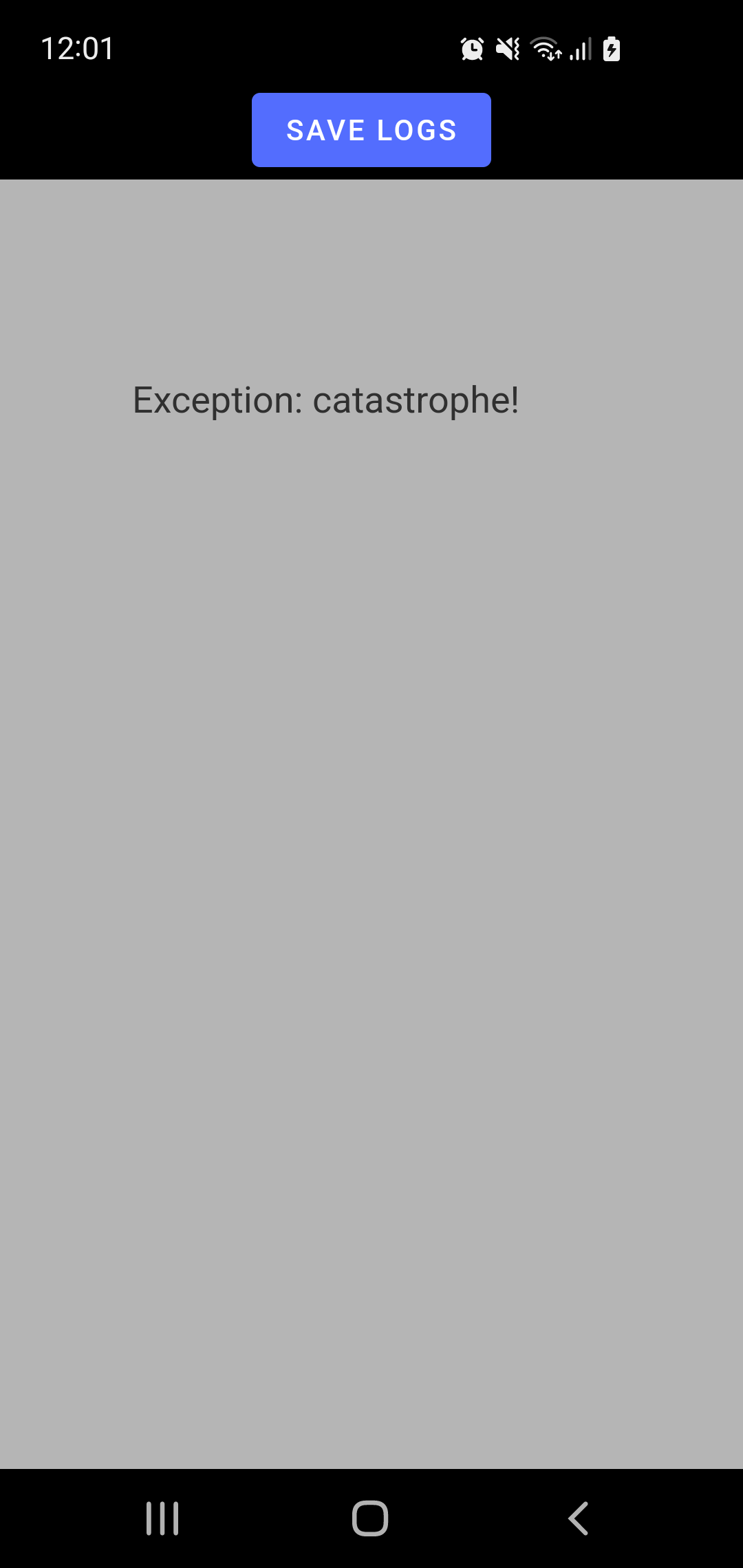
Please 1) take a screenshot of the error details, 2) save the logs to a file, 3) attach both to this thread.
Alright, had a long day sorry for the late reply, I'll get right on it!
Well shit, even after waiting it's still a pure white screen. (Also checked whether being connected to the internet somehow affected it. Tested wifi, mobile data and offline, nothing.) I CAN hold down on the app icon, which brings up "videos" "search" and something else I think? If that could somehow be used. But yeah. No progress on my end I'm afraid.
"Welcome to Aves" and the terms of service etc shows up, The three checks to allow access to app inventory, anonymous reporting and TC's pops up. I allow them all, tap continue. I'm then greeted by a white screen for about half a second before it asks me to allow access to media. I accept and it just stays on the white screen. (Figured I might as well give a full rundown just in case.)
Curiouser and curiouser! Thanks for the feedback.
You wrote about a "white screen". Is it actually a gray screen, like the one in the screenshot at #158 ? Also, if your device is set to use dark mode, do you see a black screen instead?
By the way, one reason devices sometimes act funny is faulty SD cards. Do you have an SD card in your device? Did you try the app without the SD card in?
For info, the app should work fine without internet (only location related features need it).
Holding down the app icon presents the "Videos" and "Search" shortcuts (but nothing else, or maybe you're talking about the widget?). If you don't get a white screen with the "Search" shortcut, I'd like to know!
Ahhh, something just dawned on me. I also use tachiyomi for manga. And have about 1k chapters downloaded on the sd-card... Which is between 20 and 30k pics... (Which frankly don't need to be in a gallery haha) Hmmm, the screen may be grey, but it's a lot lighter than the one in #158. Sadly my phone doesn't have a built in dark mode. I'll see if there's an app of some kind that'll turn everything to dark mode and test it.
Okay after getting the app and turning on dark mode, the screen is definitely a dark grey now! Let me just get everything set up to take the SD card out.
Wait I'm an idiot, removed my sim lmao. Being up at 2 am is rough on the head I guess! Yeah, removing SD card fixed it right up!
With that said I feel really bad for wasting so much of your time haha. Guess I gotta figure out a way to have it not read that sd-card since it's purely for manga chapters so it doesn't need to be added to the gallery itself... (App looks gorgeous by the way, loving the design!)
You're not wasting my time. It's actually precious feedback, because I cannot reproduce and test that kind of exceptional situations by myself. So thanks again for trying stuff at 2 AM!
If it's because of the SD card, it's tricky... I will try and patch the app so that al least you don't get the white screen. But even if this is patched, a faulty SD card makes Android go nuts and it gets difficult for the app to interact with storage.
In Aves you can hide folders so media in them are not shown in the app. You could hide the whole SD card, or the folder containing your manga chapters if you wish, but the faulty SD card will still be causing trouble. I can't guarantee what will or won't work.
Well thank you so much for trying! I might end up deleting all of the chapters, hiding the folder and then re-downloading them. It'll take a while but if it works it'll be a godsend, Aves is leagues above the built in gallery!
No need to delete stuff. It's just hardware problems. If the issue is what I think it is, I'm surprised you can move files to your SD card at all.
Oh man, don't tell me that I just bought like a month ago haha! At least SD cards are decently cheap. Also somehow in the process of dismounting, taking it out and then putting it back in I lost all the chapters anyway! Guess I'll re-download and see if the problems comes up again. Seems fine so far, but my SD is empty.
If you don't mind, could you try this build, with the faulty SD card in your device? https://drive.google.com/file/d/1SuUGeXr6x_FVOOeDrPvTBcq-a4CWj4EX/view?usp=sharing
It should not be stuck at the white screen anymore, but there may be a 1 second delay. And I don't know if access to storage will work afterwards.