
markdownload
 markdownload copied to clipboard
 deathau
Obsidian integration does not work on Windows
Looks like really great extension, but integration with Obsidian doesn't work for me. The extension downloads page/tab ok, puts it under Download's correct subfolder but it never appears in Obsidian Vault. I tried relative and full paths in Obsidian integration section with no luck. Extension v3.2.1, browsers Firefox and MS Edge, os Windows 11.
Is there a way to look at extension's log or console?

+1 (Google Chrome browser) Does anyone can show working extension configuration?


Same for me, using Brave, using the obsidian Advanced URI from the same browser opens the page fine. I assume I am doing something dim in the configuration, but I can't see what.


Aside from #213 .... The symbolic link topic was previously well answered ... https://forum.obsidian.md/t/markdownload-markdown-web-clipper/173/136
Aside from #213 .... The symbolic link topic was previously well answered ... https://forum.obsidian.md/t/markdownload-markdown-web-clipper/173/136
I find out , and It can work normal in windows. When we configurate the obsidian integration in markdownload , we should disable/enable the extension! And Then , We can find the obsidian integration in page context menu! Quote: https://github.com/deathau/markdownload/pull/152#issue-1345454036
I find out , and It can work normal in windows. When we configurate the obsidian integration in markdownload , we should disable/enable the extension! And Then , We can find the obsidian integration in page context menu! Quote: #152 (comment)
thank you - got it working now without needing a symbolic link.
Please can you screenshot the config? I can find where to enter the config, but could not get it to work
Please can you screenshot the config? I can find where to enter the config, but could not get it to work
Perhaps like me at first, you are not looking in the right place.
I was before looking for ... Download Selection as Markdown Download Tab as Markdown
instead one has to use ... Send Text Selection as Markdown Send Tab as Markdown

Thanks, I have those but it is still not working for me. I can paste an AdvancedURI url in to the browser and that prompts for access to Obsidian and then opens the note in Obsidian OK.
In MarkDownload, selecting either Send tab or Send selection sometimes prompts for Obsidian access, occasionally opens Obsidian but never has content and I can't find a note anywhere.
I've added the vault name, and tried with the full windows path to the root for Obsidian, and with no path in case it was expecting something relative to the Obsidian root, and with an obsidian folder name. It must be something dim I'm doing, but I can't see it.
Tried Brave and Firefox with the same results.
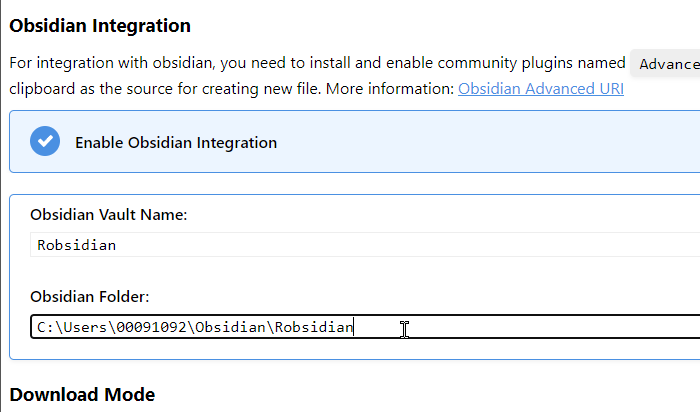
Ahhh, sods law, having posted, I have just tried with an obsidian folder of "/" rather than blank, and that is now working correctly.
Please can you screenshot the config? I can find where to enter the config, but could not get it to work
Perhaps like me at first, you are not looking in the right place.
I was before looking for ... Download Selection as Markdown Download Tab as Markdown
instead one has to use ... Send Text Selection as Markdown Send Tab as Markdown
Thanks for pointing that out

@RobColes Hahaha, Robsidian, you really have something
No need for full path, just the folder name

@LakeishaKowalczyk Thanks - that is working for me now (and my ego manages to sneak in everywhere 😁 )
@RobColes Hahaha, Robsidian, you really have something
No need for full path, just the folder name
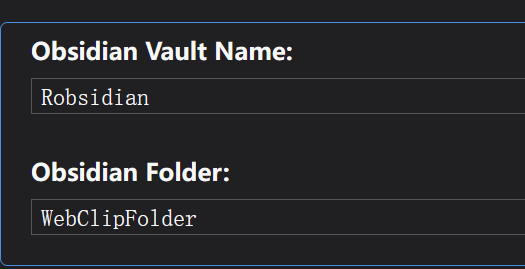
It doesn't work for me. Instead of creating a note with the {pageTitle} filename it's creating a note with a name from the "Obsidian Folder". Like Robsidian/WebClipFolder.md, Robsidian/WebClipFolder 1.md and so on.
upd. It's something with {pageTitle} smh. If I change it to {title} (article title) it does work. upd2. It's the problem with particular characters (like | ) in the page title.

upd2. It's the problem with particular characters (like | ) in the page title.
use this setting in markdownload
@RobColes Hahaha, Robsidian, you really have something
No need for full path, just the folder name
Thanks bro, I also made that mistake.

@RobColes Hahaha, Robsidian, you really have something
No need for full path, just the folder name
i do this,and "send text selection to obsidian",but just the text in Clipboard,nothing occur in obsidian,could you help me please😭

i do this,and "send text selection to obsidian",but just the text in Clipboard,nothing occur in obsidian,could you help me please😭
Have you enabled the advanced uri plugin in obsidian?