

 de-jcup
Incorrect and messy auto-complete when using Groovy GString inside build.gradle
When I try to use Groovy GString anywhere in build.gradle, the auto-complete is messy.
Steps to reproduce
Issue 1
- In
build.gradlefile, try to typeprintln "Hello ${user}". - Some times, the moment you type the opening
{, it is expanded incorrectly into this:
println "Hello $[ ]
Issue 2
- Delete the incorrect
[ ]characters and try to type{again. - Some times, the moment you type the opening
{(again), it is expanded into an empty closure:
println "Hello ${

}
Expected
When I type println "Hello ${, it should either show a list of possible values or at least not do anything (as opposed to issues reported above).
There is no pattern to the order in which the above issues happen. They just happen alternatively randomly, if that makes sense. But one of the two issues happens every single time I type the opening {.
Environment Setup
- EGradle Editor 2.4.0
- EGradle IDE 2.4.0
- Eclipse - Version: Oxygen.3a Release (4.7.3a) - Build id: 20180405-1200
- JDK 1.8.0_121
- macOS High Sierra 10.13.4

The problem is the auto create ending brackets. I am also not very happy sometimes...
But you can easily turn the feature off inside preferences:
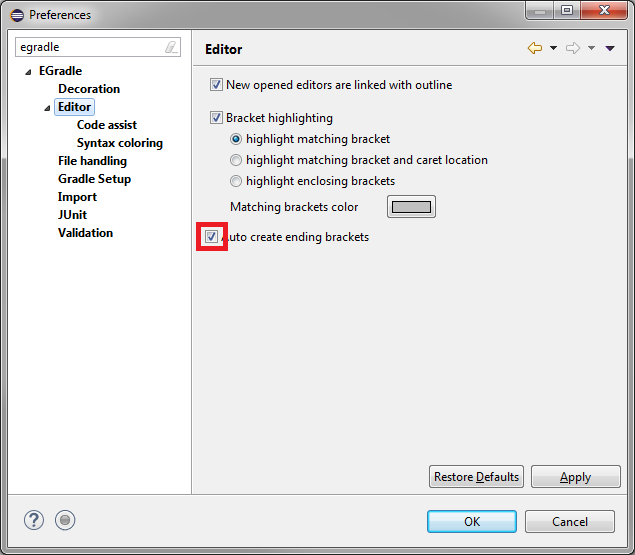
I hope this helps you.

Turning off the 'Auto create ending brackets' setting, gets rid of the issue. Thanks for the workaround!