
php-mvc
 php-mvc copied to clipboard
 daveh
daveh
Router / .htaccess on shared host
Hi,
I have a site on a shared host and am having issues getting any controller that isn't the "Home.php" controller to render, and I believe it is a .htaccess issue, but I'm a bit stumped.
The file structure on the shared host public_html
---App
------Home.php
------Jam.php
---Core
---public
------Home
---------index.html <-- extends base
---------Template
------Jam
---------index.html <-- extends base
---------Template
------base.html
------.htaccess
---vendor
.htaccess
.htaccess in public_html set up by shared host to utilize /public/ folder
# sharedhost.com
# .htaccess main domain to subdirectory redirect
# Do not change this line.
RewriteEngine on

# Change example.com to be your main domain.
RewriteCond %{HTTP_HOST} ^(www.)?mydomain.com$

# Change 'subdirectory' to be the directory you will use for your main domain.
RewriteCond %{REQUEST_URI} !^/public/

# Don't change the following two lines.
RewriteCond %{REQUEST_FILENAME} !-f
RewriteCond %{REQUEST_FILENAME} !-d

# Change 'subdirectory' to be the directory you will use for your main domain.
RewriteRule ^(.*)$ /public/$1

# Change example.com to be your main domain again.
# Change 'subdirectory' to be the directory you will use for your main domain
# followed by / then the main file for your site, index.php, index.html, etc.
RewriteCond %{HTTP_HOST} ^(www.)?mydomain.com$
RewriteRule ^(/)?$ public/index.php [L]

# php -- BEGIN cPanel-generated handler, do not edit
# This domain inherits the “PHP” package.
# php -- END cPanel-generated handler, do not edit
.htaccess in /public/ from the php-mvc file structure
# Remove the question mark from the request but maintain the query string
RewriteEngine On

# Uncomment the following line if your public folder isn't the web server's root
#RewriteBase /

RewriteCond %{REQUEST_FILENAME} !-f
RewriteCond %{REQUEST_FILENAME} !-d
RewriteCond %{REQUEST_FILENAME} !-l
RewriteRule ^(.*)$ index.php?$1 [L,QSA]
In my indexAction in my Jam.php controller
        $template = "Jam/index.html";

        //VARIABLES FOR THE VIEW TO RENDER THE GRIDS
        View::renderTemplate(
            $template,
            [
                'title' => 'Site Title',
            ]
        );
The same template render from Home.php controller
        $template = 'Home/index.html';

        //VARIABLES FOR THE VIEW TO RENDER THE GRIDS
        View::renderTemplate(
            $template,
            [
                'title' => 'Another Site title',
            ]
        );
The added routes in route.php
$router = new Core\Router();

// Add the routes
$router->add('/', ['controller' => 'Home', 'action' => 'index']);

$router->add('jam/index', ['controller' => 'Jam', 'action' => 'index']);

//GENERIC ROUTE FOR CONTROLLER WITHOUT METHOD, IT WILL CALL "indexAction" FROM THE CONTROLLER IF ONE ISN'T DEFINED
$router->add('{controller}/?');

//THIS IS THE CATCH-ALL ROUTE AND HAS TO BE AT THE END per mvc author
//GENERIC ROUTE FOR THE controller/action
$router->add('{controller}/{action}');

//DISPATCHING THE QUERY STRING? DOESN'T TAKE INTO ACCOUNT THE JAM FOR SOME REASON
$router->dispatch($_SERVER['QUERY_STRING']);
The site link: www.mydomain.com renders the Home controller just fine, but www.mydomain.com/Jam/index or www.mydomain.com?Jam/index or www.mydomain.com?Jam or www.mydomain.com/jam or www.mydomain.com/jam/index all return 404 errors except for www.mydomain.com?Jam which returns a 500 error.
Can you see what I am doing wrong? I assume my error is in the .htaccess files or in the router->add()?
Thanks

A 500 error will be accompanied by more error detail in the server's error log - do you have access to that to see what the error is? I would try it without the URL rewriting, e.g. example.com/index.php?jam/index - if that works, then the folder structure is ok, and it's a rewrite issue (I can't see any problems with the .htaccess code at first glance though)

example.com/index.php?jam/index <-- provides a 404 error
www.mydomain.com/Jam/index or www.mydomain.com?Jam/index or www.mydomain.com?Jam or www.mydomain.com/jam or www.mydomain.com/jam/index <--- all return 404
The only one that returns a 500 error is --> www.mydomain.com?Jam and the error log on the shared host is empty.
Looking at your file structure above, it looks quite a bit different to the original - the public folder should just contain the index.php script, along with any static files. The App folder should contain a Controllers subfolder with the controller classes, and similarly a Models folder. If you change these around you'd have to change the code in the framework that loads these classes. The 404 error you're getting is because the index.php script isn't in the public folder.
I don't believe I've changed the file structure to the degree you mentioned above. Please see the image of the file structure. The App folder only has the Controllers, the Models only has the models, the Core only has core, public only has index.php, etc. View is the only folder with more complex files in it. These all work fine on my localhost running nginx, but fail on the shared host using htaccess.
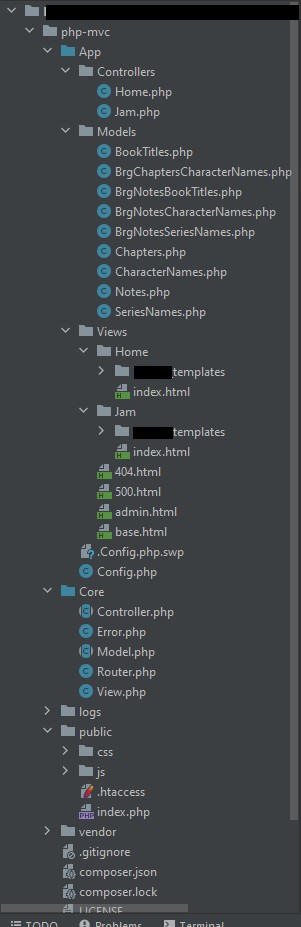
Ah ok. The first message in this thread was missing the "Controllers" and "Models" folders which is why I thought it might have been that. How is your live host configured? Have you set the web server's root folder to be the public folder? If not, then you either need to do that, or add another .htaccess file in the root containing something like this:
RewriteEngine On
RewriteCond %{REQUEST_URI} !public/
RewriteRule (.*) public/$1 [L]
to rewrite all requests to the public folder
According to the shared host who helped me get the initial site pointed to /public/, they had me do the following:
.htaccess in public_html set up by shared host to utilize /public/ folder
# sharedhost.com
# .htaccess main domain to subdirectory redirect
# Do not change this line.
RewriteEngine on

# Change example.com to be your main domain.
RewriteCond %{HTTP_HOST} ^(www.)?mydomain.com$

# Change 'subdirectory' to be the directory you will use for your main domain.
RewriteCond %{REQUEST_URI} !^/public/

# Don't change the following two lines.
RewriteCond %{REQUEST_FILENAME} !-f
RewriteCond %{REQUEST_FILENAME} !-d

# Change 'subdirectory' to be the directory you will use for your main domain.
RewriteRule ^(.*)$ /public/$1

# Change example.com to be your main domain again.
# Change 'subdirectory' to be the directory you will use for your main domain
# followed by / then the main file for your site, index.php, index.html, etc.
RewriteCond %{HTTP_HOST} ^(www.)?mydomain.com$
RewriteRule ^(/)?$ public/index.php [L]

# php -- BEGIN cPanel-generated handler, do not edit
# This domain inherits the “PHP” package.
# php -- END cPanel-generated handler, do not edit
In my attempt to get the "Jam/index" part to work, I added the following in the "public" directory of the MVC project. .htaccess in /public/ from the php-mvc file structure
# Remove the question mark from the request but maintain the query string
RewriteEngine On

# Uncomment the following line if your public folder isn't the web server's root
#RewriteBase /

RewriteCond %{REQUEST_FILENAME} !-f
RewriteCond %{REQUEST_FILENAME} !-d
RewriteCond %{REQUEST_FILENAME} !-l
RewriteRule ^(.*)$ index.php?$1 [L,QSA]
When this didn't work and sent me the 404 errors, I tried Google. When I couldn't figure it out on Google, I thought I'd ask here. I'm kinda stumped at why it isn't working.
I can try what you posted above in the "/public/" folder and see if that works.
That looks like it should work. Try commenting out these two lines to see if that makes a difference:
RewriteCond %{HTTP_HOST} ^(www.)?mydomain.com$
RewriteRule ^(/)?$ public/index.php [L]
It's a bit difficult to debug without being able to reproduce it. Perhaps your host can help out as it seems to be specific to their setup? As far as I can tell from looking at your code, it should work...
Update for any who find this question and want to know how it resolved for me.
As it turns out, my localhost was running one PHP 7 version higher than the shared host's version, and the shared host did not accept variable typing in the class declaration outside of the methods.
So this public **string** $base_link; "string" declaration was actually what was failing and not the .htaccess at all. Once I removed the typing "string", the routing was resolved without issue. public $base_link; worked just fine.
Thanks for your help!